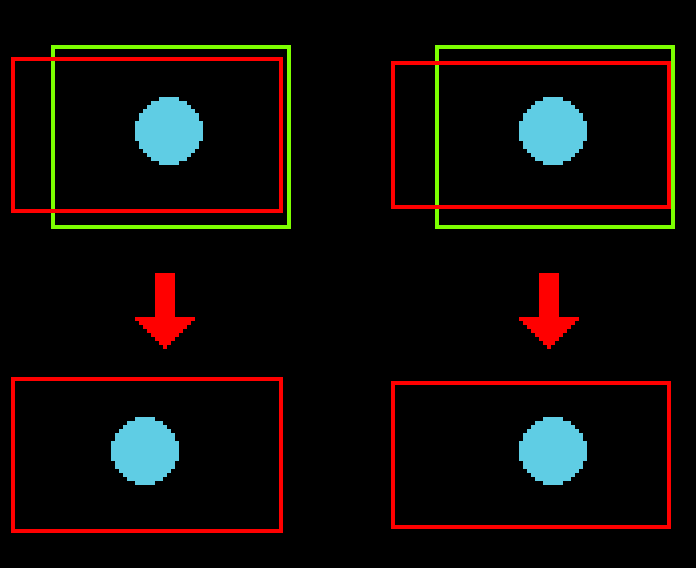
The camera of the layer stays centered when the game window is resized. This is usually useful for game content or menus
The top-left corner of the camera stays fixed when the game window is resized. This is usually useful for UI or content that can expand.
I don’t understand these 2 options at all based on this description. The first one is good for both “game content” and menus. The second is good for UI and “Content that can expand”.
Isn’t menus and UI the same? and what is “content that can expand”?
Right now I’m trying to make a top down game and I just want to easily be able to layer stuff easily without z ordering everything by using layers, so I can have a background layer (grass/sand), environment stuff layer (rocks, trees), and then player+enemies layer. But whenever I separate stuff like this it gets super wonky whenever I move around. None of the layers match eachother. Using smooth camera + top-down controller.
Found the issue, its smooth camera. Apparently you need to have it track an object on every layer that moves. So I made a dummy object on the other layers, gave them the smooth camera behavior, and set the dummy objects to always follow the player.
Layer that you would consider as UI would not move
For example your player walk left and grass behind your player should move right
Well your UI hp bar should not move right as well
2 as your 2nd message
That is kinda wrong way of doing it cause now you will need to worry about these dummy objects
Add extension type in search bar COPY
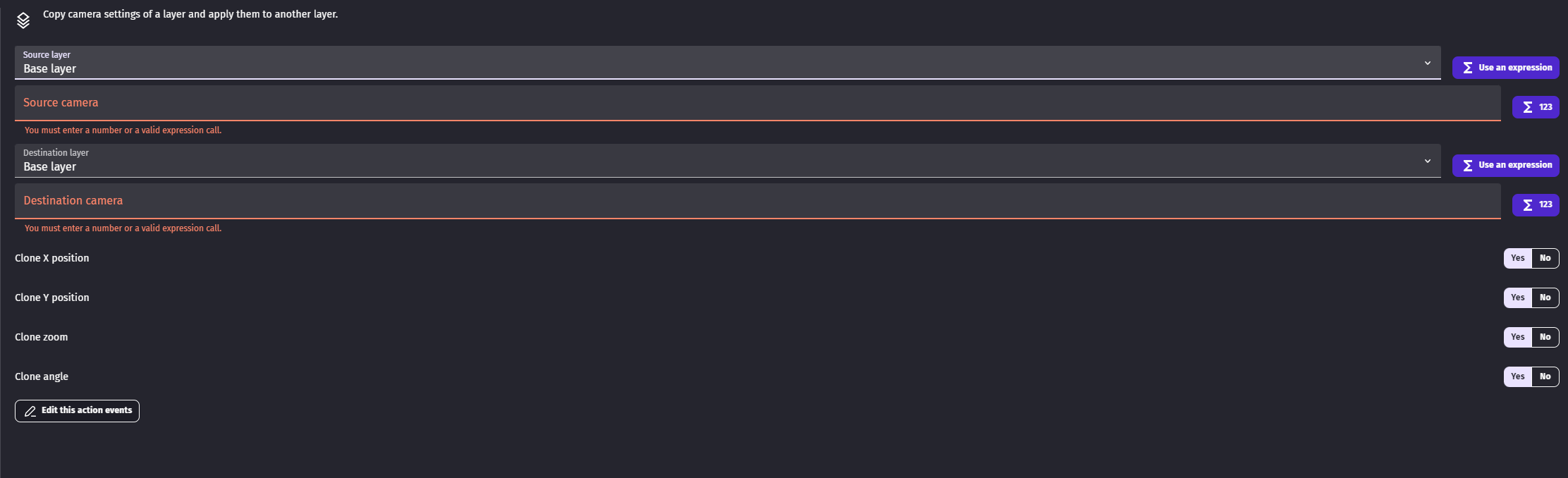
Add copy camera settings
Now in events sheet just copy camera settings from layer on which is your player to all layers that should behave the same as layer on which is player
I also forgot
1. The camera of the layer **stays centered** when the game window is resized. This is usually useful for game content or menus
IF you resize your game in this case
Let’s say to left
Then camera center will stay where it was before for example on player
2. The **top-left corner of the camera stays fixed** when the game window is resized. This is usually useful for UI or content that can expand.
If you resize window in this case again let’s say to left
Your objects will not change position on viewport but you will just see more of the game
Image to help you understand the difference
Green is your current resolutio
Red is to which resolution or window size you gonna change it
Blue is for example player or ui element
On top pre change state
On bottom post change state
Look how on right position of Blue did not change but you now see more of your game to the left
Look
You have SOME layer on which is player it can be base layer or it can be idk Game layer like whatever is its name
You have on that layer camera centered on player and you set zoom to 2
Now you add background layer and enemies layer
And you find out not enough zoom is different on these two layers
They also fail to move camera
SO you copy action center camera on player on Base layer
Like make duplicate of it
And instead of base layer you set it to background layer
One more duplicate for enemies layer
Camera follow properly but zoom is wrong
So you take your set zoom on base layer to 2 action
Duplicate it and set zoom on background and enemies layer to 2
And NOW finally your game is exactly as you would expect it to be
BUT now you change zoom on base layer back to 1
And you now need to go trough all actions that change zoom on other layers and also set them to 1
Easy fix is to set camera zoom to variable and now you just change variable
BUT then we have copy camera settings so you just copy WHATEVER settings you want from any layer to other layers
So now you have base layer on which is player you set there zoom to 5
Center cam on player
And now you add action copy camera settings
And you copy from base layer to enemies layer and background layer
And you only now need to manage cam on base layer is it zoom or is it position cause other layers works like child layers to parent layer which in this case is base layer
So on base layer zoom was 5
You set it now to 3
And background and enemies layers automatically have zoom 3 since you are copying settings from base layer to them