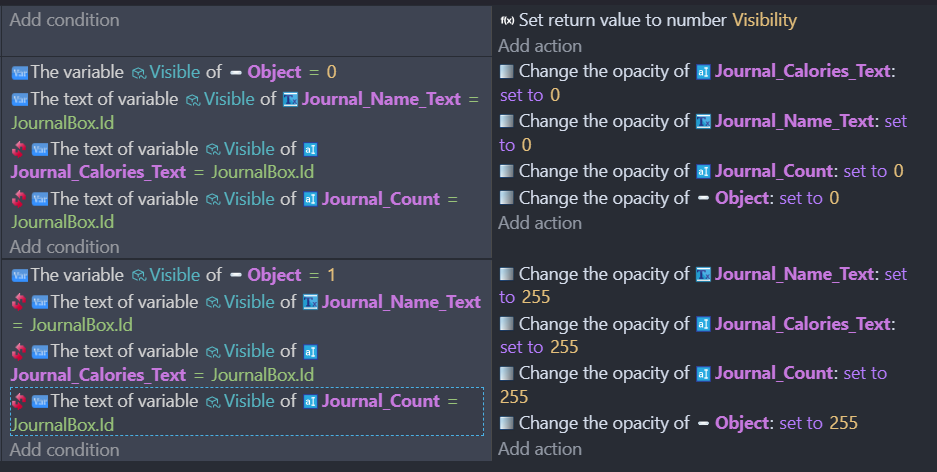
Hi, I’m working on a journal UI system in GDevelop and running into an issue with visibility.
I have a JournalBox (custom object) that represents each entry. Each JournalBox has associated objects:
Journal_Name_Text
Journal_Calories_Text
Journal_Count
Journalltems (sprite)
Cancel button
I deleted my old logic now I can’t remember how to get things working. I’m want to hide/show children of a custom object or make them visible/invisible.
What is the actual result
Part of the custom object is hiding but not the others.
What exactly does your project do? It sounds like a list using custom objects. Is it scrollable or does the layer move.
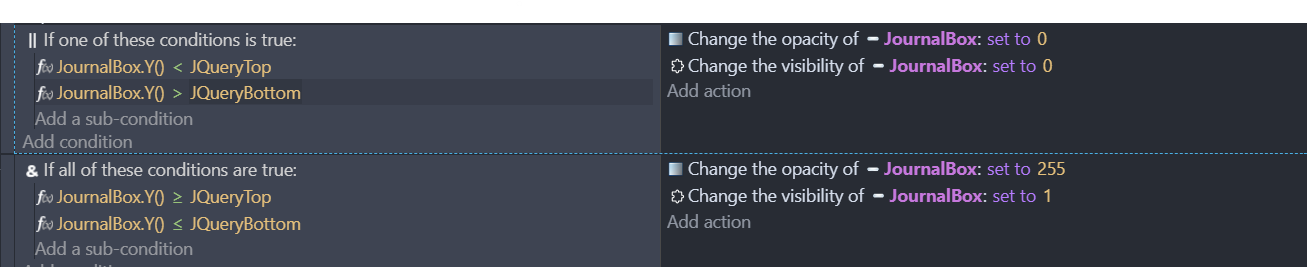
Are you hiding the children objects at the same time you’re hiding the custom objects? Are you hiding all of the children objects in a custom object at the same time or only a few child objects?
I’m just asking bc that would be unnecessary. It would be enough to just hide the custom object.
Your last event group is using compare 2 numbers instead of the regular position condition. Is there only 1 object at a time or are the events inside a repeat for each object?
Compare 2 numbers doesn’t pick objects. It just evaluates to true or false.