want to create an endless vertical platformer where the player keeps jumping upward, but I’m having a problem.
Currently, I can randomly generate platforms along the X-axis. However, sometimes three platforms spawn exactly on top of one another.
I want to create a horizontal offset of 600 pixels to the left or right of the previous platform, choosing the direction that has more available space.
Is there a way to implement this in GDevelop?
The image with the red platforms shows how my game currently looks (it’s an approximate illustration).
The image with the blue platforms shows how I want the game to look.
Any tutorials, guides, or forum posts that could help me solve this problem would be greatly appreciated. Please feel free to share any useful resources.

Can you send a picture of your event sheet?
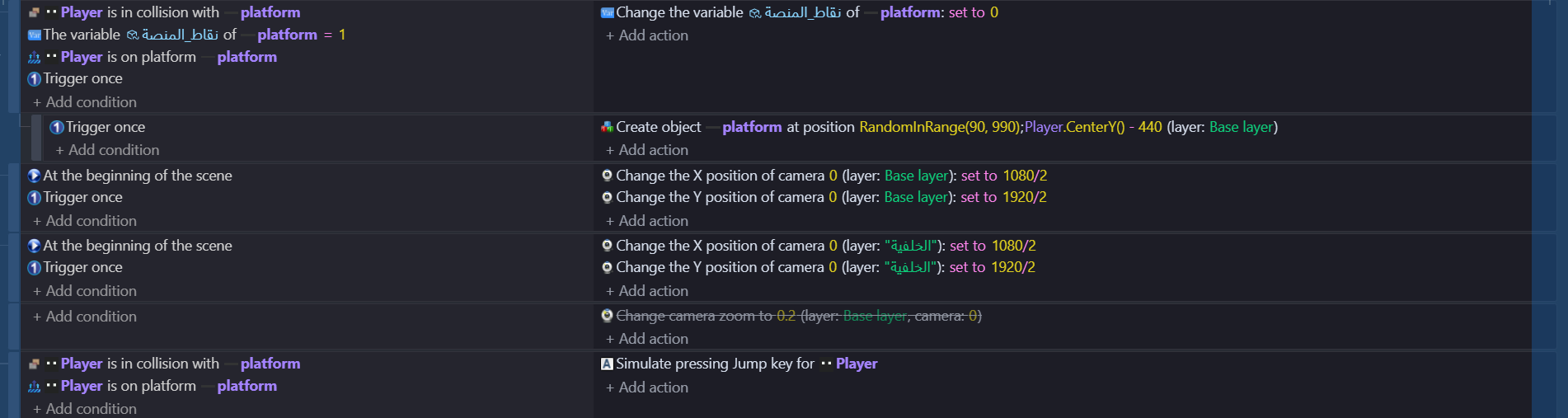
Start off by removing all the Trigger Once conditions for all events except the top one. At the beginning of the scene already only triggers 1 time and in your subevent you can remove the one there as well, since it already will only trigger once from the parent event.
The one-time activation conditions aren’t really important.
My problem is the object-creation procedure RandomInRange(90, 990) on the x-axis, where the object is created with a starting point of 90 pixels and an ending point of 990 pixels. This creation is random and doesn’t give me any control over platform creation, since multiple platforms can be generated on top of one another, and the player isn’t forced to move at all, so the game becomes very easy and without challenge.
The platforms are activated according to the logic I intended and are created according to what I want, with the number I actually want. The problem is my inability to precisely control where the platform appears on the x-axis.
I want the ability to create consecutive platforms according to logical rules. Is this possible?
Remove the in collision condition in the top event. See if this fixes the issue?
How about
The collision condition is what creates the platforms according to an intended mechanism. If the player lands on a platform, create a new platform on the y-axis at a distance of 440 from the player’s y-center. So this is intentional, and there is no error in it.
You do not need the trigger onces or that condition though. It can cause bugs and also make the event sheet messy having unneeded conditions.
Please start by removing all them and then tell me what happens.
They are looking to create platforms above a player, not making random elements.
If it were creating 3 at once, it would be creating them on the same exact spot, not above each other like shown in your picture. This means it is triggering 3 separate times. Any idea how this is happening?
It doesn’t create 3 on top of each other. The drawing above is just a quick drawing to illustrate the problem. A platform is created randomly within the range 90–990. When the player climbs onto it, a new platform is created. This platform is also created randomly within the range 90–990 on the x-axis. The problem is that the platforms end up on top of each other, very close together in their coordinates on the x-axis—not that it produces 3 platforms at once.
This is another illustrative drawing. As you can see, all the platforms are on one side; it is automatic generation according to the parts within the area 90–990 on the x-axis. But even though it is automatic generation, there is nothing guaranteeing that they will be far apart from each other. I want to write a procedure where there is a distance of 400 pixels between copy 1 and copy 2, and between platform 2 and platform 3 a distance of 400 pixels—whether +400 pixels or -400 pixels. The important thing is that there is a 400-pixel distance difference between the platforms on the x-axi

s.
Okay, cool
I am not exactly sure what is causing it to happen.
If you’re doing a doodle jump thing it’s best to create the platforms in patterns (otherwise they’re too random) generated from external layouts (see the wiki documentation). I did a quick version this morning. You can create layouts from an expression and name them “1” “2” etc. Window is an object the size of the scene window located at 0,0

Is that serious reply or you are trolling?
Hard to tell
If you would watch video i gave you
After you would duplicate what you saw there
And it would work
You could just remove walls
And then set to random in range x position of platforms
So they are still in Y distance that to allow jump onto them but in different X pos so they don’t look repeatetive
i was actually serious when I wrote that but it does seem like a troll after actually reading it and its contradiction
Good cause i was really confused do you not see how it can be used or you are making fun here
Always think about in what ways something can be used
And not lock yourself in believing it can be used only in one way
I think I didn’t get enough sleep 
@JKI1991 Try what Petlimpet said in post 14