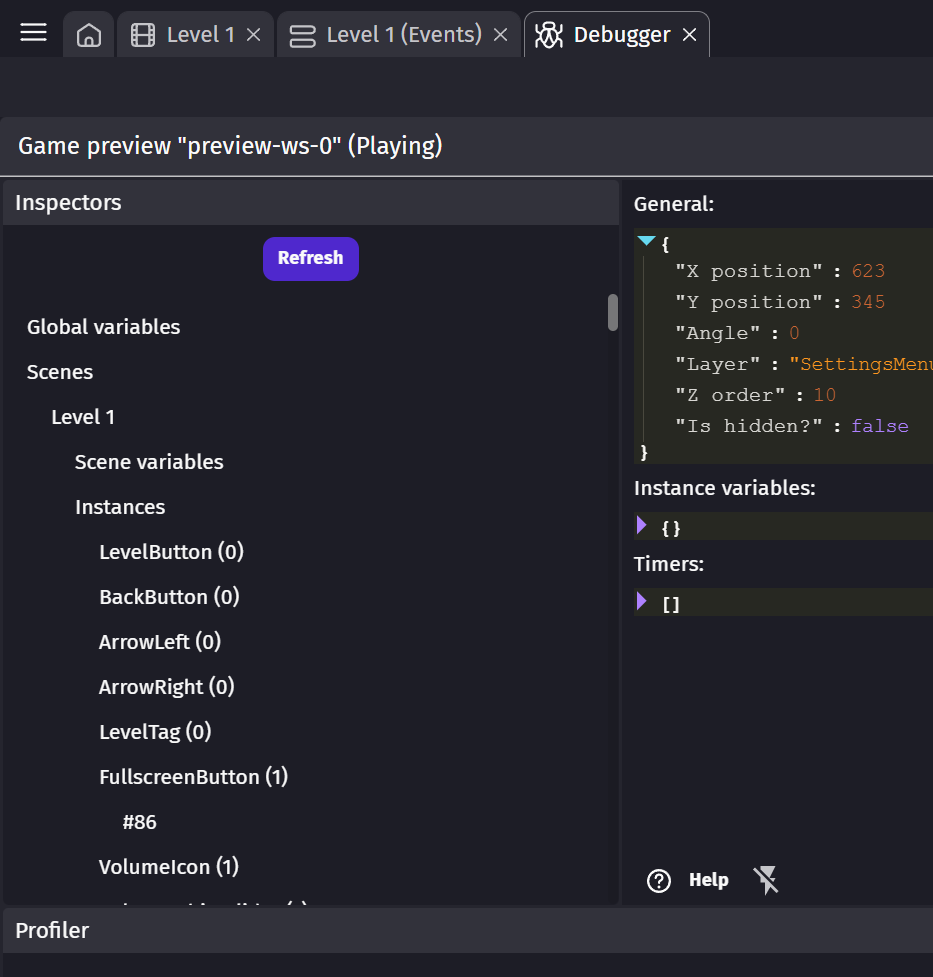
Major Debugger problems : I’d like to point out two major issues with the object list of the current debugger tool, making it almost unusable for any medium or large project that contains a few dozens of objects. And the larger the project grows, the more unusable the debugger becomes…
-
First problem : the debugger shows all objects of the scene and global objects, including those that don’t have a single instance… And there is no way to toggle it. That results in a very cluttered list that contains way more items than it should. For any medium project or anything that has dozens of objects, it becomes progressively unusable.
-
Second problem : The order in which objects are listed feels completely random. It’s not alphabetical and there is no way to filter the list, so looking for anything in a medium size project becomes very slow and impractical. From what I understand objects are listed by order of creation in the engine, which is why the list feels random.
Feature description : My request is simple, I’d like to have a usable debug tool. I think it needs at the very least the following changes :
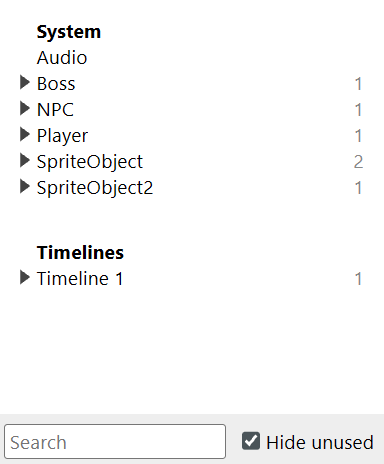
- The ability to hide objects that have no instance in the current scene.
- The ability to sort objects by alphabetical order
- A search bar at the top of the list to filter objects by name
This is something that exists in most other engines including Construct3, I hope it would be possible to have something similar with Gdevelop. Below is an example in Construct3 that features a search bar and a toggle for unused objects.
I invite other users who want these changes to add a  on this post. I believe it’s a high priority issue so I hope someone will look into it.
