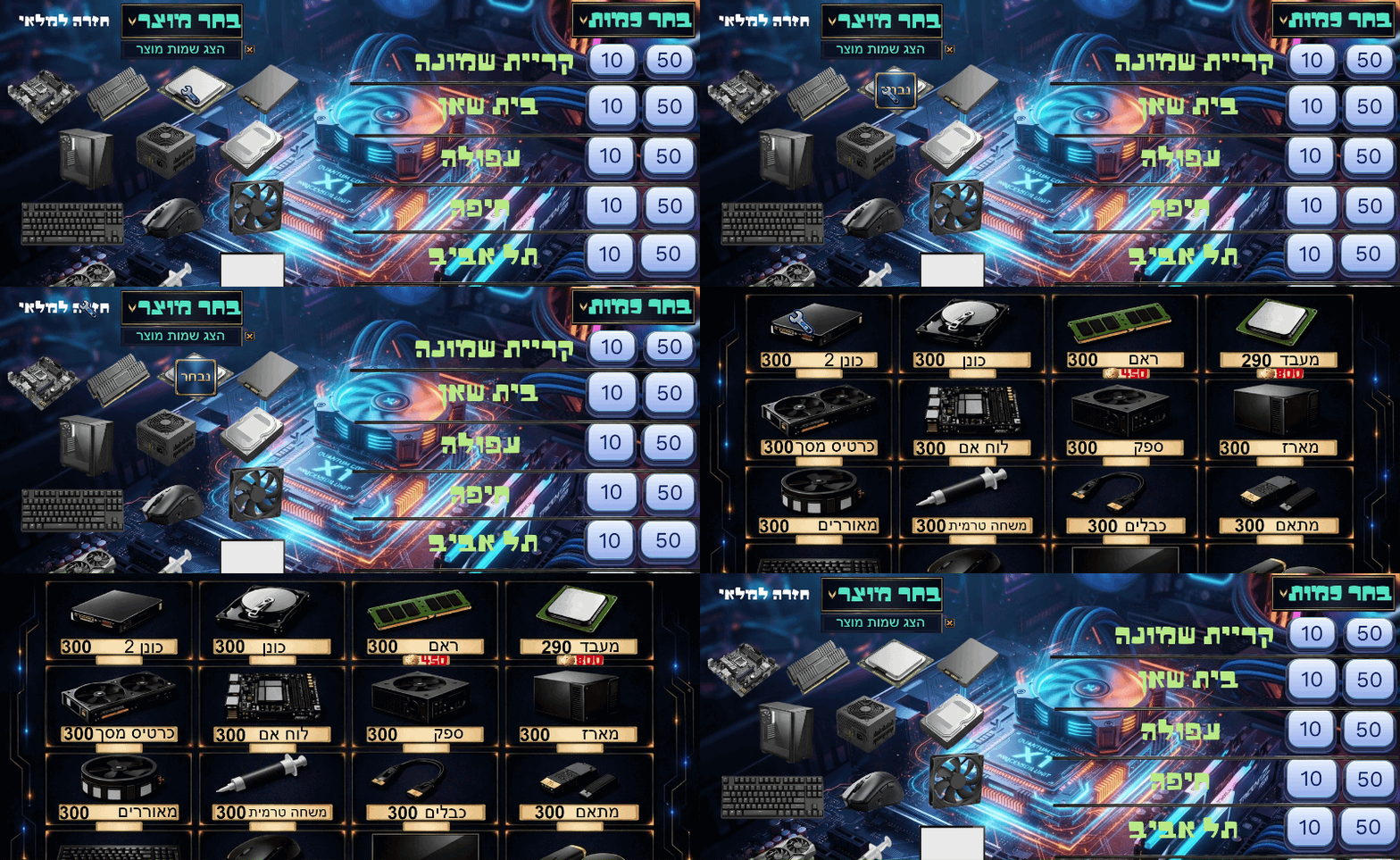
Hi! I’m still experiencing a strange inventory transfer bug in GDevelop, and I can’t figure out what’s causing it.
Here is exactly what happens:
I click the 10 button to select a transfer quantity of 10.
I click the CPU button, and 10 CPUs are correctly deducted from the main inventory.
Then I click the Case button, without clicking the 10 button again. The game deducts another 10 CPUs AND another 10 cases.
If I click the CPU button again without clicking the 10 button, it deducts another 10 CPUs.
It seems that the selected quantity or transfer action is not being reset correctly, and the previous product selection is somehow still affecting the inventory.
I want the game to deduct inventory only when I explicitly select the quantity and the product, and each transfer should happen only once. Selecting a different product should not deduct anything from the previously selected product.
Has anyone experienced this issue in GDevelop? What could be causing it, and how can I fix it?
I understand that the variable names are in Hebrew, but if you can look at the logic, conditions, and actions, the language itself shouldn’t be a major obstacle. I’d really appreciate it if you could take a look at the logic and help me understand what might be causing the issue. Thank you for your time!
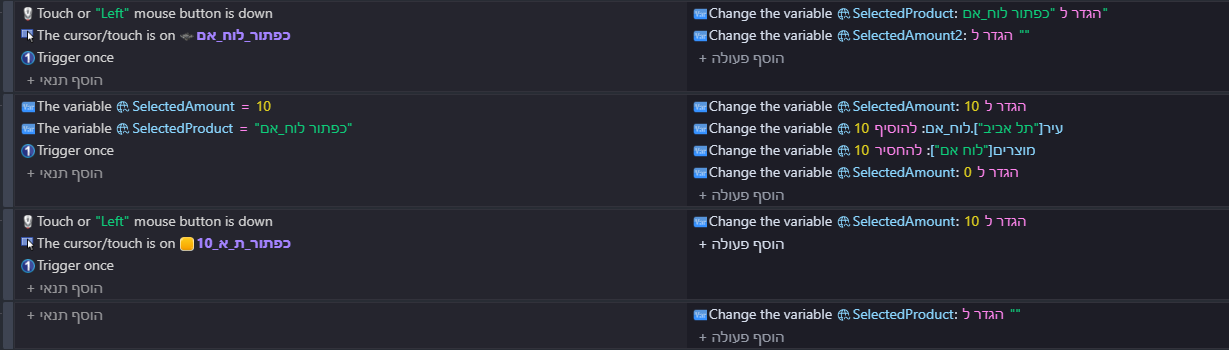
It’s a little hard to understand what’s happening, but in both event groups at the end you’re setting SelectedAmount to 0 and to 10, which happens one after another in the same frame. I think that might be the cause of the issue.
Your condition is
SelectedAmount = 10
SelectedProduct = X
Then you trigger an action to change some variables, and set SelectedAmount to 0 and then back to 10, so by the end of this event, you still end up with:
SelectedAmount = 10
SelectedProduct = X
So, your condition may still be valid. Maybe that’s why it’s not resetting?
Thank you for your suggestion! I removed the action that sets SelectedAmount back to 10 after setting it to 0, but unfortunately, the problem still persists.
The issue is that after I select the quantity 10 and click the CPU button, 10 CPUs are deducted correctly. However, when I select another product, such as the case, another 10 CPUs are deducted along with 10 cases, even though I didn’t click the quantity button again.
Also, clicking the CPU button again without selecting a quantity still deducts another 10 CPUs.
Do you have any other ideas about what might be causing this behavior? I really appreciate your help!
SelectedProduct is a global text variable. It stores the name of the selected product button, for example “כפתור_SSD”.
In the condition, I compare SelectedProduct to the button’s name as text. It is not an object group.
I haven’t been resetting SelectedProduct, because I thought selecting a new product would overwrite the previous value. Could that be causing the issue where the previous product’s stock is deducted again even when I don’t select the quantity button?
If it’s a single global variable, then it’s value should be replaced when you click on the next item, but:
I would reset the value after the number is deducted to be safe, unless you specifically want to allow to keep the selection.
I would use an object group for the shop items. Right now you are duplicating the code: you have the red event group, and the blue event group. They do the same thing but for a different shop item - that could potentially introduce a timing issue, and could be why it’s applying the deduction twice. Let’s say you have CPU, GPU, RAM, etc. I would create a group, e.g. PC_Parts or Shop_Items, etc. Add all those items there, and then use only one event group:
Cursor is on Shop_Items & Left button is pressed = change SelectedProduct to Shop_Items
By hovering over a specific item, you’re already filtering the items, so the correct item should be set in the variable.
Thank you so much for your help! It worked! The inventory system is finally working correctly. I really appreciate you taking the time to help me figure this out. Thanks again!