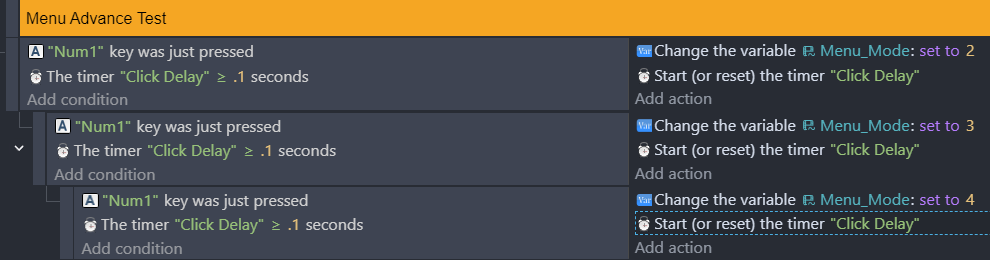
Ok, so I’m trying to make a menu system, and there is a problem with the logic skipping all the way to the end of the tree when it shouldn’t be. Not sure if it’s a bug, or I’m missing something, but I do need help. This is a condensed version of the code that illustrates what is going on
But I’m trying to get it to only go through 1 at a time just like a menu system should. “trigger once” logic isn’t fixing the problem, and timers cause the menu to get stuck.
0.1 seconds is pretty fast… you might want to increase that to like 0.5
Anyway, the problem is in how these conditions are set up. Sub-events (indented) only happen after the parent event succeeds.
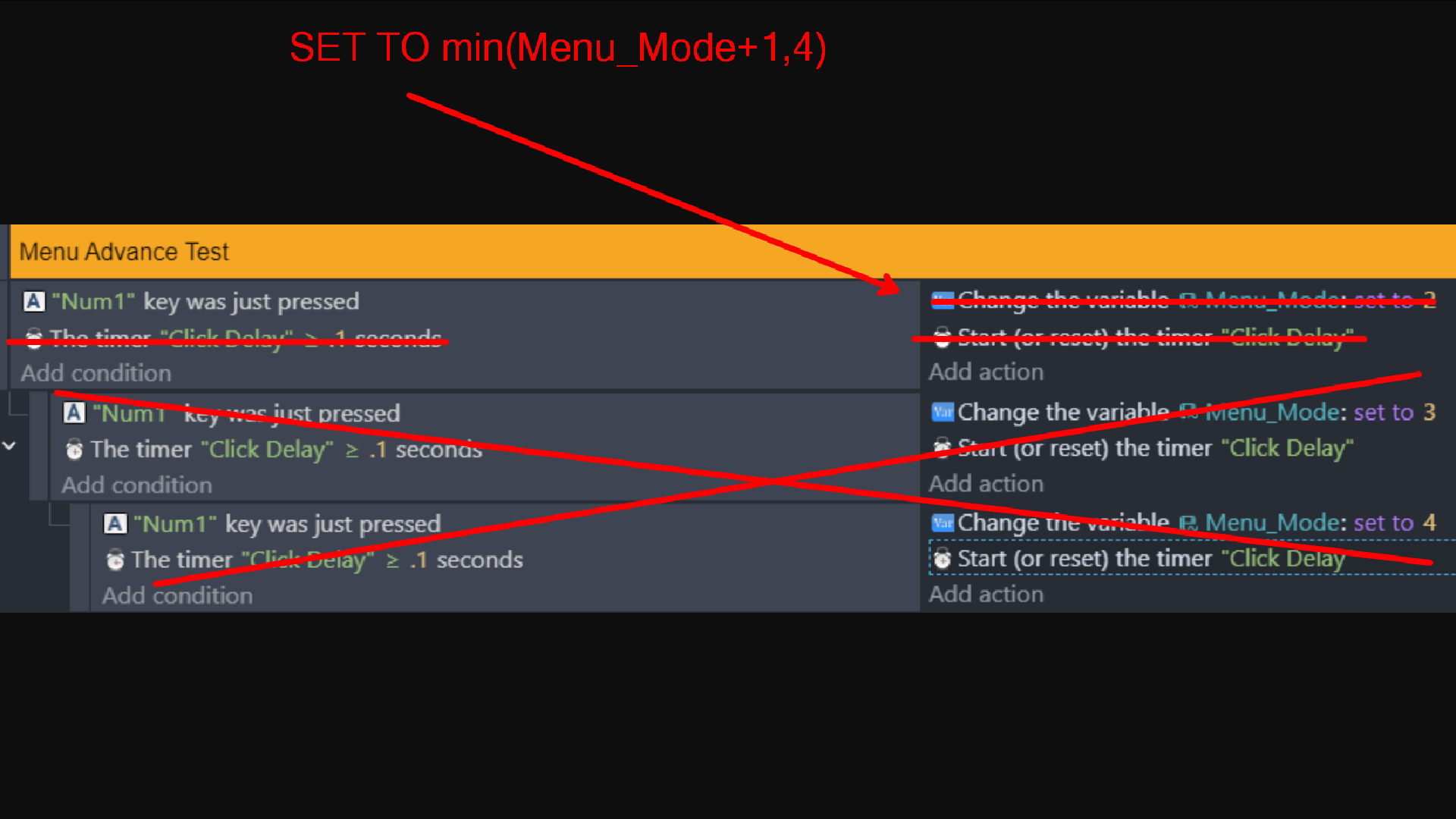
Even disregarding that, duplicating events just to do arithmetic is going to hinder you significantly. Despite being a “no code” engine, this is still programming, and hard-coding values will almost always take longer than calculating them:
This will wrap around, if you don’t want that then you can set to 4 instead. You can also use min() and max() as zero suggested, although you may want to avoid that for now as this makes the logic more plainly obvious
Doing it this way will not make a giant difference for just having a few possible values, but it is something you really need to learn for the future. What happens when you want to add to this menu? Instead of copying and pasting even more events, simply change the maximum number. Need multiple menus? Don’t copy and paste - make an event that detects how many elements are in the current menu. Then you can have one menu with three options and another with twenty, and the functionality will work for both.
I appreciate the response, but I’m just gonna wait on a ready made solution to be made. I am done dealing with Menus altogether, and burnout is starting to become a serious problem.
I’m sorry you’re feeling burnt out, but I’m a little confused about your tactics here. It seemed like you were trying to build a menu system “from scratch”, which would imply that you don’t want a ready-made solution and want to make it yourself.
There’s already built-in functionality that you can use to make a menu. Throw some buttons, toggle switches, and slider objects onto your scene. Put them all on a unique layer. Show or hide the layer as needed. Boom, you have a menu.
Now if you don’t like the idea of having to make the buttons do something, then unfortunately I’d say you just don’t like game development. I’m not trying to be insulting or anything, but it’s like, you came here with a programming question, then basically said “I don’t want to do any programming.”
I looked at the other thread you linked, and I’m not seeing anyone promising to make a menu system for you, unfortunately.
Even if someone were to make a menu solution for you, it is going to be incredibly important for you to understand how timers and subevents work (or how events process per frame). Based off the screenshot you provided above, you might be running in circles that’s leading to the potential burnout due to a misunderstanding of how those core concepts work.
I’d recommend reading the wiki overall, but explicitly this page around Event Structure, along with Event Execution Order: Events - GDevelop documentation
Learning the event structure, and the way events, subevents, and other special use events work will be required for most if not basically any game logic, even beyond menus.
As Magicsofa mentioned, there are some things available to make the component pieces easier (toggle objects, bar objects, etc), but the above will still be needed in order for you to put the pieces together.
I hope the above can at least get you started in the right direction, and wish you the best of luck on your game dev efforts.