Say you have an RPG where you can save anywhere in the world
Say you save using “Save to storage” at one place in the world, say at the waterfall location
Your game has a main menu, with “Load” on it.
Upon loading, it does not place you back where you left off. It loads the right scene, but none of your custom data got loaded at all!
However, if you then quit to the main menu and click Load again, NOW all of your save data loads in!
Why does this happen? Why must the scene be loaded one time first before pressing Load, to actually load in your data? How can it be fixed?
Create a main menu with a load button
Change scene to gameplay, Save game somewhere in the scene
Quit game
Load from main menu
The scene properly changes but your data does not load, its fresh
Quit to main menu
Load game again
Now all your data finally loads
I kind of got around it by brute forcing a double load, but this is weird and may have unintended consequences.
Pic 1 main menu load
Pic 2 brute force double load after clicking Load on main menu (load again in the scene)
1 Like
This isn’t a normal behavior, right? Should be under Bug Reports
Amigo54
January 27, 2026, 11:15am
5
Hello!
I have not never used this saving function but, reading this post, i deduce that this action depends of the scene where the backup took place.
This been said, so, the remedy would be to preload this scene before to invoke the reloading from storage.
A+
What do you mean? where should this go?
Preloading scenes doesnt fix it
ZeroX4
February 1, 2026, 2:26pm
8
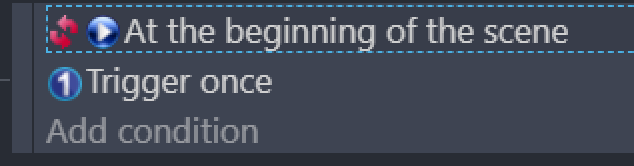
These are conditions you should use for your load event
Normally at beginning of the scene condition makes something happen when scene start and never after
INVERTED at beginning of scene
Makes something happen AFTER scene started
However idk if it will fix your problem cause i never used save state system
Like this? This is the “LOAD GAME” button on my main menu.
This doesn’t fix it sadly, same issue.
It correctly changes the scene, but I am not in the right position
MrMen
February 1, 2026, 8:48pm
10
Using a global variable to determine whether to load a saved scene works for me:
In the menu scene for the reload button clicked, use this event (I’m using a button object):
And in each scene that can be saved, use this:
Yes, it’s a bit of a faff to have that in each scene, but it’s a way to get what you’re after.