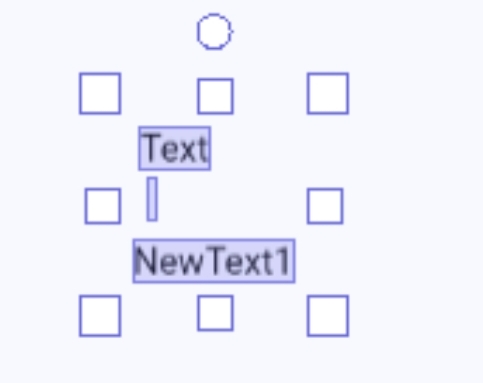
This annoys me to no end. If you add a text object and then delete the text, the control is invisible in the editor and nearly impossible to reselect or modify. You can either drag a selection box where you think it is or use the instance list tab. Or leave the text and modify it at runtime. Or keep adding and removing the text.
It would be nice if empty text objects displayed some form of placeholder text like the object name. Currently, I usually leave the default text and then clear it with an at the beginning event.
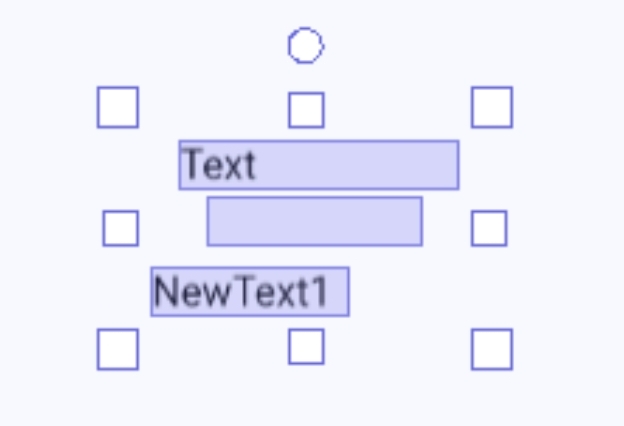
Here are 3 selected objects. You can barely see and modify the center one. The last is an example of an empty object using the objects name.
Another option would be if the editor had a larger selection area for empty text objects. Sort of like if the hitbox in the editor could only get so small. So, even if you can’t see it. You could still select and modify it.
In this screenshot. The center, empty text object has been resized. But because it’s empty, you still can’t select it. Another option is to also use the object size as the editor hit box whether there’s text or not.
I’ve had this happen before…as soon as I put a new text object on the scene and added text to it, I realized I had 5+ invisible labels!
Definitely should get a change. While it’s not the most important bug, it is one that gets overlooked a lot.
Personally, I always have text in my text labels. But when I accidentally delete the text in them and click off…and then drag it over and over onto the scene wondering why nothing is happening…it can get a little messy
Actually I take it back. I was only thinking of how I use text objects which is for trouble shooting. But yes, if you’re using them for actual game display purposes and want it to be empty until an event writes something to it then yep, for sure, having some kind of visual indication would be great.
Which by default disable effect until you enable it in runtime
I would ask for same thing for text objects
Where it would either hide text object ingame until you show it
Or it could simply set text of text object to “”
And now in editor you could have any text you want
While ingame it would not display by default
It’s not that I want to know the name. That’s just my first idea. I believe that’s how they do it in MS Visual Basic.
I just want an easy way see, select and modify an empty text object without adding actions to clear it.
If your project has a bunch of text objects then you have to reset them all. Create a group, add the objects and then set the text to “” at the beginning. It’s just unnecessary steps.
The shape painter starts out blank. They handle that by adding an icon. An icon wouldn’t work for an empty text object because the placeholder text would also help with aligning the text both in position and size.
I do it like this.
I select it. I see the text!
Or…
I edit it and change the text to 07923017.
I see the text! I move it where I need it, increase or decrease it, and forget about it if the code works correctly with it.
That’s not even the worst of it. I used to confuse events, objects, and variables, and then I couldn’t understand what was going on!
The game is called “Fish Hunting.”
When the player’s fish and the enemy’s fish collide:
If the fish is of the second level, it can eat a stronger fish. However, it cannot be eaten by a stronger fish. This is because if the fish’s level is lower than the player’s, the player’s fish will be removed.
Instead, if the fish’s level is lower than the other fish’s, the player’s fish should be removed.