Math Functions with several returne values

Just in case someone stumbles across a similar issue:
Expressions can only return one value. If you want multiple return values you need to use a functions as action/condition and make use of the Copy variable into parameter action. Walkthrough is in Post#20.


Hey there, I was building some more hex grid based logic and once again I am hitting a wall with the way external functions are setup.

So generally speaking I have inputs like X, Y, Size, Radius, flattop/pointytop, Distance. That I can setup as parameters nicely. There are a couple of things that I want to calculate, but lets stick with the basics: get (q;r) from (x;y;size;orientation)

GDevelop expressions only return one number/string/bool. But I need both cords from one expression. Here is why:

A function, which calculates q, also needs to caluclate r, in order to properly round. That is totally fine, if my application is an Action, as in the “Hex 2D Grid” Extension from D8H. There an action sets the position of an object to the grid. Actions can do that. But I need thos values for further calculations. Therefore I want to make an expression.

It is possible to just create a bigger function and include all my calculations in there, but that is not modular at all.
If I create two separate expression for q and r, I need to do exactly the same calculations twice, because of the way how q and r are interrelated with each other.

There is one solution, that I found, which is to make an expression which only calculates q from (x;y;size;orientation) and saves r in an extension variable. If I need r I can access it simply by returning it. That is not pretty at all, and more of a workaround.

Has anyone a nicer solution that I am not seeing? (I am happy to keep most of my calculations inside the extension and only return something like a string “q;r” to the event sheet, but at least inside my extension I want to be able to have the system modular)
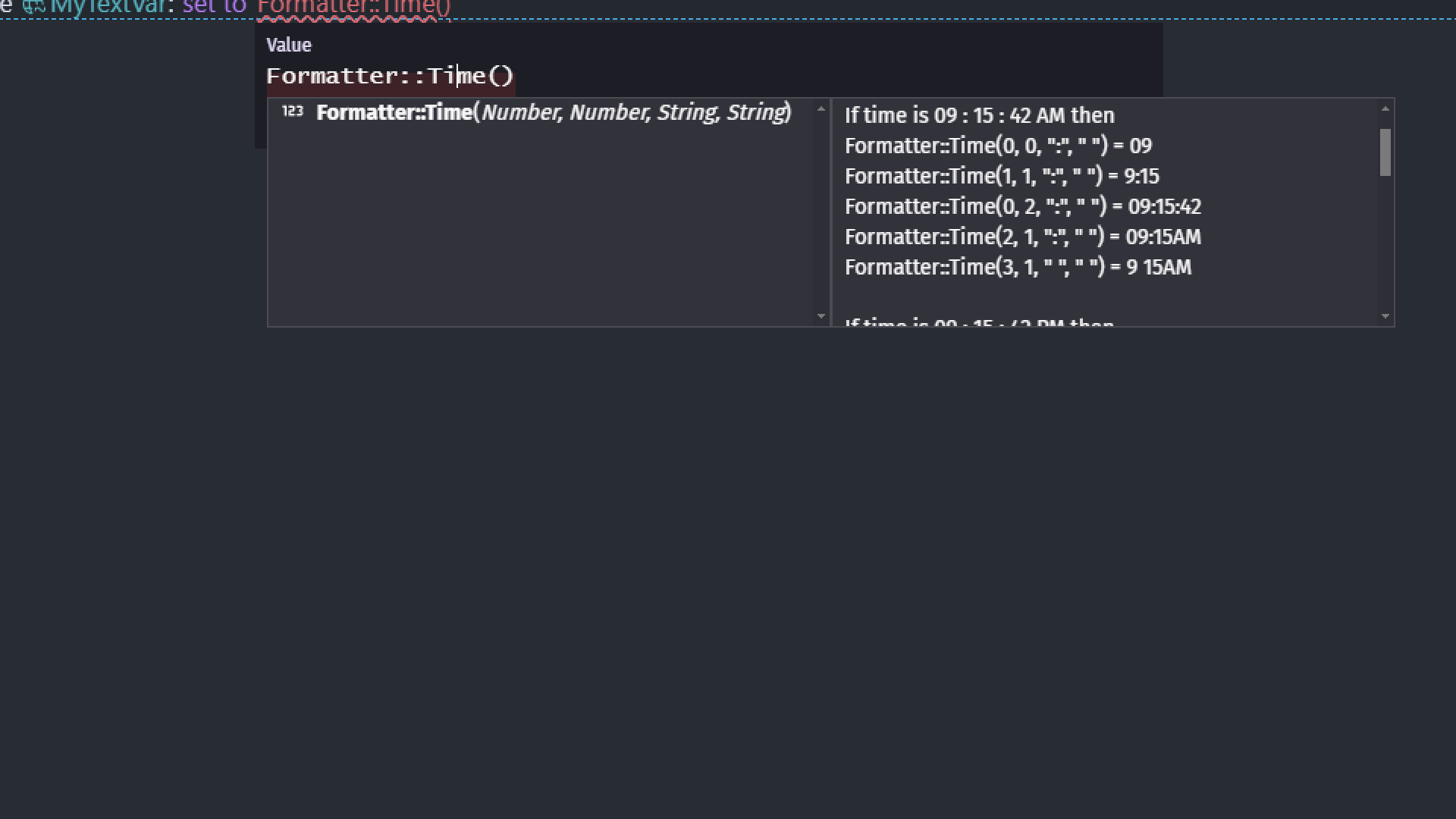
I have hard time understanding your request cause i never worked with hex grid

But as far as i get you
Are you trying to use same expression to spit out different stuff?
For example

MyExtension::Time()

Either return me
19:22
Or 07:22 PM
Or even just 07:22 without PM
Or if i want for it to spit out 19:22 07:22 PM

Like using same expression which i can configure IN expression itself
For it to spit out different things based on stuff i input?

Not quite. That would be achievable if I am fine with different string returns. But I want (need) two number returns from one expression. (because splitting into two expressions would double the calculation, since each individual variable is interdependent)

I just said
Using ONE SAME expression
To spit out different stuff depending on what you input

Look what i did

Calculations are always made for all of them
I just have option to decide how much of these calculations to return
I can even choose which to show and which to hide

To me it looks like you are looking exactly for that

I use 0 1 2 3 4 (numbers to decide what to show/hide)
But it is 100% possible to set it to depend on orientation
So for example i set grid cell orientation to be 45°
And i get this and that
But i set it to be 150° i get something else

I don’t fully understand your issue. Apologies if this isn’t helpful.

You could return multiple values using a variable(s) as a parameter type but I don’t think that’s recommended. You could use a structure variable.

https://forum.gdevelop.io/t/not-a-bug-variable-parameter/65018/2?u=keith_1357

I think the recommended method would be to use seperate expressions. You could store the results in variables or call one function using another functions result as a parameter. Or you could create a seperate function that calls those expressions.

The values could be stored in a scene or an object variable. Maybe, create a behavior instead. The values could be stored as properties.

It all depends on how frequently the values change and need to be updated or accessed and how you’re using them.

Here is my current approach:
I calculate the coords (q;r) with the first function (condition). This function saves the q and r in the extension structure variable __HexCalc.q and __HexCalc.r
Then I have another function to get all neighbours. I can access the variables __HexCalc.q and __HexCalc.r
Fine
But I can only use the second function, if I put it behind the first one.
So whenever I need to do any future calculations on any (q;r) I will always need to start the function with the previous one… and while writing that here I feel like this is my solution… I need to make a condition, that goes like: “Calculate q and r from (x;y;size;orientation)”. And then I can do whatever I want with it, but it must always be preceeded from that condition… makes any sense?

So internally I will have to use this “Calculate q;r”-condition, to get what I need - and make this one private. Then I can still build my other logic behind and it will use the correct values. Those can then have proper sentences, as stated for extensions… only my internal condition needs this weird formulation…

The issue is that each expression does the whole calculation, because in order to calculate q, I also need to calculate r. And in order to calculate r I also need to calculate q. So that leads to two expressions that both do all the calculation work twice… not performant. That was/is my issue.

I was just thinking:

If I make the calculation of q;r not dependet on function parameters, but put it in doStepPostEvents and make it dependent on extension variables, then I could implement a boolean that gets triggered by an event sheet action. that action would only do the following: set variables with parameter values and trigger the corresponding booleans. the StepPostEvents method will see the boolean change and do its calculations based on the variables inputtet via the parameters, and switch the boolean back.

That sounds a bit confusing… but could work.

So the idea goes as follows:

  • I have functions that only do two things: trigger my calculation booleans and apply the input parameters to the extension variables. (These functions are visible in the event sheet)
  • Then I have functions, that all live in the DoStepPostEvents, that contain the actual calculation based on the extension variables. (These functions are private)
  • In the DoStepPostEvents Method the private functions life behind the boolean condition. They need to be there in the right order, so that q;r gets calculated first. And they need to turn the boolean back to false.

What do you think? That should not drain performance, if everything lifes behind booleans, right?

I still don’t get it

But now i have better question
Did you actually check how much performance it drains that you try to combat it?

Like OF COURSE any math will drain performance
But i seen ppl who put trigger once to text change action
Cause they believe it will save their game from lag

Well again yeah it will save SOME performance
But how much?

How frequently are the calculations done? Are they being calculated for a lot of objects?

A step event could be triggered 60 times a second plus, it would only update in between frames. You might need a different values within the same frame.

Unless you need every tick, I’m afraid you might be trying to optimize too much. If you truly do need every process time that you can get, I don’t know that adding something on each frame is the answer.

The simplest approach is often the best. We can overthink things.

mh… my thinking is actually rather about architecture, than performance.
I just haven’t played around a lot with DoStepPostEvents. So all of this is not in behaviors or objects, but extension functions. So it should not drain more than normal event sheet (I guess), but I am still asking, if this is smart at all… but it seems hard to understand what I am trying - well, I think I need to try it out :smiley:

I do overthink - its like a hobby ^^

So the calculation happens for a lot of objects, but it is filtered. So only objects that are currently moving and far away from their current hex center (I store that one as x;y so its cheap) trigger the calculation, weather they enter a new hex. So in some cases there can be many… and here I just found another weakpoint… in using the extension variables it could happen that two objects trigger the boolean at the same frame and overwrite each others extension variables with their respective parameter… that’s bad…

I think I need to restrain from that… :confused:

1 Like

I can understand what you’re saying. You don’t want to repeat the same calculations. That’s understandable. Sometimes, it’s not always practical.

Everything is possible and I hope you discover your best solution but it’s not always practical. Believe me, I’ve been there.

Recently, I noticed that I had the exact 5 events for 2 objects. I figuired I could put the objects into an object group and then use a repeat for each instance. The only issue was the objects weren’t created yet so I couldn’t use a for each instances event. I decided to put their positions and other values into an array and use for each child. In the end, I’m not sure which version was more efficient. The modified version used fewer events but not by much and I added some complexity. So, IDK. In this case, I probably should’ve left things alone.

You might need to use a few more resources to keep things from getting overly complex. Efficiency is always a high priority. Learning new ways is also an important goal.

Yes, without the struggle we probably wouldn’t be doing this - I would probably be playing games… its nice to instead do this problemsolving of selfmade issues^^

thanks to you two for the quick chat about my issue @ZeroX4 and @Keith_1357

2 Likes

You’re welcome. We need more discussions. We don’t learn anything by just giving/getting answers. I always try to also explain why or how my events work.

1 Like

After one night sleep I figured a pretty nice solution. Whenever I create a hex, I create an ID, that points to a HexData.[ID] Structure (AoS). So my calculation still gets (x;y;size;orientation) parameters, but outputs only the ID, which in return points to the DataStructure which then contains the [q;r;s;size] (and more!).

Its basically similar to object picking (I guess) just for a a grid.

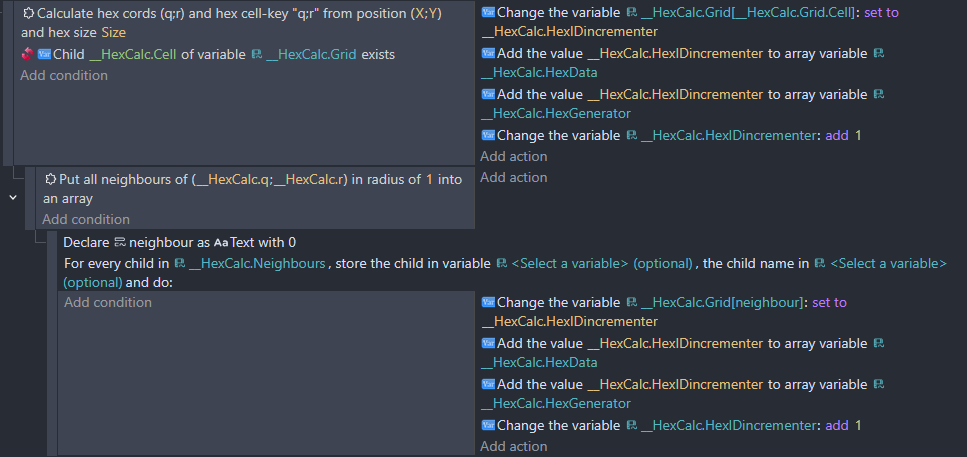
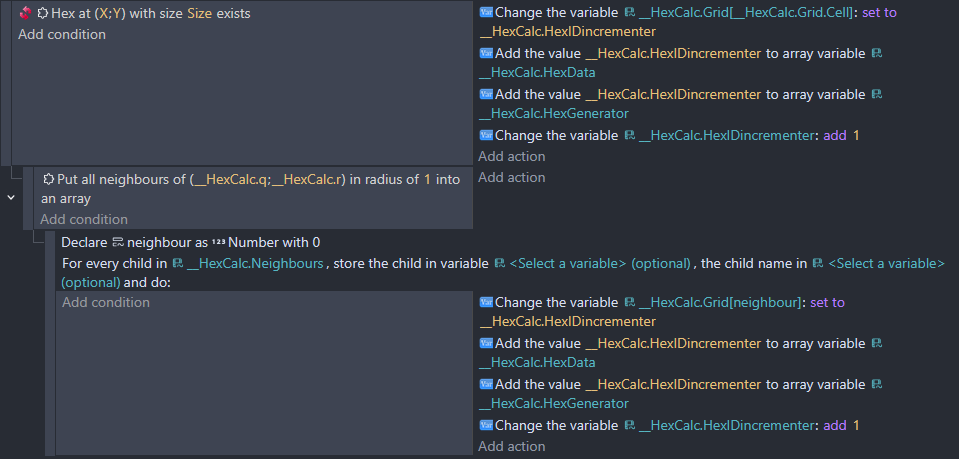
Here is my two functions, which I was building to find neighbours (I added the option to create a hex, which isn’t existing yet inside the same function, because that’s what I need for my dynamic creation):
grafik
So the first picking aktion puts the ID in HexGrid::Hex() and I can access it via that expression now (for now its just a number variable, I could expand it later to an array to pick multiple hexes).
The second function picks all adjacent hexes (for radius 1 at least). Inverted it picks all non existing hexes (which might not make sense, but maybe does… I will work on it).

After that “breakthrough” of mine, I figured: maybe I can make my first contribution to GD, if there is interest in the functionality I am looking for myself (basically expanding upon D8H’s Grid expansion).

So what I am building for myself is:
A hex grid that gets created dynamicaly as the user “explores” a tile.
I am also planing to include:

  • hex neighbours
  • hex distance
  • hex line (like raycasting on hexes)
  • maybe hex pathfinding

What could be achieved from this as well:

  • A Custom Object, that the user places, where the origin of the hex should be
  • predefined hex grids (instead of dynamic hex creation creating one from 0;0 to 10;5, or similar, also in different shapes…)

So that is a lot, but it might be useful for many people. Just writing this down here to reassure myself that this might be desireable (I mean in the end everything here can be achieved with D8H’s expansion, but it could be simplifyied further for GD-users)

IDK if you’re familiar with the Linked Objects Tools Extension. It can move an object with pathfinding on a hexagonal grid. It has a lot of features. You can define things like terrain type using object variables. You can then do things like allow ships to move only on water or vehicles on roads. It can also restrict movement based on distance.

https://wiki.gdevelop.io/gdevelop5/extensions/link-tools/details/

I knew of it but have never used it and neither properly looked at it, since I usually sticked to the normal pathfinding behaviour… but reading this reveals that this one is actually doing most of the things I am trying to accomplish.
Cheers :smiley:

1 Like

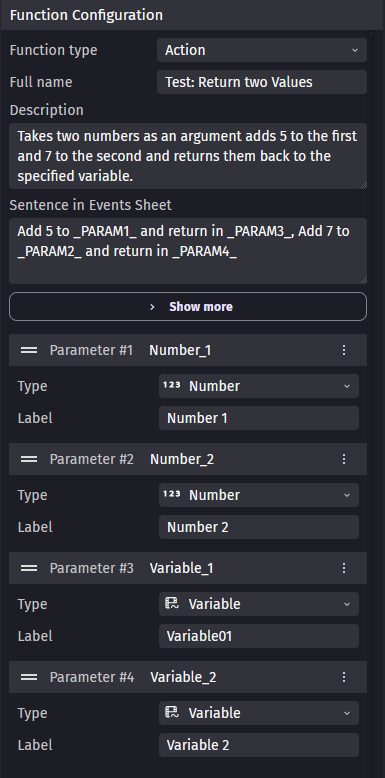
I think you might have said this in your answer, but I didn’t quite grasp it. The solution is: Use an action (or condition) instead of an expression & copy the results back to any amount of variables.

  1. Setup an action (or condition) with the arguments/parameters (of any type), that you need for your calculation and the parameters of type variable where you want to output/return your results in.

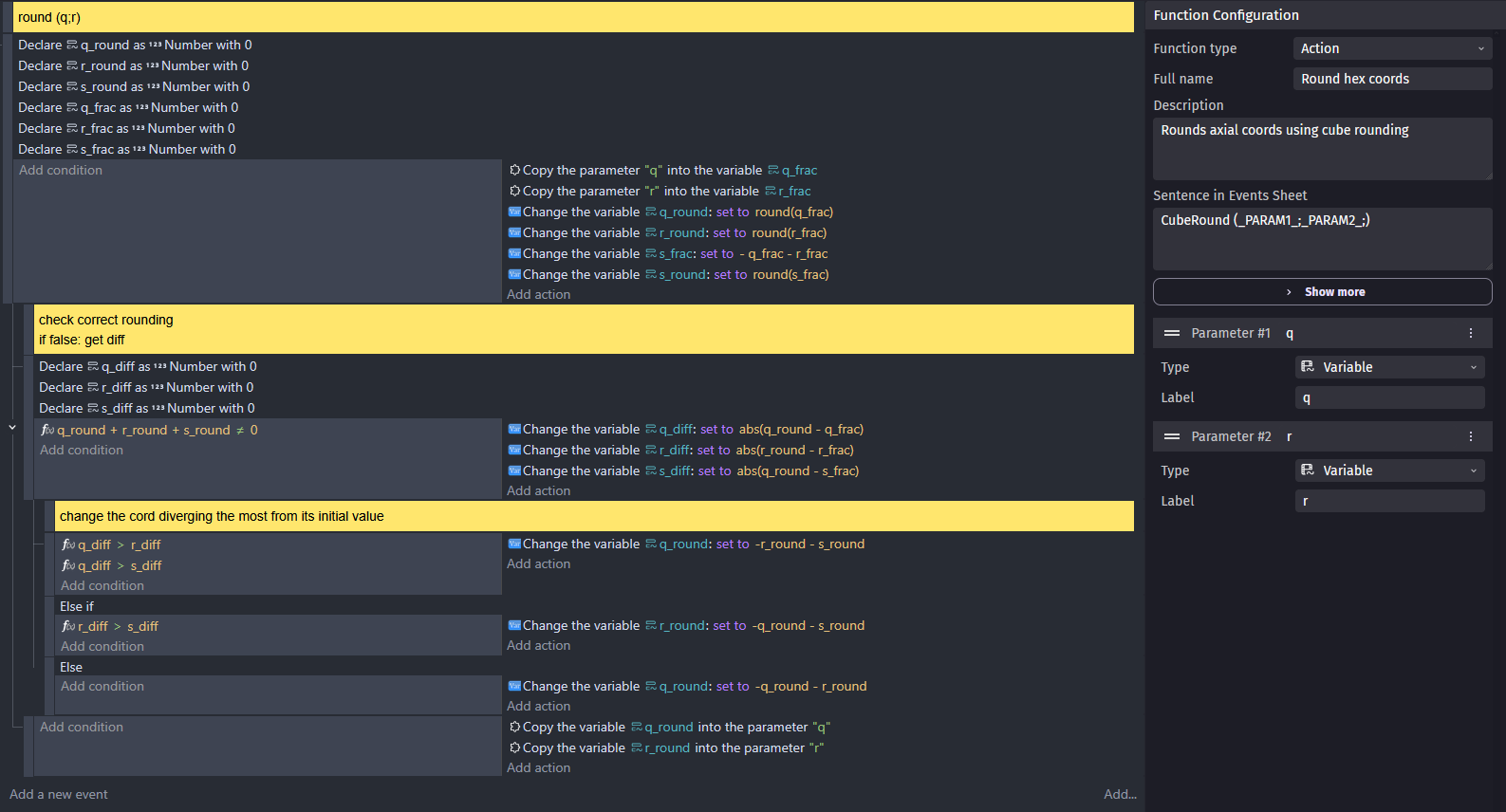
Create your function logic using the input variable:


3.
Use the function in events:
grafik
4.
It works:
grafik


This was only an example, it works for my case perfectly. I even return the variables back to where they came from, since my q;r input should become an q;r output (from fractional to whole numbers).
My application:

most important to me. It looks clean, minimal and pretty :slight_smile:

In events:
grafik

1 Like