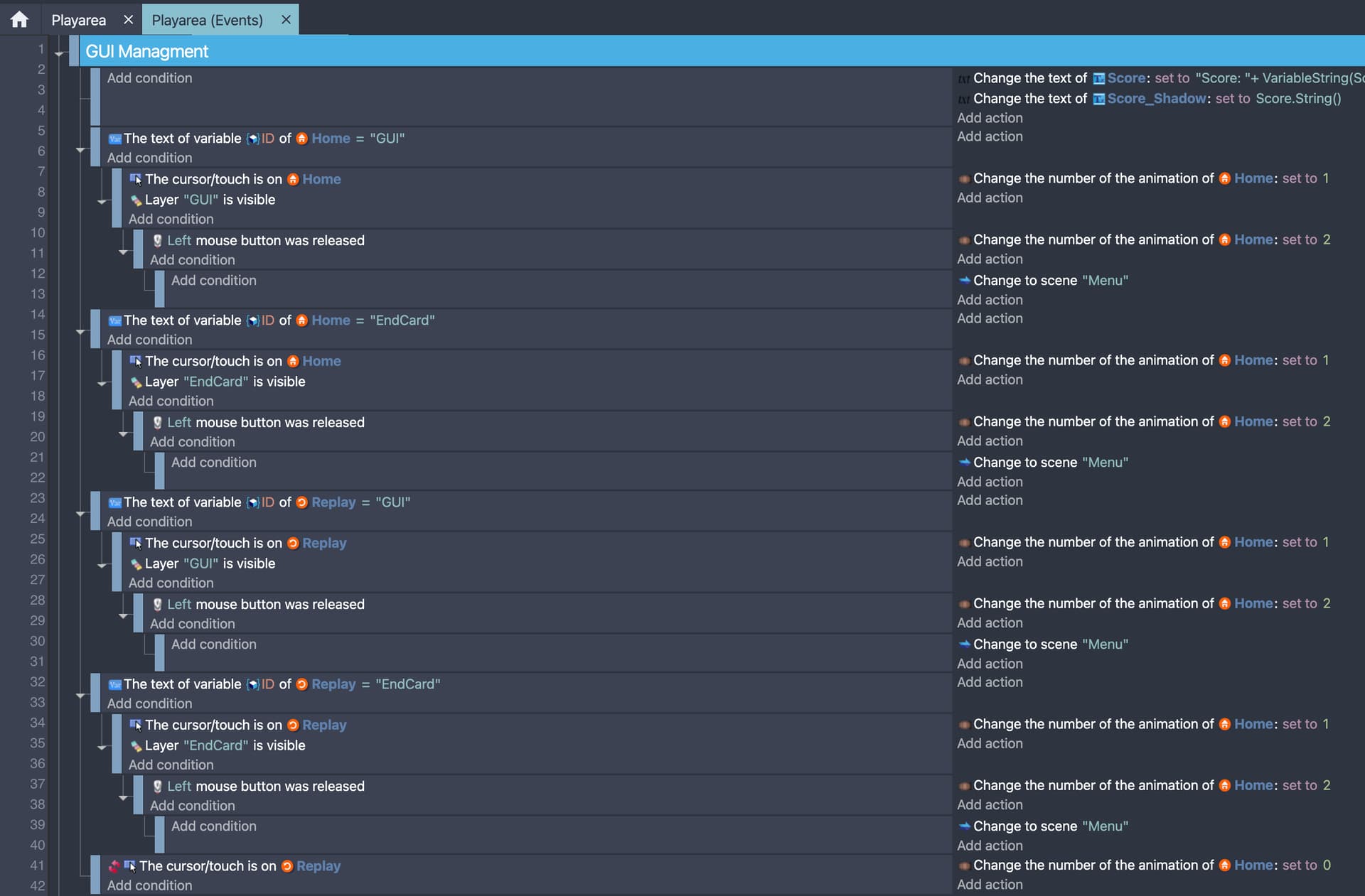
I am certain it has been requested in the past but could not find the topic so I decided to post this again.
Currently if someone is asking for help and we would like to point out at which event they have made an error, we have no choice but to make screenshots and draw on the screenshot to mark where the error is. It is not very convenient, even if you have a decent screenshot tool installed on your system that allow you to capture any part of your screen in less than 2 seconds, it can be uncomfortable when you need to make multiple screenshots, prepare them, upload them, position them in your text and I believe we are also limited to only 3 images / post.
So what I am proposing is to have a numbered list at the side of the event sheet similar to code editors:
Ideally it would be preferable to have each individual event numbered or at least align the numbers with each individual event. But I understand it can be an expensive operation to re-calculate the event numbers and alignment every single time when we move, delete and add an event.
So even though it does not look very polished, but having just a list of numbers at the side can be sufficient. Instead of making a bunch of screenshots, we can point out the collision check near line 328 and the assignment operation for a variable near line 121. Still not very precise if the number does not align with the event exactly, but more convenient than making screenshots.
Also worth considering the scenario when you are collaborating with someone in person and sharing screenshot is not an option, instead of asking the person to come and see what event you are talking about, you can point out which event you are talking about by simply using the line number.
Not sure if this has been already implemented, but I would really appreciate this feature.
My project has become very big with a lot of logic. Sometimes I need to implement quick changes for testing in the “main” events which I delete a little time later. Also I need to document bugs and possible to-be-changed sections. Even though there are external events, comments and groups, it can still be confusing to go over all the events to something specific.
Just wanted to point out that it can also be helpful for the daily work of one developer.
Almost 3 years and still event lines numbering is not implemented ???
It’s a crucial and fundamental thing in every editor to be able quickly and easily find the specific line of code and/or tell other people look at the line 351 instead making a screnshot, editing it, sending image, or explaining find the group, then find an event that contains conditions like… then check the event 3 lines below than prevous event xD
I was using a fusion engine for over decade and can’t count how many times we refered to specific event lines. Can’t even imagine how much time people spend (waste) on explaining how to find the specific event in houndreds of event lines, when they cooperate or send a source and ask somebody for help.
Even for solo developer events that are numbered are so helpful to orient yourself in the code.
LOL 2026 and NOW THE AI REFERS TO EVENTS BY SAYING EVENT (NUMBER HERE) BUT YET THE EVENT SHEET STILL DOESNT HAVE IT SO THEY EXPECT US TO MANUALLY COUNT LOL
Then here NEW EVENT under that event group
I would have
7 -
Or
3 -
And on top of that
Would collapsing event group would affect numbers below it?
AND LASTLY i wonder
IF you would be to rely on numbers
What if for idk a month you would have play sound when bullet is fired event at line 172
And now above it you need to move few events cause they cannot be below it
And now its 196 instead of 172 and how much it would confuse users?
I am not against ideas
I am just looking at potential harm it could cause and issues it brings along
Where i 100% agree someone sends screenshot and say issue is here at event 16
That would be ultra helpful in most cases
When you collapse an event group yes it should effect line numbers. When an event group is collapsed then you should see line numbers with gaps like 145 146…172 173…etc
If it would confuse beginners I am uncertain. An other possibility is to do it like in the good old BASIC days and let us enter whatever line numbers we want that would only serve as a flag in this case.
Line numbers usually can be toggled on and off. So in case it is getting in the way on mobile and small screens, it should be possible to just hide it and display it only if/when you need it. But yes considering the mobile layout it could potentially look out of place in portrait mode. Option to hide it is possibly the best thing to do on mobile and small screens.