Player still respawns after fire is extinguished

Hi everyone,

I’m currently developing a small 2D educational fire safety game in GDevelop where the player learns how to extinguish fires using the PASS method.

In my game, each fire consists of:

FireCore (logic object with variables)

FireEmitter (particle flames)

SprayHitbox from the extinguisher that reduces fire intensity

The fire works like this:

FireCore.Intensity decreases when the extinguisher spray hits it.

When FireCore.Intensity <= 0, the fire is extinguished.

I set FireCore.IsActive = 0 and hide the flame emitter.

The issue is with my respawn system.

I currently have a system where:

If the Player collides with FireCore, they respawn at the SpawnPoint.

The problem is that even after the fire is extinguished, the player still respawns when touching that area. This happens because the FireCore object still exists in the scene.

However, I cannot delete the FireCore object because I use it to check when all fires are extinguished, which then triggers dialogue to continue the level.

If I delete FireCore when the fire is out, the post-extinguishing dialogue never triggers and the game gets stuck.

So my questions are:

What is the best way to handle damage/respawn from fires in this situation?

Should I create a separate hitbox object for active flames and delete it when the fire is extinguished?

Or is there a better pattern for handling fire logic vs collision damage in GDevelop?

Right now I’m considering checking FireCore.IsActive = 1 before triggering respawn, but I’m not sure if that’s the best long-term solution.

Any suggestions or recommended design patterns would be appreciated.

Thanks!
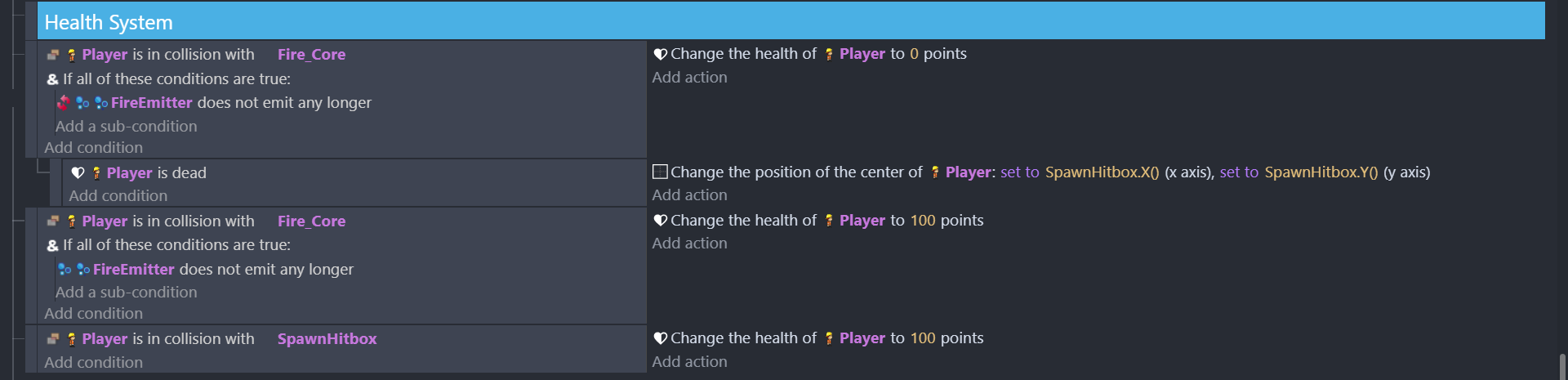
A condition to test FireCore.IsActive is exactly what I would do.

I’m a little confused by this event that sets the player health to 100 if they are touching Fire_Core and the emitter is empty? Is that intentional?

Also, you have some AND conditions that don’t do anything. AND (if all of these conditions are true) is only ever needed below OR. It is used to group multiple conditions there, as in “If A and B, or C and D.” In a regular condition block without an OR, all of the conditions must be true to continue, so AND doesn’t make any difference in the logic.

There’s a redundancy with “player is in collision with Fire_Core”… those events could be consolidated together:

player is in collision with firecore
   fireEmitter does not emit    |     do stuff
   -----------------------------------------------
   fireEmitter still emitting   |    do different stuff

This will generally be more organized and use less processing time, since you’re only calculating the collision once (makes a big difference when lots of collisions are happening - in this instance, it won’t matter for performance, but it is still a good practice)

You also have an unnecessary condition “Player is dead”, since you just set the health to 0 anyway. If the condition will always be true, you don’t really need to test it :stuck_out_tongue:

Here’s how I would reorganize your events with all that in mind:

player is in collision with Fire_Core   |
player.Health > 0                       |   change position of player to SpawnBox
Fire_Core.Active = 1                    |   change player.Health = 100

Now you have a single event that handles respawning. I added a check to see if the player has health, to avoid the event firing when the player is supposed to be dead.

I also consolidated the health refill, but you don’t have to do that if you want the player to be able to go back to the spawn to heal

1 Like