Remove the extra TPose from my glb animation file?

How do I…

Remove the extra T-pose of my character.
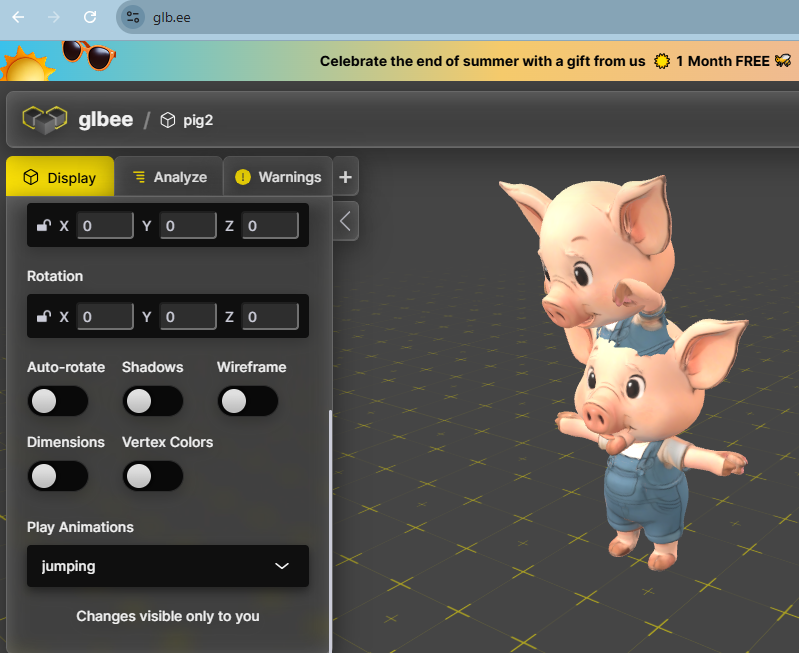
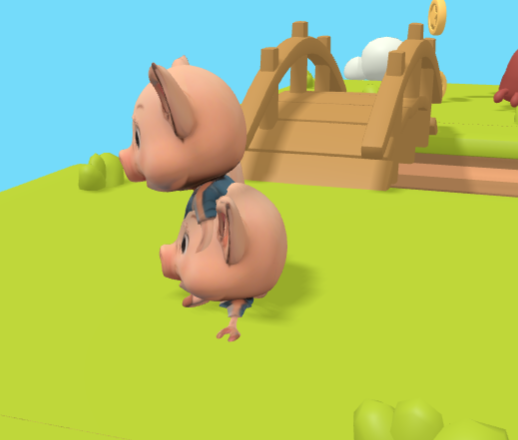
Half a model down, there is an extra Tpose of my character. I think it might be an error in the .glb file?
Otherwise the animations work just fine…

I created the model with https://www.meshy.ai/ posed with https://www.mixamo.com/ - downloaded idle, run and jump and put it together with https://www.mixamo-to-glb.com/
If I view the .glb in https://glb.ee/ - it also seems there is a doppleganger…

I realize this might not be a GDevelop problem at all…

open the glb in blender, enable wireframe, and see if there is a model/mesh stack, if there is, select the mesh and delete it.

I loaded into Blender online - RunApps

  • and I see there is the extra TPose, but I can’t seem to delete it.

Thank you for the effort, I’m sorry, Blender never was a favorite of mine…

try this…
if animations are baked…
play some anim…ojnly the wanted meshes will move,…stop…
select the meshes not moving…then…ctrl + or select more and delete…

or try this…but im not sure.
open from scratch
in edit mode…select all…clean up (from meshes menu)…merge by distance

or …if u want
i can try to fix it if u upload the glb
1 Like

Thanks for trying, I see this happening with several 3d-models created this way, so it must be something generally wrong that’s happening…