Render to sprite works like live stream
You cannot stream something that does not exist
And you cannot save it
However
What you are asking for can be achieved same way we slap gun or sword onto player
Look you have player you change position of gun to Player.PointX(“GunPoint”) Player.PointY(“GunPoint”)
Assuming you first made that point
When it comes to avatars it would be even more simply cause you don’t need to have points
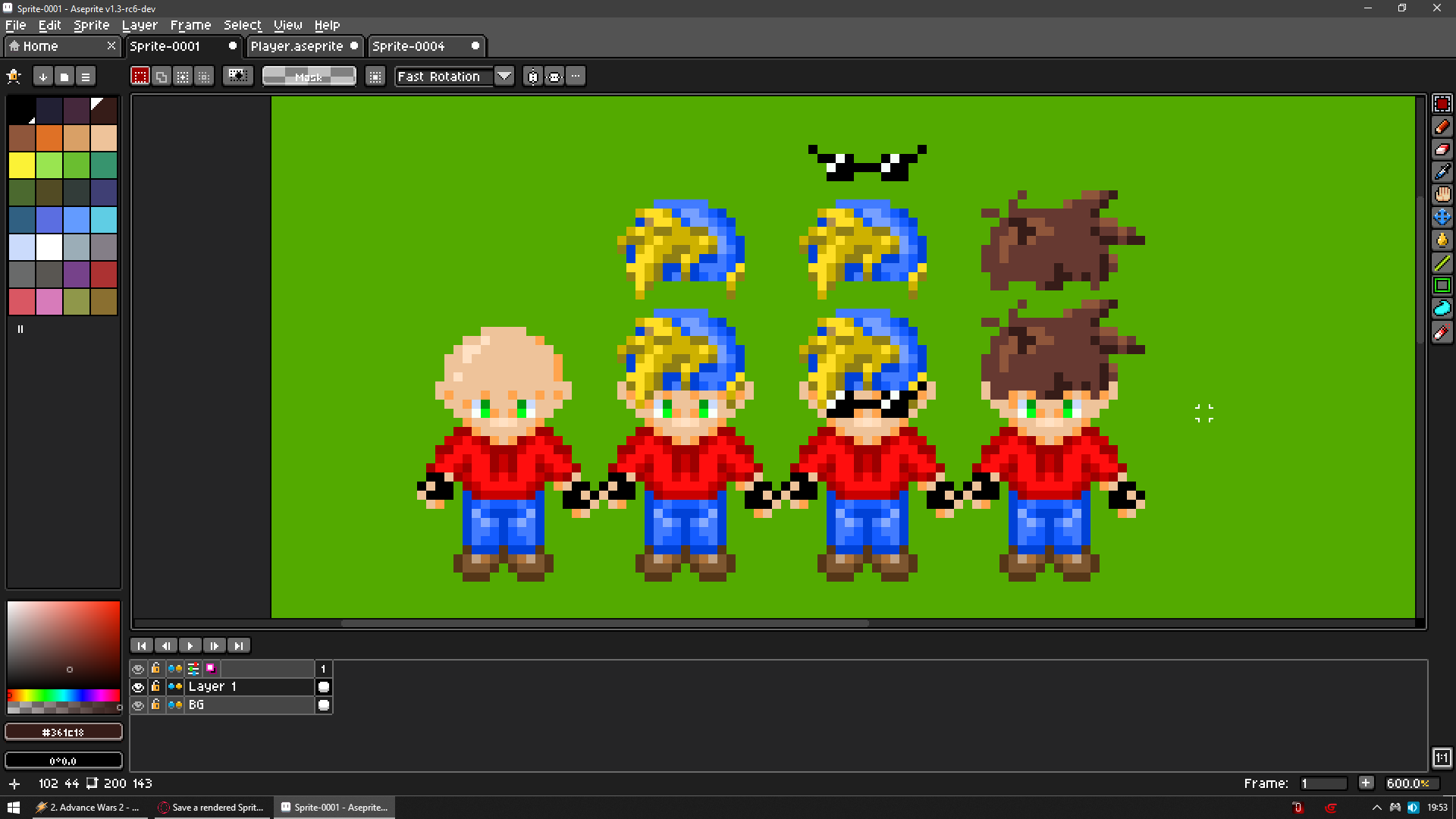
ALL your images can have same exact resolution
But you will need to prepare separate object for each piece
For example objects like
Head
Eyes
Glasses
Hairs
Facial hair
Hats
And so go on
Now you shove into them some animations
And you slap one onto another
For example
You have object Head
And object Hair you change position of Hair to Head.X() Head.Y()
You may need to play with zorder
But that would be to like on creation of each object for example Hair or Glasses which always would be above Head
Where most likely Glasses would be above Hair
Change ZOrder of Hair set to Head.ZOrder()+1
Change Zorder of Glasses set to Head.ZOrder()+2
So you just need to split them into different animations
And now you can save them to variables
And set animations to these variables
Actually you could literally use 1 variable to store all possible combos
Using SubStr() and changing animations by name
Thank you ZeroX4 very much for your helpful tip on how to solve this.
If everything were based on animations, your solution would be great.
But if users don’t like any of the animations, they can generate the color of the hair, clothing, and background (if they don’t want a flag) randomly with a click.
For this reason, I would like to render the assembled avatar and save it as a simple sprite or graphic.
I would just call up the sprite and that’s it.
The avatar is only displayed in small size and has no other function.
You said IF
Problem is your IF
I mean what you described
NOTHING what you wrote is impossible doing it way i said
So only question how much you need it vs how much determination you have
Look for all game care animations could by number
BUT then you will need to remember more or less what is what if you need that information
For example yellow hair is animation 1 red hair is animation 2 and so go on
IF you don’t need that then it can be all numbers and you won’t need to care
While you can also go with names of animations
And use array for whatever you need
Imagine this
I choose hair style of animation 3
I choose hat of animation 7
I choose glasses of animation 25
So we need to save 3 7 25
We could store it into text var like s3es7es25e
Now we would read each value between S and E (se like S tart and E nd)
Now let’s imagine someone want random hat
So instead of 7 let’s use Random(20) assuming you have 20 animations there (actually 21 but whatever)
You can save names of all animations to array and then choose random child array
You can save all animations to array or to singe variable like i described above
And now best part
You make hair only 1 color
And you can tint them or use adjustment effect
ONLY problem would be multi color stuff
For example hat that is red and green
Coloring that would be possible but would not give most likely wanted effects
So in the end what i suggest is not 100% ideal
But it is next best thing
HOWEVER i need to warn you it will require a lot of set up
So again only thing in your way is your determination