Here is what I want to happen. I will have a group made up of two objects, one a normal object that can have many different static animations, the other a custom object. There could be hundreds of them in the scene. Each one gets a unique id when created.
They all can be dragged and their z order will be determined by their bottom Y position. I am doing this rather than use the Ysort behavior. Only one object can be dragged at a time.
If one object is dragged over another object and the drag hold lasts more than, say, 1 second, the z order of the dragged object should change to 1 more than that of the other object so that it will appear in front of it. But when the now front object with the changed z value is dragged away so that there’s no longer any collision, its z order value should revert to bottom y position.
I can’t get it to work properly. What happens is that I record the z value of the object that is not being dragged and save it to a scene variable. Then later, if the timer gets to more than 1 second I change the z value of the dragged object to the scene variable z value plus 1. It works, but only for the first collision. If, in the scene I make a new collision, it takes on the z value of the previous collision.
I have tried sticking for each object in various places, removing/adding trigger onces and various other things. So the key thing I can’t get to work is for a new collision to make sure its new z value doesn’t affect objects already in a collision state. I’ve also tried using the Picking extension to try to isolate things but I can’t get it.
This is one of my attempts. This is a test project and the group is called Shapes. There could be variables in there that are not being used as conditions in this particular attempt. I have not included the event for changing z order back to bottom Y because it’s not currently working and I’m not sure which event it is as everything is a mess of boolean variablles that I’ve changed around, but it was working at some point.
Hi bubble - where did you try using for each? did you try it after the collision?
I think id need to have a go at it myself. Im unclear on GeneralZ - (i picture him as a moustachioed dictator) - is that the only time that the variable changes?
Haha, I also have another version of it called GenZ which, can you believe was a scene text variable that I had all sorts of to string and to number stuff going on so that I could do a hard null reset like Change GenZ to “”. Also, I think GeneralZ probably hates GenZ.
To be clear, yes GeneralZ is a scene variable and the only place where the value is changed. Because I didn’t know how else to get the value of z from one object and give it to another object and for the events to know which object was which, or something like that.
Unfortunately I don’t know where I had the for each, I’ve been battling away like the proverbial monkey with a typewriter hoping that eventually something beautiful like a sonnet will come out of it. But no.
Sometimes when I use dragging, I like to move the object to a higher layer temporarily so that’s it’s on top of everything. I then put it back when it’s dropped.
In your case, it might help to only change the Z-order of the object that’s being dragged. Change it either to the y based order or use the object that it’s in collision with. You can change it either in realtime or during a paused hover or when dropped.
Changing the other placed object might change their relationship with other existing objects creating a domino like effect.
If placement is adjustable then adding a keyboard shortcut and/or a popup menu or some other UI control might also help. It depends on your target devices. It’s always best to plan for every senerio.
Yep, that’s all I aim to do. I only want to change the z of a dragged object that is hovered over another object. And then if a third object is dragged and dropped over both of them, but not hovered, it will be in front of all of them. Imagine it was a potato with a higher z order so that it’s visible on a plate. So I hover the potato so that it will come to the front. Then I drag a cup there but don’t hover it and it keeps its normal z value which is in front of both because it has a higher y value.
I need this to work any time it’s done even if there already other pairs of objects with one already artificially brought to the front.
More detail, this gif shows everything seemingly working well but it’s not. The top left circle should change its z value to 180, but instead it changes to the z value from the previous collision of 325. The answer is probably easy but I’m not seeing it.
What said by Keith is well (you move hitted object on another layer).
But you can add this: move the hitted object far away (say 10000 pixels on right or left) during 1 seconde. So, there is no more collision between the 2 objects.
I don’t know if the last proposition can be good for the case of your game but is well suited to hitted object which must invisible.
Yep, it also works but all is depending of the problematic to resolve in the game.
By example, in Rick Dangerous, i moved some triggers for moving out the harrows of the walls. After a few seconds, i replaced the triggers in the opposite sense to permit the harrows to work again.
It was a simple solution i found to this particular problem. Perhaps, it would’nt work for an another issue.
I’m not using the Drag behaviour either but for the purposes of this test project here, I am.
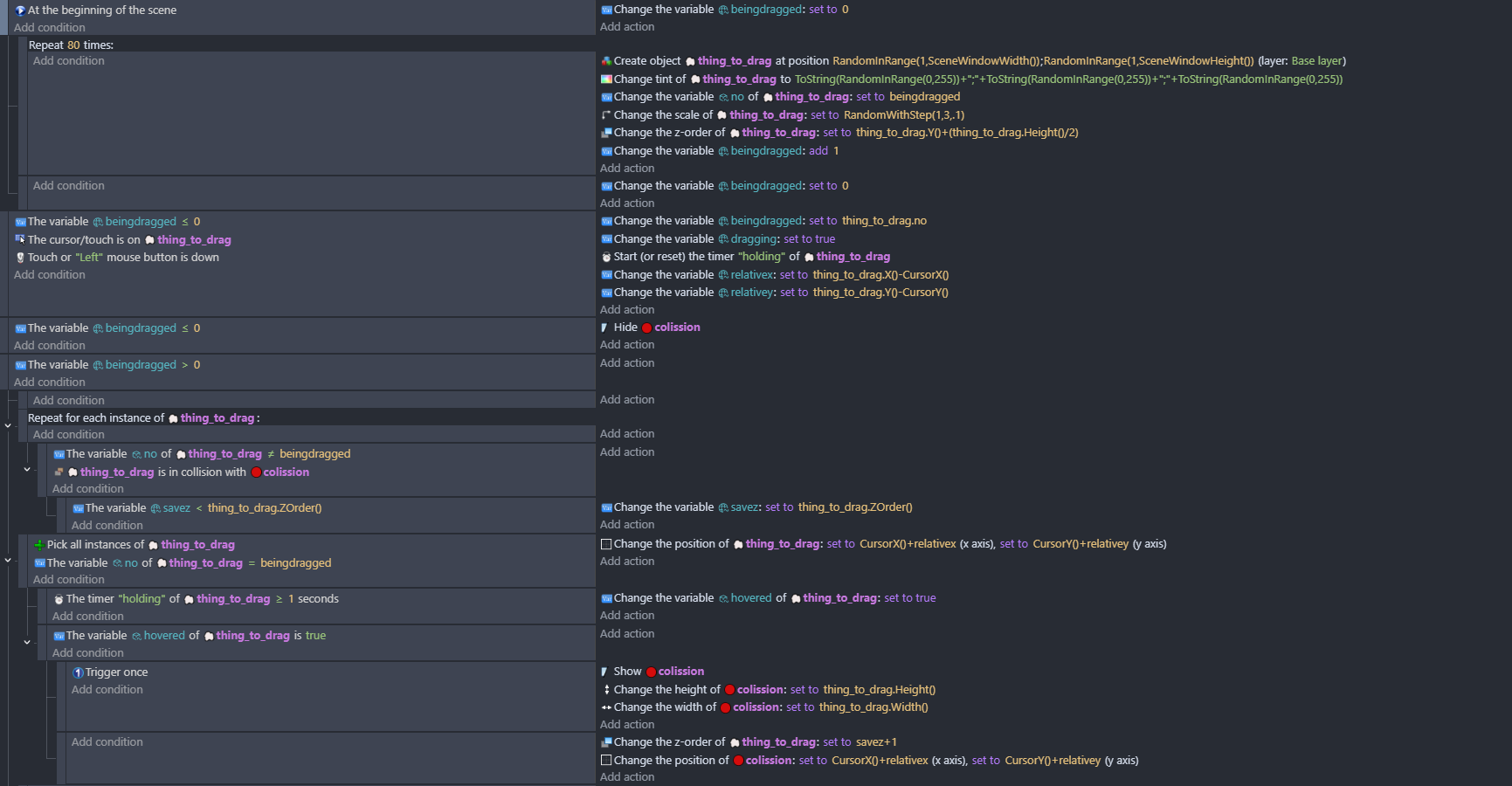
Could you explain the principles of your events as they relate to the variables? There’s a lot of variables and I can’t get my head to understand it, for example, variables called ‘no’.
And can you explain more about the collision object that moves with the cursor and mimics the size of the dragged object.
You’ve set the z order at the beginning of scene on creation, what happens after that, is there a re-set to that?
I couldn’t tell from the gif if it’s what I want or not. From what I could tell, dragging an ojbect raised it up above all other objects and then when it was dropped, it took on its natural y based z order? What I need to know is if a small object is placed/dropped on a larger object where it would normally have a lower z order, will it, in your example, have a higher z order and be in front of it?
Is the fact that you set your y based z sorting in the middle of the object rather than at the bottom significant? I understand this can make the overlap easier to acheive and I’ve already tried that. This pic shows the left yellow circle in front of the purple block because it’s been hovered and on the right, the yellow circle is behind the purple block because it hasn’t been hovered. Both are above the center point of the purple block.
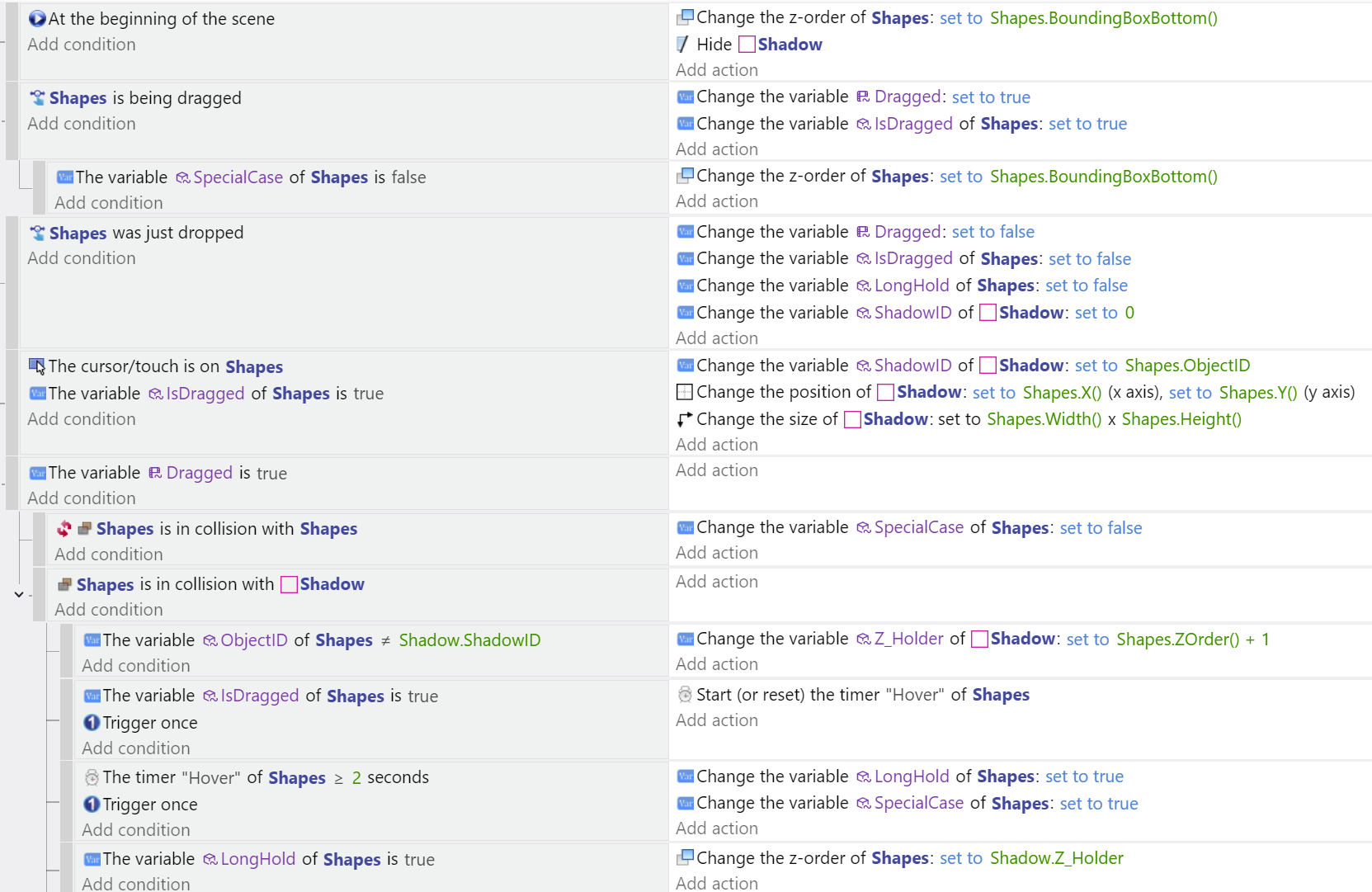
Right, so this is probably solved now, I’ll mark it as solved when I’m sure. I used PetLimpet’s idea of the second object for collisions and used a system of comparing IDs of the Shadow object and the Shape object to determine which shape to do what with.
In the end, the events are pretty simple. I stored the desired Z value in a Shadow object variable which I think was the key; it was a neutral place to store it but also had direct links to both Shape objects.
I need to make some improvements though, including that the timer only runs while the cursor is relatively still. And then hope that everything works in my main project.
Glad that its working now. Im still not sure whether I did exactly what you were after and sorry for a lack of explanation above!
looking at what i did - it’s not quite right - shoddy in fact, and if impelemented could lead to systems failure, and global economic decline
‘no’ is the object id. When object dragged i set ‘dragged’ to the object ‘no’.
I using dragged=0 as default instead of an extra boollean.
the repeat for each there - there needs to be a condition to that is only happening when the timer has turned hovered to true.
One thing that repeat for each does which you’ve not got is that its checking all the objects that are under the colission object and updating the savez (scene var) to the highest value.
otherwise its similar to yours above
When not being dragged - it changes the object z to its y…this is an error
it should be y + half object height like at the start as the points are in the middle of the object. An error than will prove costly and result in collisions on the tram network and orders being placed for thousands overhead power cables that are half a yard too short.
On examining mine more, the timer is starting as soon as an object is dragged, so I have to get it to wait for a collision but so far I can’t get it right, the collision is triggered by the static object but it’s the dragged object that needs the timer. Oh welll, I’ll keep at it.
I will try your suggestions, thank you. In my actual project I’m using my own drag events just like you did with cursor offsets etc. But for the purposes of this test project, I used the Drag behavior and the Shapes is being dragged condition is part of that.
Haha, the red typing was about as red as it gets. The big arrow was a milder red though.
Can you say what your proposed changes achieves? Is it optimisation and to make sure that different collisions don’t cause things to happen with other collisions? If so, it’s a very worthy goal.
I tried your suggestions although I didn’t know what to do where you had the big arrow. The thing that no longer works, probably because of the For each is being able to re-position an object slightly after its had its z value raised, this is important to be able to do. Imagine it’s like putting something on a table and then moving it to a better position. Or, alternatively, no hover and putting the thing on the floor behind the table. So, with the for each, as soon as the object is touched again it disappears behind the other object.
With the extra condition of z order, I thought that would be a problem because of the re-positioning aspect that I need and it would mean that the zholder would only be updated by a dragged object coming from a smaller y position but it didn’t seem to have any effect.
I guess I’m lucky things are working as well as they are with no For eaches in my events. My current attempts are to have the timer on the Shadow object instead of on Shapes to try to get it to only start on collision rather than when drag starts and then for everything else to keep working. But it’s not a goer yet.
One thing that isn’t working is if I wanted to have a chain of objects. For example, a plate sitting on a table and then some food on the plate. The third thing, the food doesn’t change z value. Although I can have many ‘plates’ on the table and that’s more important than having a third thing.
I’m sorry - i didn’t realize exactly what you were up to until this - before i couldn’t work out why you wanted the objects to sometimes be above something with a greater y - doh!
Well, in case anyone in the future wants to do the same thing, it’s now working properly. The change was to put the timer on the shadow (collision) object.
Here’s the events. Big thanks to petlimpet for the collision object suggestion. Now, I’ll use these events in my main project.