Open your mind
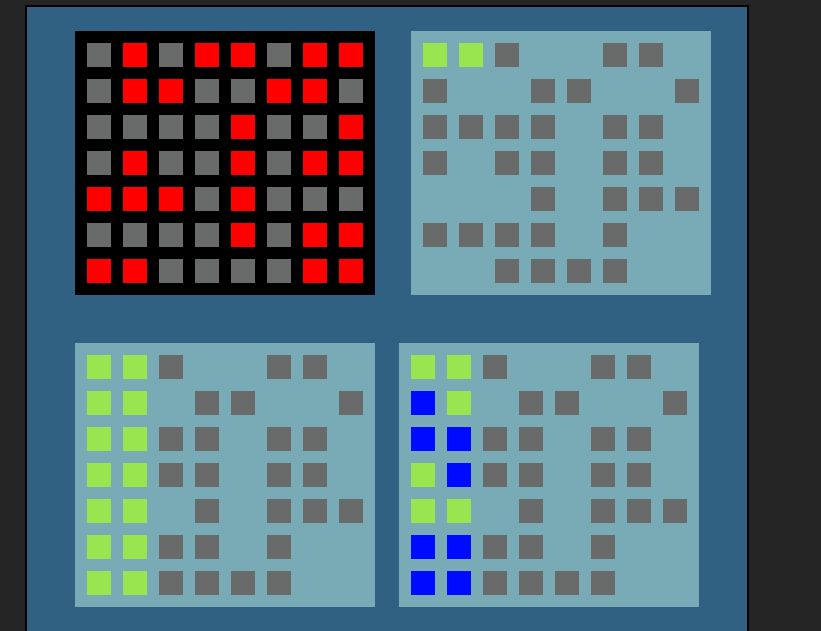
Top left image
Let’s assume gray tiles are empty
Red are occupied
Top Right
Imagine we duplicate our grid with different objects somewhere
And now we delete tiles which were occupied (or better yet don’t create them at all)
GREEN is our checker object
Now let’s move it each frame to the right by 1 tile position
IF our checker.X()+checker.Width() is greater than our fake grid X + Width()
Then we move our checker 1 tile position down and reset it to the left
BUT that is for noobs
And that is why
Bottom Left
We spawn as many checkers as we can on the left
And we let them go to the right 1 frame at a time
With that grid 8 frames would take to check if there is available move for this shape
BTW each move we check if checkers are in collision with gray tiles
If not then there is available move
BUT that is still for noobs
And that is why
Bottom Right
We spawn all our shapes on top on each other
And we move them all 1 frame to the right by 1 tile positon
Checking if they are NOT in collision with gray tiles
Some shapes cannot be dealt this way so we actually gonna need revert back to moving them 1 tile position down and resetting their X position when they reach end of board
You could do it with points to save performance
You could have multiple fake grids to check MORE combos at once
Whole check process could take 1 frame if you would do in more clever way
You could even give fake grid tiles ID variables
And advance checkers by these IDs
So if there is tile with ID 1 2 but not 3 and 4 and next existing is 5
We would go 1 2 5
So process would be speed up even further
Amount of optimization ideas i could vomit at you here would make this longest topic you would ever see in your life
Amount of ways it could be done would make this topic give me error for being too long (yes thats possible you can exceed allowed characters count)
You could literally in 1-4 frames check all combos with pieces being rotated in all possible directions
Even flipped horizontally or vertically (if that would change anything)
And all that could happen on hidden layer or beyond viewport
And you could run it as soon as player place piece on grid
All you really had to do is
Change checker X position (let’s assume your tiles are 16x16) add 16
Checker.X()+Checker.Width() is greater than Grid.X()+Grid.Width()
You could also store grid right side position in variable and compare against that
There is also condition to pick nearest object to SOMETHING
You could do all that when space key was just pressed to actually see what is happening
Then after you get it to move/detect properly just run it without any condition to kick it in each frame
To copy gird you could delete grid tile at position of original gird tile + some offset but only for occupied tiles
HECK you could not even delete anything
You could have there tiles with different colors and flip them
And then Keith came in with arrays
My god how that would speed up things but bit complex
Anyway lesson for today is even so you solved it
You got it working
YOU DO NOT need to even try what i said
But look how now many things just become obvious
You was looking to do it in THIS specific way instead of thinking outside of the box or just brute force your way trough it
That is worst thing you can do to yourself
Papu zero will be back with even more useless tips
Or not