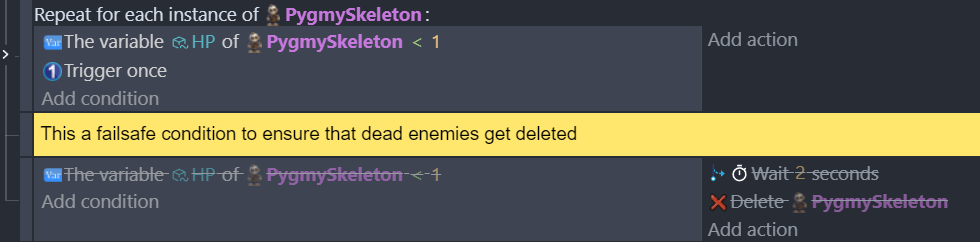
I have problems with handling the removal of dead enemies correctly. I have this code:
But sometimes the first condition fails to trigger… So I’ve had to add the second condition as a failsafe (shown disabled).
The fails occur primarily when the enemies die in quick succession.
I should also mention that the code under the first condition is rather long and contains different waits, change of animations and stuff - I am wondering if that’s what causing the problems; it is also linked to the “trigger once” condition. (which I can’t remove because then other issues ensue).
However the main question is: is this a good way to handle enemy death and removal - or is there a golden and always working way of doing it?
I know what I want in my code: I want to check if HP is below 1 for each instance of an object, but… is my code the correct way?
You almost never want to use a trigger once inside a repeat for each instance. I say almost bc there could be some unique reason but it would be extremely rare.
Instead, you could add and check for a 2nd boolean like DeathAnimIsPlaying. Also, it’s more efficient to check the HP before the for each, that way it only loops if there are dead skeletons and then only for the dead skeletons.
So,
HP of skeleton <1
DeathAnimIsPlaying = false
First action
… DeathAnimIsPlaying=true
… For each skeleton
The boolean will work like a trigger once but on an instance level instead of an object level.
When you use a trigger once the state of the action being checked needs to go from true to false and back to true to trigger again. But with an object with multiple instances, this has to happen with all of the instances. Only 1 instance would need to be true but all of the instance would need to be false to remove the trigger once. Only then could it trigger a 2nd time.
When a character is killed and then immediately deleted, this usually isn’t an issue because on the next frame, the object is gone. So, a trigger once isn’t needed.
Another option is when the skeleton is dead, you add a different object to its position and delete the original. That way any events that pertain to the skeleton would ignore the 2nd object. Then when done with the death animations, you delete the 2nd object. It would completely remove dead skeletons immediately while allowing an animation to play.
HP of skeleton <1
… For each skeleton
… … Add Deadskeleton at x, y of skeleton
… … Delete skeleton
… … Play animations and whatever on Deadskeleton
… … Delete Deadskeleton object
(Solved)
THANK YOU @Keith_1357 
That did it - this is my code now:

so no bl**dy “for each” and no “trigger once” - this is clean, nice and readable