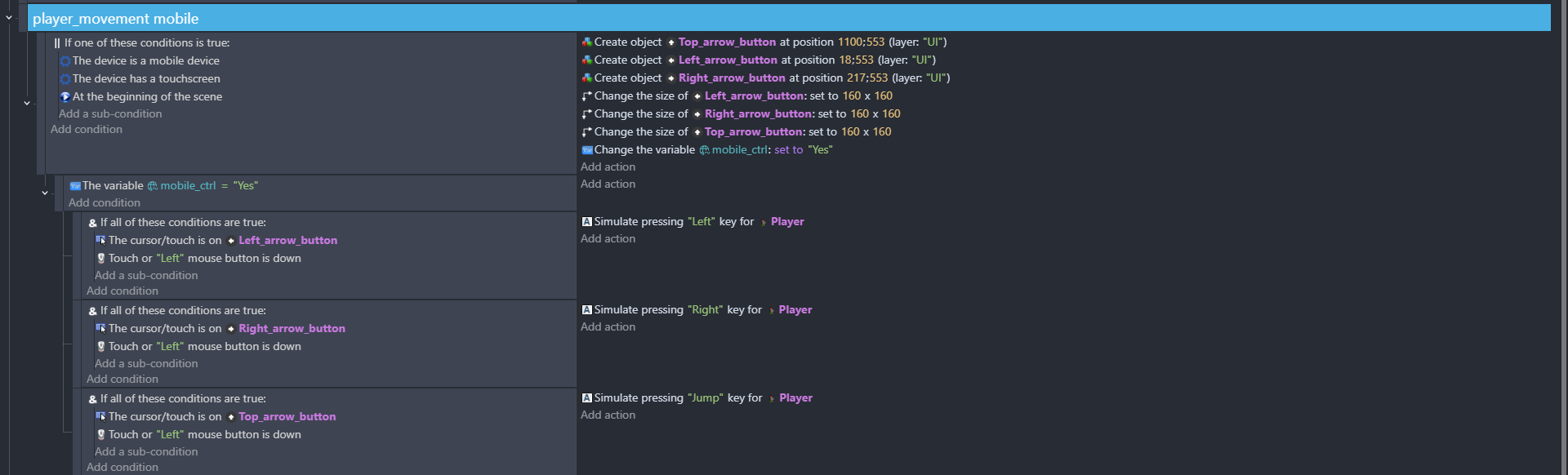
I am making a 2D platformer game and have ran into an issue. I was adding in mobile support, and while playtesting I ran into an issue. Whenever I click jump while holding left, my left input just stops until jump is released which is a big issue since you need to hold jump whilst moving in this game. Any help would be appreciated.
Hi the way that it’s set up is quite strange
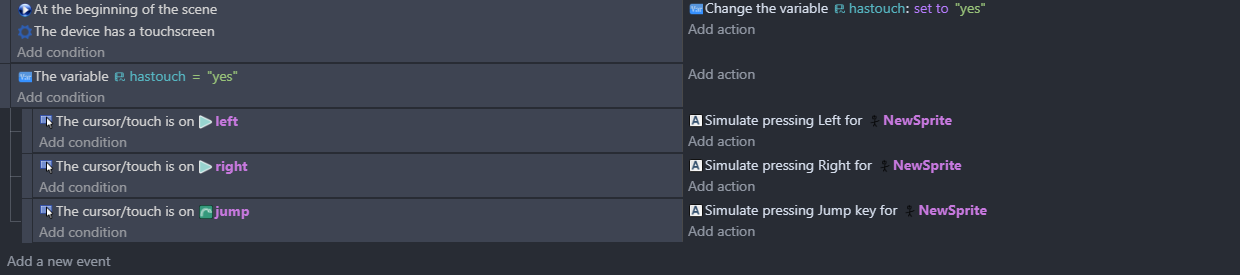
Id have it
At the beginning of the scene
If device has touch screen set the variable to yes
Then as new event
If variable is yes
Sub event …touch on object and left mouse button down …simulate controls
For each control …that should work. You don’t need ‘and’ there …only really need those when using an ‘or’
Thank you for your reply, this is my first game on GDevelop and I am still figuring out how to use the program to its fullest. I will try what you recommended, I have it set up that way-excluding the and statements-is for bug testing because I was not on a touch device when coding this.
I have tried the multi touch joystick but due to the game design it does not function in the way I intend it to. My games setup is close in design to the game ovo, talking in the sense of controls and 2D setup.
I have applied your code and it has fixed my issue, but it has caused another issue where when I release the jump it forces the left and right movement keys to stop.
This worked great, but my character continues moving after being released. I will try and debug this on my own but your input will be greatly appreciated.
Currently you are using one input (the mouse pointer moved by a finger touch). It sounds like you need to use multi touch. It’ll require a bit more work, but it’ll allow for a direction button to be held while the jump button is pressed.
Because the mouse is moved by your finger. When you stop touching the screen, the mouse is still on the screen and stays put on the button until the next touch is made.