[Solved] How to toggle hitboxes with JavaScript

I can’t seem to find out the correct way to enable and disable debugDraw (hitbox drawing) from GDJS? Here is my current code:

const rt = runtimeScene;
const rVar = name => rt.getVariables().get(name);
const obj = name => rt.getObjects(name)[0];
const objects = [obj("Debug"), obj("CommandLine"), obj("CommandOutput")];

if (rVar("ShowDebug").getAsBoolean()) {
    objects.forEach(name => name.hide(false));
    gdjs.evtTools.debuggerTools.enableDebugDraw(true);
} else {
    objects.forEach(name => name.hide(true));
    gdjs.evtTools.debuggerTools.enableDebugDraw(false);
}

The enableDebugDraw commands won’t work. How do I toggle it?
1 Like

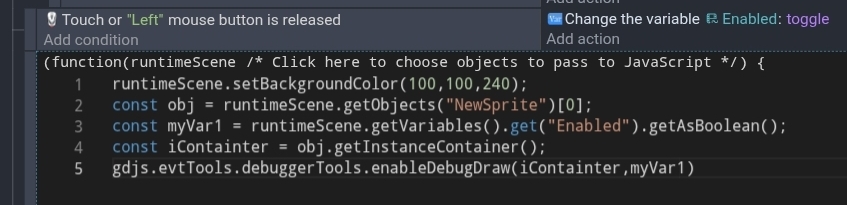
IDK if you solved this but it was bugging me. I’m doing this on my phone so, I can’t seem to copy the text from the GD Javascript editor.

This works. It uses the object NewSprite and the variable Enable. There’s probably an easier way to get the Icontainer parameter without using an object but this was the only way I knew how to. Plus using the Javascript editor on a phone is a pain in the butt.

OK. This is much simpler.

https://docs.gdevelop.io/GDJS%20Runtime%20Documentation/classes/gdjs.RuntimeScene.html#enableDebugDraw

2 Likes

Alright, thank you for the help!

1 Like