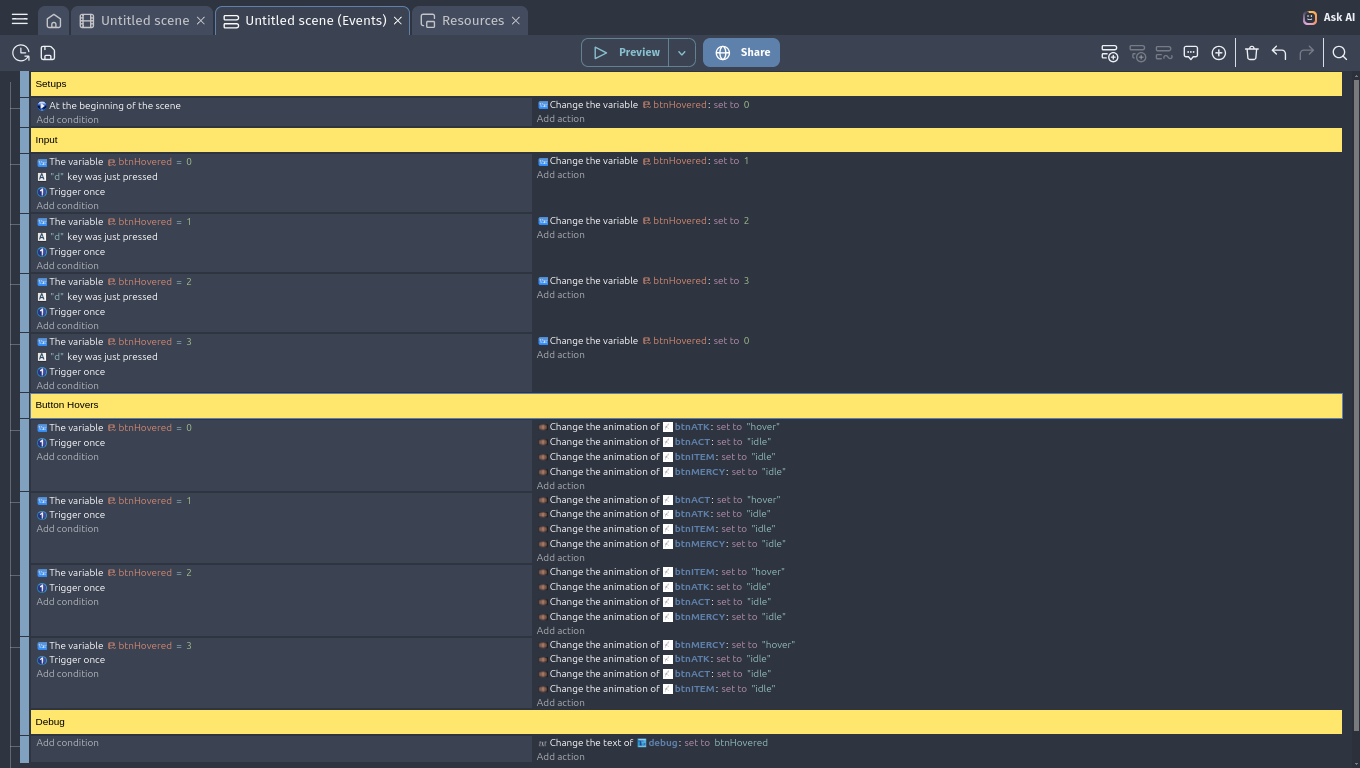
I’m trying to remake the Undertale buttons system by using a ‘btnHovered’ variable system. Basically, at the beginning of the scene, the btnHovered variable is set to 0, and each time the right key is clicked and released, it adds 1 to the variable until 3 (after 3, if the right key is clicked and released, it goes back to 0). If btnHovered = 0, the Attack button will be hovered, if = 1, the Act button will be hovered, if = 2, the Item button will be hovered and if = 3, the Mercy button is hovered (they play the ‘hovered’ animation when btnHovered = their value).
Although, the system will only “work” (for this I mean showing any sign of life) if I have specifically a Key pressed action in the buttons, except for mercy. WHY??
The problem is that there’s a trickle down of conditions:
In the first event if btnHovered is 0 and “d” is just been pressed, btnHovered is set to 1.
This then satisfies the next event’s conditions (“d” is still considered to have just been pressed) and btnHovered is set to 2.
Which in turn satisfies the condition that follows it (“d” is still considered as just pressed) and sets btnHovered to 3.
And guess what? That satisfies the final event, and btnHovered is set to 0
To fix, replace those four input events with this one:
mod(btnHovered+1, 4) is the modulus operator, and that line can be read as “add 1 to btnHovered and return the remainder when it’s divided by 4”.
FYI, the “Key was just pressed” condition is only true for one game frame, so the trigger once is not needed.
Common mistake. I call it a domino effect or chain reaction.
You can simplify the animation part by putting the objects into a group and then give them an object variable like ID. Set the object variable for each object with the matching number. When the button is released, set them all to idle and then pick the matching object by its ID and set it to hover.