I am looking into optimizing performance. Do you know of a way, that I don’t have to check for collision twice, when checking for collision of many different objects during the same frame? I always think, that I need to check for all objects, that collided, and then do the same inside a “For each” loop, to know, which instance of my colliderObject collided with which instance of my targetObject.
Also…
For anyone trying to optimize collision: I was just testing different collision performances and stumbled across a surprising find, that I wasn’t fully aware of:
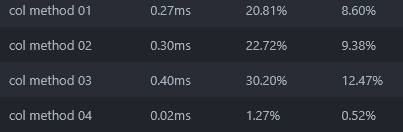
Point inside Object seems to be more than 20x as performant than collision tests, Distance checks about a bit more performant and only checking for the single closest projectile at a time about 45% more performant. Here are my Profiler results:
EDIT:
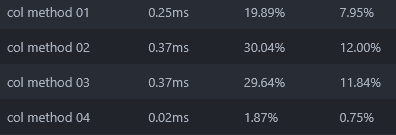
Did a second run and showed similar results, but distance seems to be same as collision (which makes sense, since collision is meant to check for distance first too)
Start with
FIRST
Distance check and distance should be width or height x2 (depending on which is larger) of the bigger object
And under it you check for collision
For example Bullet is 20 width and 5 height
So you would check distance of 40
BUT if enemy is width 30 height 30
Then you would check distance of 60
It could even be 100 in this case
But point is you need to 1st filter object by SOME distance to not check all of them for collision
And then you can check collision against objects you actually care
Think of it like
Reply to any user that had replied to you
Now you are checking all users on this forum did they replied to you
BUT
From users who wrote anything in this topic
Reply to any user that had replied to me
Look how that filtered users you need to iterate trough
For anyone looking for what I was looking for: I did some more tests and found an answer to my question (see point 2 below), as well as some more efficency and precision twerks. Here is what I found.
Point inside object will remain the cheapest option by far. It can miss a collision event, if the ProjectileObject is too fast, or the TargetObject is too small.
Using Collision for all instances and then again for each instance is only needed, if you want a ProjectileObject to be able to hit multiple TargetObjects at once. Instead use Pick nearest object (This is cheaper and will ensure that you only pick one TargetObject).
If you only need “good enough” precision but want good performance and high reliablity only checking Distance first and then Pick nearest objectfor each instance can be sufficient (Given your targetObjects are having the right shape for this)
This isn’t really surprising, testing a single point will always be more efficient than testing a box. “Object in collision” will work when any part of the collision box is overlapping. Whereas, point inside obviously just works on that single point, ignoring any height or width of the object.
This consideration is not unique to Point Inside. Fast projectiles can also skip over things when using the regular Collision condition. They just need to be going a little bit faster since again, you’re checking the entire box, not just the center.
You got it backwards here… you mean that for each is needed if you want multiple projectiles to be counted when hitting Target at the same time.
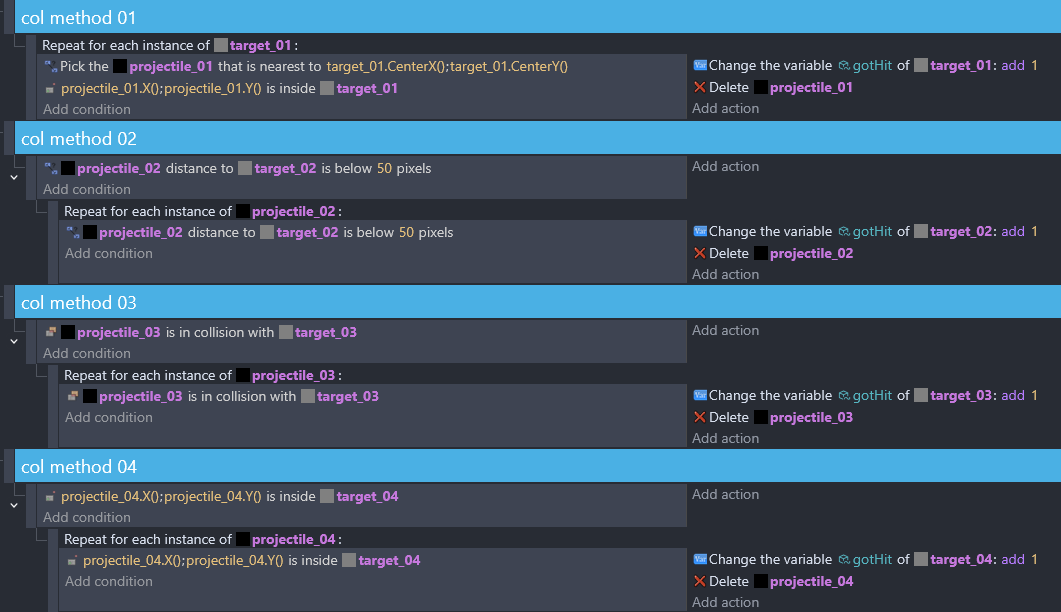
By the way, you have extra conditions in methods 2-4 that are not needed. It is redundant to repeat conditions unless there’s some specific reason you need to re-filter the objects (such as using Pick All instances):
projectile is in collision with target
    repeat for each projectile
          (no condition)       |      do stuff
Thanks for your reply and the addition of possible skips for collision checks. It can be adjusted by legthening the projectiles “tail” (aka lengthening the collision box behind the projectile), if applicable.
Thanks for replying to my initial question. But I think you missed a crucial detail in my phrasing: […]to know, which instance of my colliderObject collided with which instance of my targetObject[…]
In order to know the targetObject of each colliderObject I do need to check for each instance. Otherwise each colliderObject will apply changes to all targetObjects, that collided with a colliderObject during that frame.
On the contrary, it is possible to cut out the collision condition above the for each event. But I wouldn’t want that, since that would be more processing intensive than having it (to easily filter out all objects, that are too distant to my targetObjects).
I see, that does make more sense… the way you had worded it in the second post makes it sound like “a single projectile hitting multiple target” which would happen regardless of using for each. Still, this explanation isn’t exactly correct.
To apply all changes in bulk, no “for each” is needed. If three projectiles hit one target, the target only takes one collision.
To account for multiple bullets hitting one target, “for each projectile” is needed. This goes through each projectile individually and applies its collision to all targets at the same time (as in, all targets that ONE projectile is touching)
To account for one projectile hitting multiple targets, separately, “for each target” is needed. This could be combined with “for each projectile” or not.
That’s not what I meant. In the example event that I gave (in the code block), you’ll see that the condition (is in collision) comes before the For Each. It’s the condition under that For Each that is unnecessary. The logic would be like this:
Gather all balls that are red.
Pick up each ball one at a time
Is it red? → do stuff
No need to ask if its red again… you already filtered the objects based on that condition, and are simply going through the pile one at a time instead of in bulk. Even if this doesn’t add processing time, I feel the need to nitpick it because it is sort of like misleading yourself to leave it in there. (I think it will add processing time as well, unless there is some magic sauce in the way events are interpreted that avoids redundant logic)
Thanks @magicsofa, I have time to properly respond now.
I propably should had been more specific in what I am testing for to begin with. The logic of my example bases on the following:
Units can shoots projectiles. By doing so they pass all relevant “on-hit” variables (damage, etc.) to the projectile itself, so that it can act on it own (apply changes mid air, or continue to know what they do if the “sender” dies).
Projectiles can hit other units, so therefore I check collision (or simply distance - doesn’t really make a difference due to collisions inherent distance check) to get two lists: all projectiles and all units that have been in collision with each other for the current frame.
For all projectiles in that list: cycle through them individually, because they might inherit different variable values, depending on who has send them.
Inside my loop, I need to assign exactly one unit to each projectile, to apply its effects upon individually. So that is why I need another pick condition: nearest / distance below & pick first / in collision & pick first, etc. (This is why I wrote in my second post: “[…]needed, if you want a ProjectileObject to be able to hit multiple TargetObjects at once”, because you could hit multiple targets per frame, if you don’t pick nearest, or another condition to only pick one instance)
I have tested many different methods, and this is why I wrote more confidently after my first post, how things are working. Please feel free to correct me, if you still think, that there is a flaw in my logic… but I believe in my case, there is really no way to not use a distance/collision method again for each projectile, to ensure each instance applies its specific variables to one unique target instance.
And this was my question to begin with… because it felt redundant to me too, but I couldn’t find another method to ensure this kind of picking specifically.
I hope this makes my intention clear
@superely, sry I haven’t payed attention to your answer. I wonder if that can be true, because in my mind physics2D should be more demanding than normal conditions, but I do not know and am going to test it …I would guess tho, that physics are not recommended for isometric perspective(?)
Ah, in that case of wanting to only hit one target per projectile, then you will need another condition. I would use “pick the nearest X”. Distance between objects still picks multiple objects, so you will be getting all Target that are within 50px.
Even so, in method 2 you already used the distance condition before the For Each, and then again after, so it is still unnecessary to do the second one. The 2nd and 3rd methods could be rewritten like this to include picking only one Target for each collision:
method 2:
projectile distance to target is below 50
    repeat for each projectile
        pick the nearest target

method 3:
projectile in collision with target
    repeat for each projectile
        pick the nearest target
I’m just realizing some other issues with methods 1 and 4. Method 1 is looping through every target in the scene, because there’s no filtering happening before the For Each target_01. Because of this the processing time will grow linearly with the number of targets in the scene. I suspect that if you increase the number of targets to 100 or more, this method will suddenly fall way behind the others.
Method 4 is not actually picking projectiles. It is picking targets. I’m not exactly sure how this is working considering that no projectiles are picked, but you are comparing the points projectile_04.X() and .Y(). How does the engine know which projectile to use? Usually in cases like this it will just use the first instance in the list, I think (for example, when you want to spawn damage numbers but forget to use For Each, then you’ll end up spawning only over one object). Did you test this with multiple projectiles on screen, where some are colliding and some are not?
As far as I can tell the logic is this way:
Find all target_04 that overlap projectile_04.X()/.Y() (which X and Y though?)
Loop through all projectile_04 (every one in the scene - none have been filtered out)
Find all target_04 that overlap projectile_04.X()/.Y() (<- NOW we are comparing to each projectile. But how would we get this far if the condition on top failed?)
I would imagine that this would fail to detect collisions as long as the X and Y used in the first condition happened to be not colliding. Does that make sense?
Yes, you are totally right, my initial 4 tests were designed badly. They didn’t really do what I wanted them to do. That’s why I followed up with new test results… but I didn’t phrase that well as I can see by now
So pick nearest is the solution I was looking for - yes.
Anyways, for Method 4 of my initial post: I must admit that I missed that… and it makes no sense to me, thinking abouit it. I don’t know why, but it was working fine and performing good… maybe it was using the earliest created projectile available. I have had that before in another case, where I wasn’t precise enough and it used that very first instance, which I created. Might be a similar default, as how pathfinding sends all objects to (0;0) of the scene, if you pass invalide cords. So the condition probably picks projectile[0], which happens to be the most recent one. And that worked in my test, because my test environment didn’t include misses.