Hello,
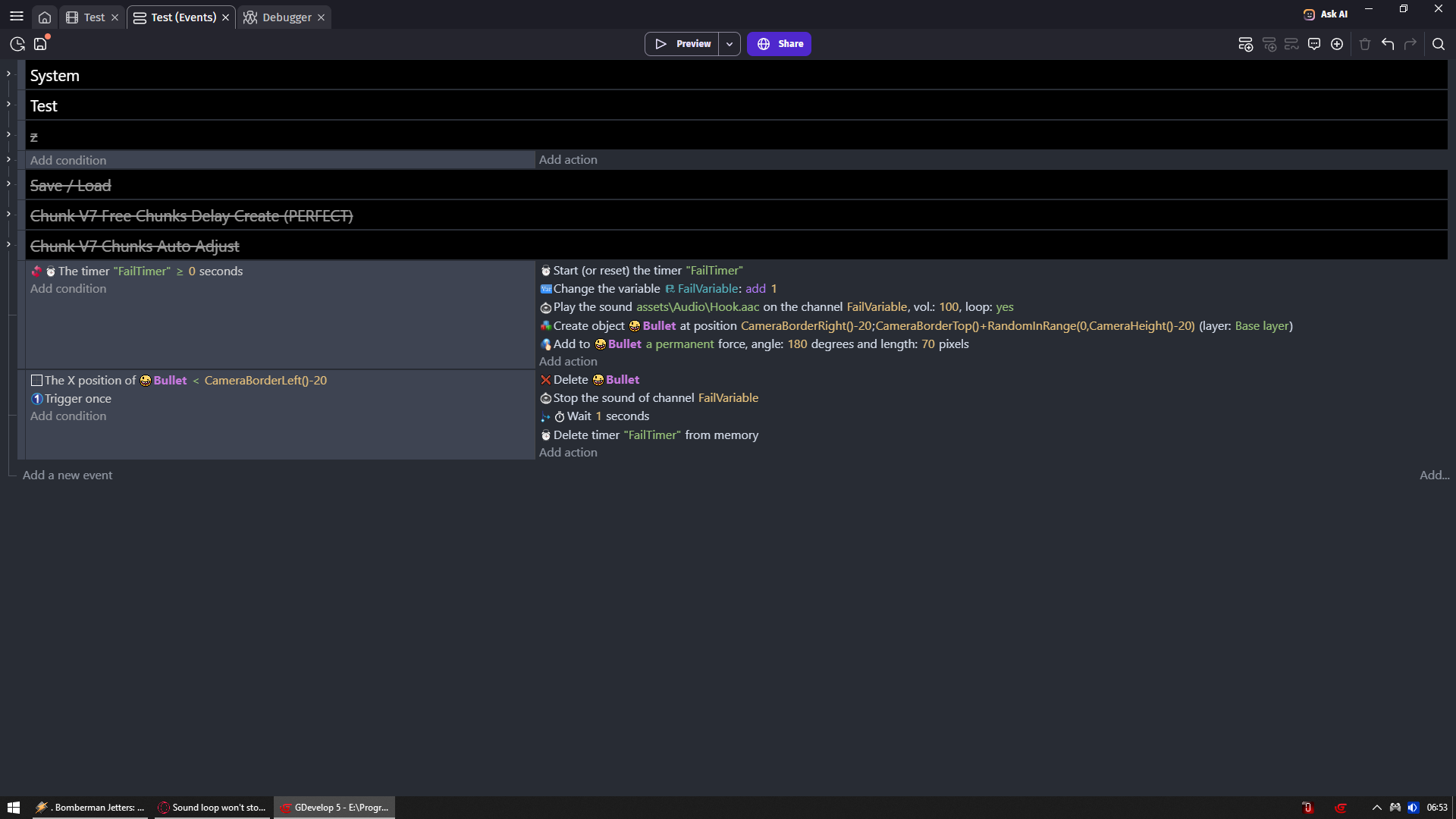
I am playing a looping engine sound on object creation for a ship sound, and I want the Sound to stop when the object is out of screen. But it is not stopping. Stopping a sound loop seems difficult. Please check the snapshot of my setup. Any help is appreciated.
Thanks

I am not sure i understand what you are doing?
Are you creating ships on the left and make them fly to the right
Or you create them on the right and make them fly to the left?
Do you know where is -150?
Width is not position its distance
Same as height
Why you are using random float?
Hi,
Ship is created on the right side of the screen randomly and it is travelling to the left side of the screen. -150 is left side of the screen as zero is the left edge so 150 pixels outside of the left. Inam sorted with the ship logic. My issue is with the sound only. Sound is looped and played on a unique channel and I just want it to stop when the ship is deleted. That’s all.
Your logic is very based on position checks
So your problem can be more of a position check than a simple sound problem
1 thing i noticed is
If enemy is created and THEN another enemy is created
You are disabling sound only for channel of that 2nd enemy or latest enemy and not for the one that was deleted
Cause you are adding 1 to enemy sound channel variable
But you are not waiting for enemy to 1st die before doing it again
Unless there can be only 1 enemy in your game at a time
I tried it by creating only one enemy at a time and wait for it to delete and stop the sound as well. But that also won’t work.The sound would stop if if the loop is disabled. But with loop enabled the sound won’t stop. I tried it outside the object creation setup.
Works
Click somewhere to hear sound
I was sure you are checking wrong channel but then i did take a 2nd look at your events
And you are doing it correctly
Other than position check i cannot think of something in your events that is causing issue
If you have different camera zoom per layer maybe even center it differently per layer
Then i wold want to see what enemy layer have
1 Like
Thank you so much for the setup you made. I made some changes to my events after studying your setup. Now it is working but, sometimes some loops are not stopping or fading. it is like randomly some calculations are skipping or failing, and that loops stays and overlaps with incoming ones. Please tell me how to make sure that each loop stops or fades perfectly without fail? What am I doing wrong?
Thanks again.

Did you even check your calculations?
You have some math there
How you know its accurate?
I tested the position of 200 by deleting the EnemyShip_01 and it is working fine. 200 is 200 pixels from the screen left, I made sure if it. And -150 is that much pixels outside the screen. I am not using a camera.
You know - 200 + - 200 equals to -400 but most likely multiply sign after 2nd -200 is first multiplying it instead of allowing it to be added to 1st -200
Random float is giving you decimals i bet you cannot even feel that
I have doubt your math is good
IDK why you are not using what i sent you which works
And instead insist on going with something that is broken
My math is not good. I got it from Grok. I will try changing this if this is what causing the issue. But I have a doubt, even if force is giving me a decimal, won’t the EnemyShip_01 will always be crossing 200 pixel mark of screen left? So why a decimal in force can cause the failure of fading or stopping audio check as the condition is to check position of the object.
Thanks
And where i said anything about decimals causing issues?
I only said you most likely don’t feel them
Which proves you don’t understand what you are doing
That is why you are only expecting it to work where you are not sure it should work
I am sure my stuff should work cause events and math is simple to see trough
That is why i would simply try my stuff in your place
Instead of trying to go with something you don’t understand
Where my math works on position from screen borders
And not from static positions on scene
Yes, I was doing something which I didn’t understand. I am learning.
Thank you so much for the help.
IDK if this has been mentioned or tested but without a trigger once, the fade action is going to be restarted on every frame until the ship is deleted.
It’s similar to restarting a tween. Although, volume is a whole number so there seems to be rounding or something else going on.
Imagine you want to take 10 steps in 10 seconds. This is similar to a position tween. You would need to take 1 step per second. Now, if after the 1st step or 1st frame you recalculated it. You would now need to cover 9 steps in say 9.9 seconds. So, now you need to take less than a step. By the time you take 5 steps, you only need to take 5 steps in 10 seconds. Each time it’s recalculated, you take smaller steps. Eventually, you’ll be taking such small steps that you’ll never reach your destination.
Restarting a fade seems to be more noticeable. Maybe it’s because the volume is a whole number or the way it’s reset because for me when I tested it, the sound dropped quickly from 100 to 90 but then it barely dropped.
I don’t know how fast ships are spawned. You might want to check if there’s only 1 ship in the scene before fading the sound.
2 Likes
Hi Keith,
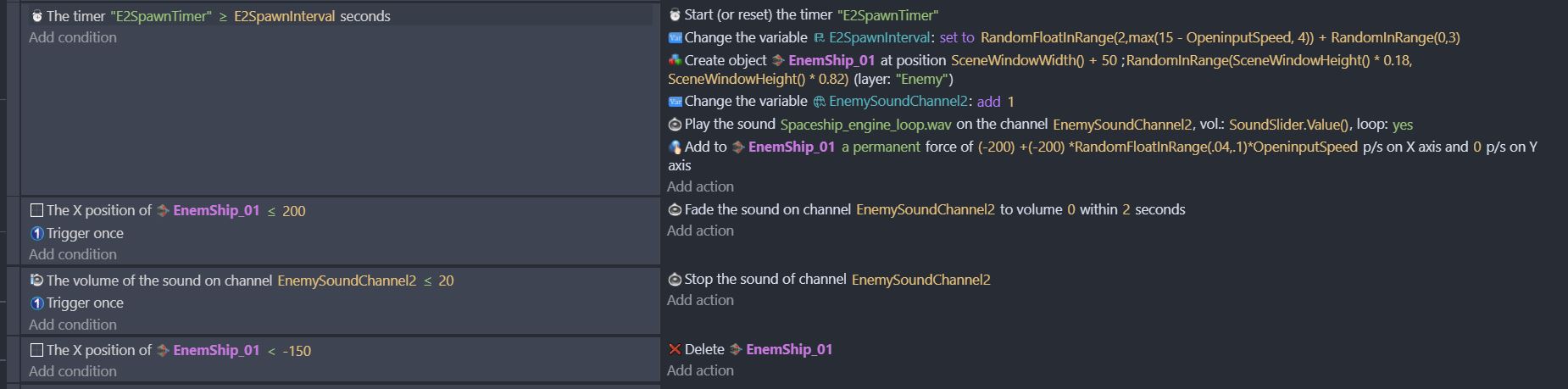
Thank you so much for this info. I tested it with stop the sound of channel, and it was working. Each sound was stopping properly. So the problem was with fade like you said, and a trigger once was not fixing it. So I modified it. You can check my new snapshot.
Also thank ZeroX4, I will be working on the force setup next.
Thank you both for educating me and help sorting this issue.
3 Likes