Hi, I have a big problem: I have thousands of small audio files and I can’t import them one by one into my game (each one is a note, around 20k in .ogg).
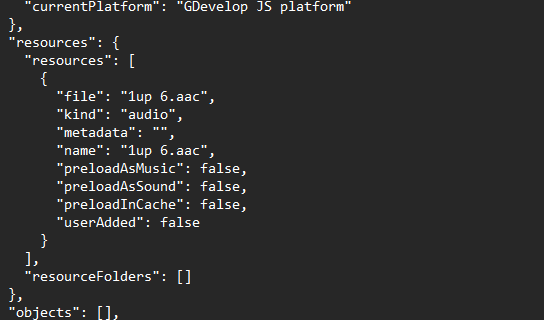
When I import a sprite or a sound, that resource gets added to the scene. Where does GDevelop record that the resource belongs to that scene? Does it do it through the engine, or does it write it inside the game’s JSON file?
With that information, I might be able to create an automatic system to handle a large number of sounds! Thanks in advance!
Hi @Ondaluce …if you start a new project and add a sound file to the first scene then look at the project json in notepad it might shed some light on how the resources are referred to.
just bumping this up as you were probably hoping for a detailed response from davy or silver streak! …and not one from me!
Thanks, I had analyzed several JSON files but was still a bit confused. I haven’t solved the problem yet, and I’ll need to run some deeper tests.
Premise: I mostly work through JavaScript. In the past, I had issues because even though I played some music tracks via JS, it was still necessary to first perform a manual upload using the preload command (you could later disable the command in the events, but it was required for GDevelop to actually include the resource). In that case, there were only a few tracks, so I solved it manually.
As for the current issue, I’ve found how to add resources to the project JSON. I also found the preload command — maybe it would be enough to add both the resources and all the preloads to the JSON, but that wouldn’t really solve the problem: my project would have to preload thousands of .ogg files every time (which is impractical).
I need to run deeper tests to understand exactly how it works — it might be that preload is only required once to “tell” GDevelop that the resource is in use, and then it can be disabled. If I find anything new, I’ll post it here.
Important!
I’d like to point out to the community that technical questions like this are useful to everyone, and it would be helpful to get official answers from the GDevelop team. This isn’t the first time similar issues have gone unanswered. The strength of a piece of software lies not only in its features but also in the support behind it.
And I’m not saying this out of laziness — I’ve combed through all of GDevelop’s code on GitHub looking for useful clues!
I agree …It would be great to get further information on the way that sound files are stored, referred to, processed. Sound related problems don’t generally get much of a response on here and there aren’t really that many helpful threads available.
Hi, thanks for the info.
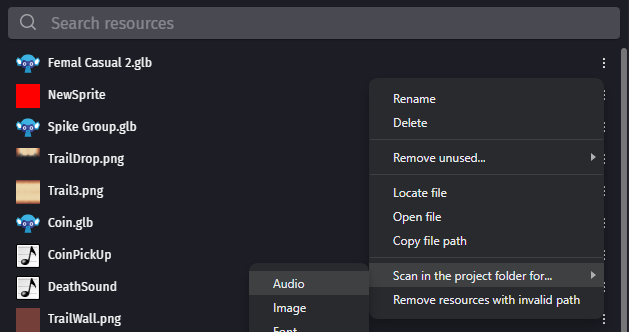
That command solved my problem. Now my app works perfectly: I edit the project JSON by inserting the list of audio files, then save, open GDevelop, and run the scan.
But my initial question was more technical: how is a sound linked, via JSON, to a single scene?
After some testing, it seems that sounds — unlike images — belong to all scenes.
In fact, I duplicated the scene, and the sound still plays. Is that correct? Knowing these technical details, which might seem trivial, can make a big difference in larger projects.
Maybe it would be useful to add, at the end of each wiki page, a list of forum links to all resolved questions related to that topic.