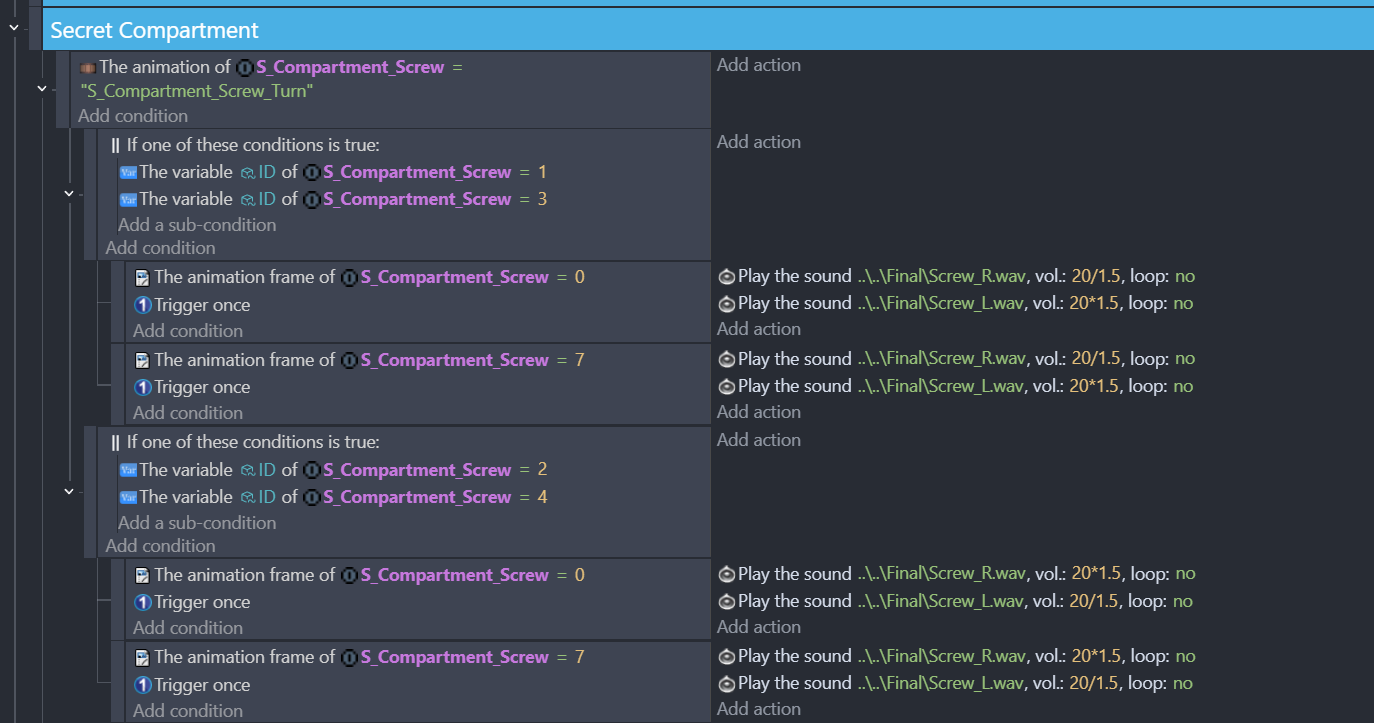
I’m using self-made stereo system where left and right channels are seperated and using calculations to set the volume of the sound. The in-world one uses a different system with distance but on puzzles etc. i just use set values.
Problem is that for some reason the sounds are not playing properly on this specific puzzle.
The ID of the object is right, the said animation AND frame is right. There are no other objects with the same name and ID in the world but for some reason it only plays the left channels audio file. I have no idea how to actually fix this as i’ve tried MULTIPLE different conditions/actions but it just doesn’t want to work.
I’ve tried :
Using it on mouse released action with a wait command after (releasing the mouse on the object with a screwdriver starts the animation)
Using position instead of variables
Splitting the actions
Splitting the conditions (removing the OR part)
Splitting both
Preloading the sounds before any event (without unloading)
One weird thing i’ve also noticed is that for some reason it… works when the backpack is open? Zero conditions or actions tied to the backpack on both puzzle and SFX side so i have zero idea why that happens. Figured it’d be something to do with sounds preloading but that doesn’t work either.
So far the only solution i’ve found was unloading+preloading the sound file before playing it in the events but that just cuts the older sounds so it’s no use.
This type of problem i’ve faced before with channels mismatching but it was usually a minor bug that i was planning to fix later. But this one is just completely unavoidable.
If there is one area where GD could be improved, it is in terms of sounds.
For example, in my latest game RicK Dangerous, the character’s walking sound is correct in the GD preview but when I launch the game on the GD website, the sound of Rick’s walking is accelerated!
Another thing, I don’t know about you but for me, it’s not always clear whether to use “Play 1 sound” or “Play 1 music”.
Sometimes I have to use “Play 1 music”. to play 1 sound only, because “Play 1 sound”… doesn’t work!
Go figure…
Yeah the sound system is definitely on the buggier side with even a small thing sometimes breaking it in terms of conditions. I’ve learned to walk around it but this time i’ve seem to hit a wall. I don’t want to just make a whole new sound file just for this puzzle since i’m gonna re-use that screw sound in the future on other parts of the game.
As for the music i haven’t gotten around to adding that yet. Zero idea if i’ll face problems with that one etiher.
Hopefully someone comes up with a fix on this one because there is nothing wrong on the logic side. I have zero idea why my backpack being open makes the sound work in the first place. Maybe closing the backpack somehow overloads the system? Zero idea.
I have also noticed that if i wait a little bit after puzzle is in on the screen also helps. Weird…
As a heads up, there are a limited amount of available sounds that can be played using the basic “play sound” event, and you should be looking into using audio channels if you’re going to be using a lot of sounds.
More information around when to use Music/Sound/Channels/etc is available in the documentation for the engine:Audio - GDevelop documentation
That’s the thing though most of the sounds used on the video are on channels.
Walking sound effect is on channels
Sound effect coming from the acid pool is on channels
Only the transition sound effect when loading the saves and the backpack sound effect is played using “play sound”. Is it really that limited? I’m sure the transition sound effect is not interfering and it has to do with the backpack one i’m guessing.
“play sound” is a single audio channel, and depending on how quickly they’re playing they can interfere with each other (because it will allow for sounds to play over themselves, unlike normal audio channels which do not allow multiple sounds at the same time on the same channel)
Outside of that, I can’t think of what may be causing your issue.
Ah… I just thought it’s just there for sounds that doesn’t need any manipulation and such as the description says. I guess i’ll ditch “play sound” action completely. Thanks for the help.