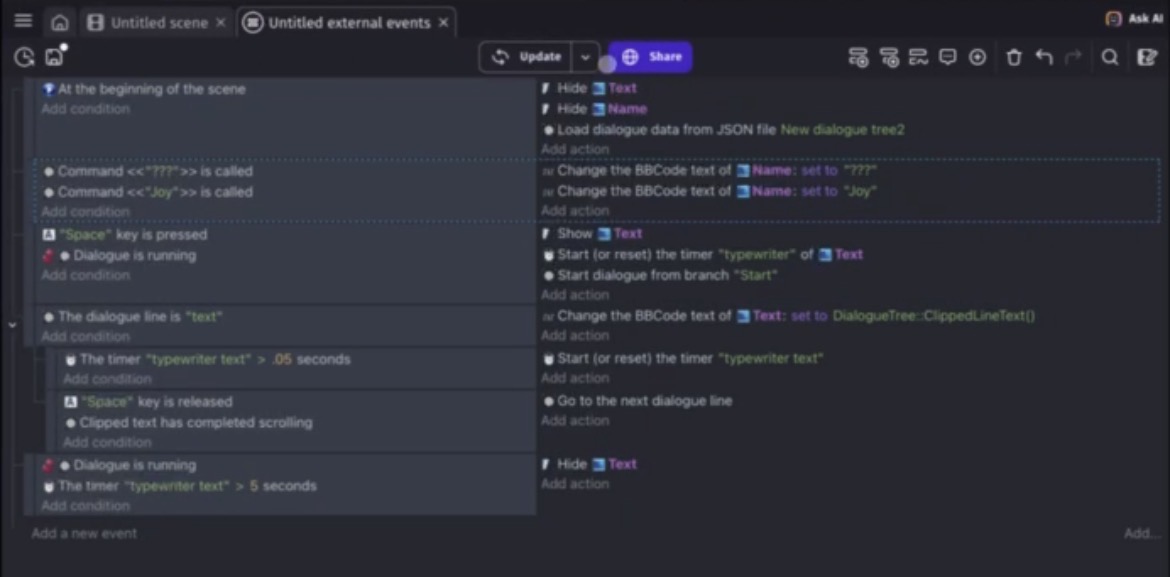
Hi, I’m super new to coding and I’d like help for an issue I’m encountering right off the bat. I want to create visual novels and made this for practice. However, the text won’t play when it’s time to preview. There seems to be an issue right from the jump with the hide command not working for the text objects I chose. The layout of events I used is nearly identical to tutorial videos I’ve seen, so I’m struggling fairly certain it isn’t an order issue? I’d appreciate any advice on how to deal with this.
A - Scene timer
B - Object timer
DAT QUALITY

For SCENE TIMER
When you add condition/action you type in search bar timer and you find action/condition for SCENE timer
For OBJECT TIMER
You add action/condition and 1st click on your object
And then in search bar type timer
And you will find action/condition for object timer
1 Like
Thanks for the reply and sorry about the poor quality.
I double checked and made sure every timer was consistent and they seemed to be, if I’m understanding your suggestion correctly. The preview still wouldn’t work.
I guess right now my main issue is more about how the very first line about hiding the text isn’t working.
Idea is there are scene and object timers
Object timer exist only if object exist
For example you wanna delete bullet after few secs
So when you create bullet object you start object timer for bullet object and if its higher than idk let’s say 3 secs you delete bullet
And so each bullet can have its own timer
Scene timer is like scene variable
You can have plenty but not with same name
So scene timer would be something you would use for game time or like power up or cooldown or like stoping something or whatever
And so you cannot start scene timer
Then check if timer of OBJECT is greater than something and vice versa
You cannot start object timer and check if SCENE timer is greater than something
Cause they are different things
Lastly try in your 1st event
INVERTED at beginning of the scene
Trigger once
That’s got me scratching my head why you’d suggest this. It only delays the hiding of text objects by 1 frame. The text boxes and any text that’s in them would be displayed for a fraction of a second.
@MattiTheCatti, your issue is that you don’t have a “Scroll clipped text” action in your events:

On an unrelated note, this event will never fire:

For an event to action, all conditions need to be met. That event is checking whether the command “???” and the command “Joy” are both called at the same time. This will never happen.
Thank you! It does work now.
As for that last bit, should I put the command for different names to appear on different rows?
Yes, make each different events
I know nothing about yarn logic
But i do know how ppl like show part of their logic
Many times i seen ppl showing events in a way like Matti
Where what they don’t show is for example creating such object in different event which is below what screenshot shows
I could not even count how many times delaying something that was at beginning of the scene did fix the issue in such cases
And since like i said i know nothing about yarn
That was my last wild shot