Every time I open u the 3d editor, go into 3d mode, or try to open up the preview for my game, it just tells me I can’t. This has been going on for about 3 weeks now and is getting very inconvenient. It works for the first 5-10 minutes when I open it and then just refuses to work for the rest of the day, and does the same thing the next day. It says I don’t have connection, but I know for a fact I do, my connection is perfectly fine and I have good internet. It doesn’t seem to be anything related to the internet since it always works for a couple minutes per day without fail, I think it might have something to do with Gdevelop. I would really appreciate the help.
I’m not sure why it not letting me attach an image or video of it so I’ll just type in what it says: The preview could not be launched because an error happened: .
Make sure you’re online, have a proper internet connection and try again. If you download and use Gdevelop desktop applicaion, you can also run previews without any internet connection.
Hey @Dukyy!
First of all, welcome to the community! We are so happy to have you here!
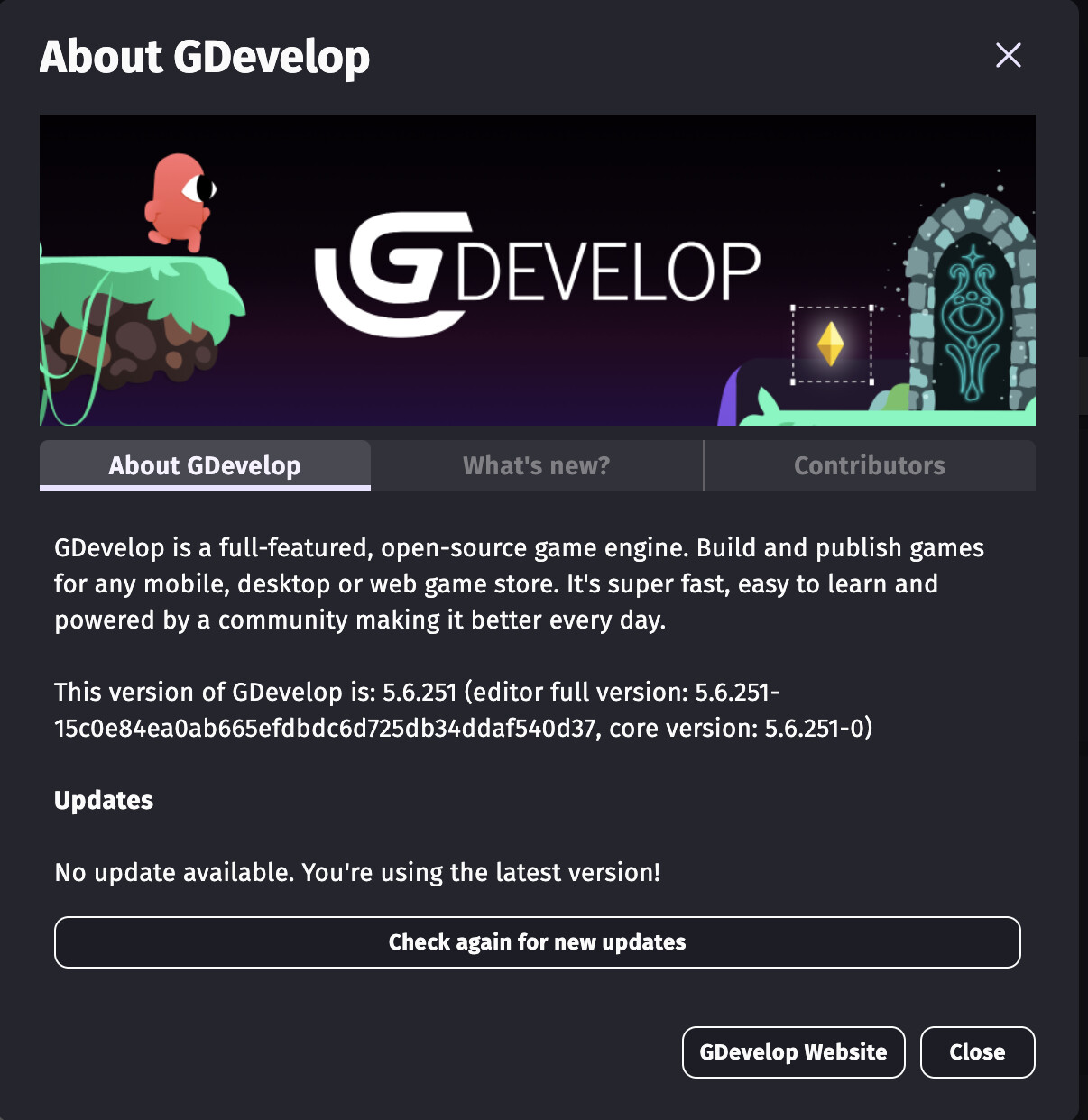
Second of all, can you make sure your GDevelop app is on the newest version? This sometimes fixes errors
The current newest version is 5.6.251
If you don’t know how to check, click on about GDevelop in the app:
Thanks for the welcome!
I just checked Gdevelop and I am currently on the newest update (5.6.251). I’m not really sure if it just updated on mine or if its something else thats wrong.
I am using the web version but I have been using that for a very long time so I don’t really understand why it would just suddenly stop working. I really doubt it is something wrong with my internet either. Is there anything else you think might be the issue?
No worries!
Being on the newest update helps a lot, it means it probably is something on GDevelop’s end. What device do you use the web app on? Personally, I think the desktop app is much better so if that is a possibility for you to get, you should definitely look into that.
As for solving this bug, some screenshots would really be helpful. It might seem annoying that GDevelop doesn’t like new users post them, but that is just so spam bots don’t flood the forum with not-so-GDevelop related images
There are 2 ways you can still send images on the forum though:
Use an image hosting site, and link the image here.
Reach Trust Level 1 which is very simple to reach. If you spend just 10 minutes reading different topics on the forum, you should easily reach TL1.
Also, (according to my knowledge), TL0 (which is what you are currently) should still be able to post images on the forums, just 1 image per topic. Try clicking the Image button on the reply, and then choosing the image from files (unless you are on mobile).
As for videos, they are not set up for the forum, so you will need to use a video hosting site and then link the video here if you want. (I think GIFs might work though…?)
Sorry that GDevelop is bugging out, and hopefully a member of the team sees this post and fixes the bug soon!
Edit: There are multiple people who have had this problem in the past, but none of them had a clear, definitive solution. I think this is definitely a problem the team should look into.
I tried to upload the screenshots again just now but it just says this:
Sorry, the file you are trying to upload is not authorized (authorized extensions: jpg, jpeg, png, gif).
I’m not really sure why since I am trying to upload a png.
As for getting the desktop version, I’m not really sure my computer would like that, it doesn’t really do well with downloaded stuff so I think I’ll stay with the browser version for now, but thanks for the idea!
Do you think they’ll be fixing the bug soon or should I try another way?
Just to be clear: Please, under no circumstances, direct someone to contact the billing/site support email address for bug reports, unless a developer or staff member does so directly. It isn’t a game dev support email.
For the OP, have you tried using the installed version of the client? I understand you said your pc doesn’t do well with downloaded stuff, but you may have no other choice.
It could be that your browser is no longer allowing webgl hardware acceleration, which is required for the 3D editor and preview. Chrome and other browsers eventually blacklist older GPUs from supporting hardware acceleration, which is the only thing that would make sense to me.
As electron doesn’t usually use the newest version of chrome, it may be unaffected by that change (if it did change).
So sorry about that.
I thought that email address was for general support.
Will not recommend that in the future. Can TL0’s still PM mods on the forum?
Sadly I cannot answer that, I don’t have a way to see the access levels.
In regard to general forum etiquette, you should never direct someone to message a mod for anything other than moderation specific things (abuse, harassment, spam, etc) anyway, and generally not instruct people to contact developers directly.
Support for bug fixes usually comes if there’s an actual reproducable bug on the forum or github. And the forums are monitored by the staff and moderation even if they do not reply to every thread. Generally, staff responses (or bugfixes) don’t happen for project or pc specific issues, which is why I hope we are able to help the OP pinpoint if its project specific or otherwise.
Got it.
Thanks so much for letting me know! Sorry that I had been recommending that in the past. Sometimes, it just feels like moderators ghost Bug Reports on the forum, so I was just wanting to make sure that newer users wouldn’t get stuck for days feeling like the moderators didn’t care
I do have the latest Chrome update (Version 126.0.6478.222). Also, if I download it, will it save as my games? And how resource intensive is Gdevelop, I know its not much but my device can only handle a small amount.