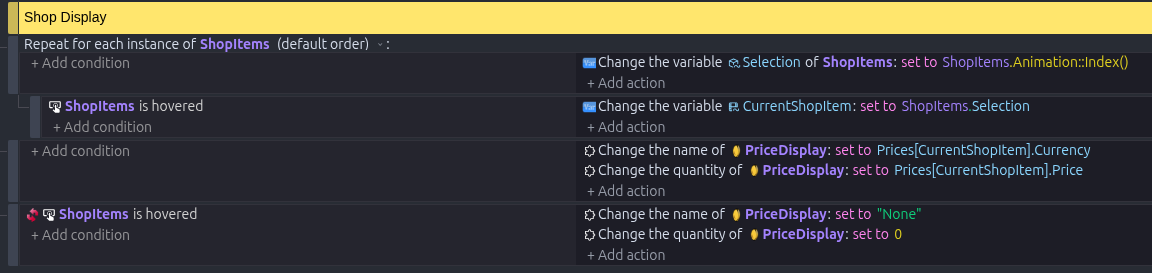
I’m working on having a little shop in my game that randomizes shop items from a pool each time you visit and lets you trade different kinds of coins for these items. What’s giving me trouble specifically is the display; I have a custom object that displays the coin needed and the number of them needed for the Shop Item when you hover over it. The Shop Item objects are just sprites with an animation for every item that can be purchased, which is randomized when the scene starts; the animation index of the Shop Item is then set to a variable called CurrentShopItem, which is then used to by the custom object to find the item’s price and currency as defined in an array.
The system works… until I have multiple Shop Items in the scene. I suspect because there are multiple objects that have the object variable for it to pull from, it’s not using any of them. I’ve tried having CurrentShopItem set to ShopItems.Animation::Index() directly, or have the animation index saved to an object variable for each instance and then CurrentShopItem is set to that object variable, but while both work with one item on the screen, it stops working when there’s two.
Is it possible to specify which instance of an object I want to pull the object variable and/or animation index from and put into a scene variable? And if I can’t how would you handle getting the custom display object the number it needs to check the array for data?
I am not exactly sure i understand your question
But part i understand you hover over object and its not picked correctly
And you want to make it be picked correcty
1 - i would try to move event with is hovered OUT from under repeat for each
2 - technically only one object can be hovered so print to text object whatever variable you need from it
And if it displays correct value then you can store that variable in scene variable
Then use it in condition
For example
Object is hovered
Objject variable = Scene variable
The ultimate goal here is to get the display that shows the number and type of coins needed to purchase a ShopItem object that’s being hovered over.
The ShopItem is an object with several animations representing the things that can be purchased. Animation 0 is a Key, Animation 1 is a Sword, etc. When the scene starts, it randomizes what item it displays and if you click it, that’s the item you purchase.
The price and currency is stored for each item in an array in the scene variables: Prices, then 0, 1, 2 etc for the items, then under each one Price and Currency. When called in full, this is Prices[0].Price; if you change the 0, you get the information for a different item.
The PriceDisplay object can display both Price and Currency by setting its text and sprite (respectively) to Prices[CurrentShopItem].Price and Prices[CurrentShopItem].Currency.
CurrentShopItem is a scene variable whose value should equal the number of the item whose price and currency you want from the Prices array.
Hovering over the ShopItem should set the CurrentShopItem value to the current animation index of the ShopItem; so if the ShopItem is displaying the Sword, it’s animation is set to index 1, hovering over it changes CurrentShopItem to 1, and the PriceDisplay is able to display Prices[1].Price.
And this works if there’s only one ShopItem on the screen. But if there’s a second, none of them display anything, I can see in the debugger that CurrentShopItem never changes its value.
The event you suggest moving out from under repeat for each has been tested both out and in, and in both cases it works if there’s only one ShopItem and stops working when there’s two or more.
So how do I get the animation index from the item being hovered to the CurrentShopItem variable so the PriceDisplay knows what information to display?
Oh my god, it was the ShopItems Is Not Hovered event that was messing it up, if I disable that the rest of it works.
Although this creates a new problem that once I hover over an object, the display changes to that and then doesn’t go back to neutral once I stop hovering over it.