Introduction: I have two instances of an object on the scene. Let’s name the object “Enemy”. The instances of “enemy” object are created dynamically.
What I want to do is to create a new object instance “Bullet” from every instance of “Enemy” when some conditions are being meet. In my case the conditions are distance to other object and the current frame of animation.
Basically, it’s your typical shooting enemy implementation, but I’ve got a problem.
The problem:
If I just let that play, the “bullets” are spawned every frame(?) from BOTH “enemies”.
To prevent this, I decided to test the “trigger once” event on the conditions for spawning a “bullet”. What happened, is that spawning timing of “bullet” correct, but only one instance of Enemy was spawning the “bullet” at a time(even tho both were meeting conditions). This is expected from the “trigger once” event, but I still don’t have a solution.
What I tried next was to place “bullet” spawn conditions under special event “for each object”. I tested it and it worked correctly on first execution of event, but after rerunning the event it went back to behavior from 2). I have no idea why.
I was also thinking about using flags like “HasFired” but deducted that in the end it would come to the same problem as in 2).
TL;DR: I don’t know how to use “trigger once” to be fired once for every instance of the object, not only once for all scene.
Your enemy’s animation frame takes a few milliseconds. As long as the condition is true it will continue to create bullets until the frame changes.
The trigger once will cause the condition to work only once, even with “Repeat for each instance”. So, if it occurred in one instance it means that it has already occurred once and so it will not happen in the other instances.
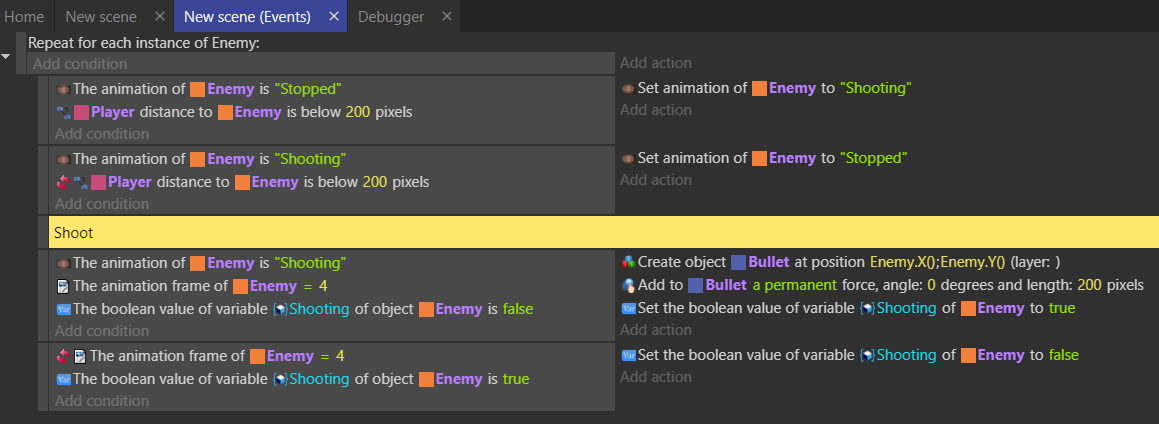
You need to “limit” your condition in another way (do not use the trigger once for this). You can use the variables as you said “flags”.
I did a simple example based on some information you gave in your comment to try to help:
Ok, it works for now. Thanks for help. One question tho. Do you think checking for a single frame is a good idea? I remember having an animation with +30 frames and I think the checked frame/event sometimes got skipped so I started using “if frame > x”.
I’m doing my first game with Gdevelop and it never happend with me (and yes, I use the “Check for a sigle frame” for some enemys make the attacks). In your place I would use and if appear any problems related with this and I could’t resolve I would bring the doubt to the forum like you did in this post.