Hi! every body. i want to add a character selection that can also modify the appearance of it. can you help me please.
Look what i did here
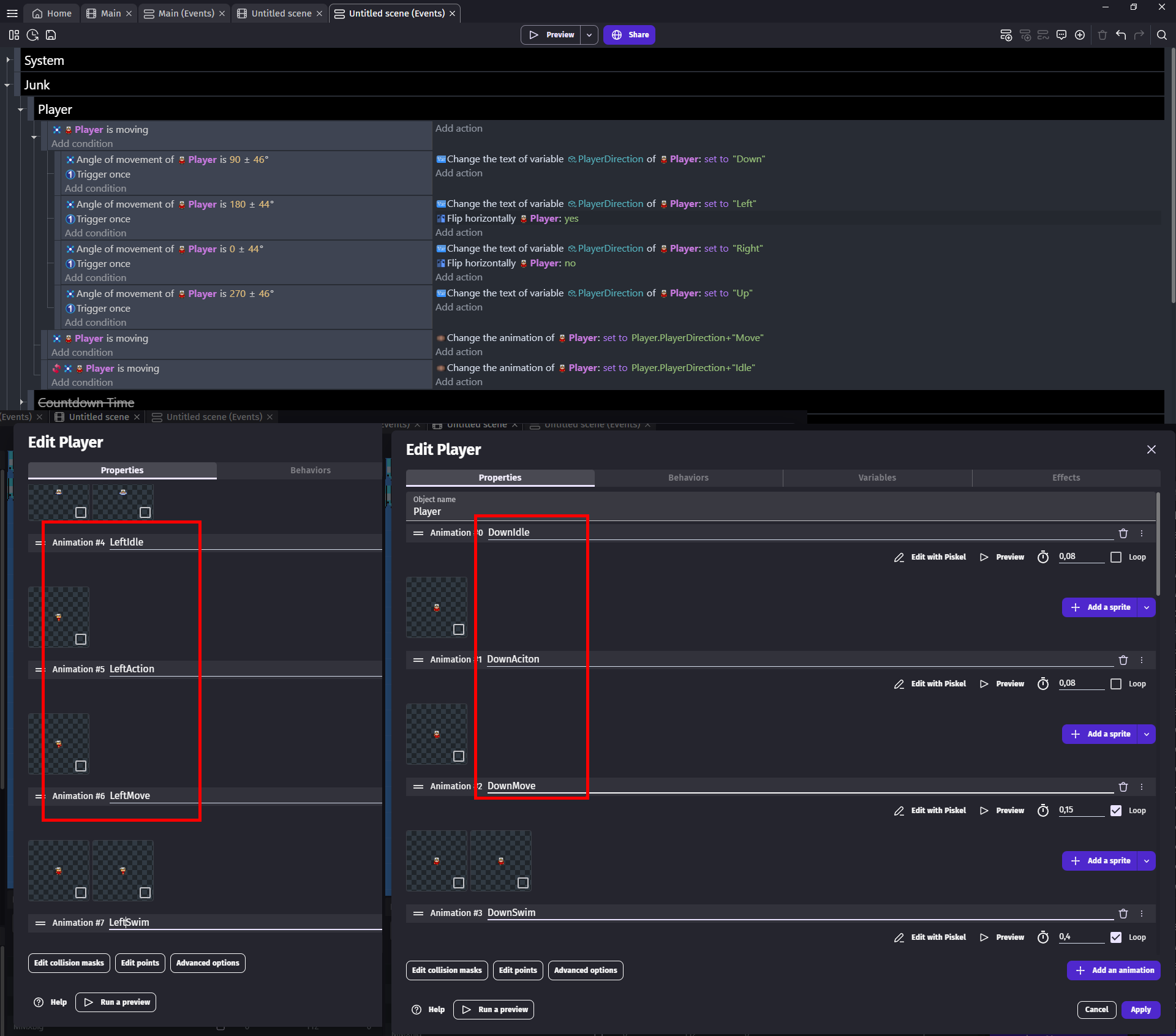
Its for topdown game
I simply check in what angle player is moving if its moving
And set some variable to either up down left or right
Now instead of hard codding all animations
I simply added all animations of my player and properly name them
DownIdle
DownMove
LeftIdle
LeftMove
And now i can change animation of player to VARIABLE + “Move”
Or VARAIABLE + “Idle”
Depending on what i need (i suggest going with scene variable and not object variable like me)
And now imagine if at my 1st screen i would add character selection screen
Like having there 3 characters and based on which character you choose set variable called Character to either 0 or 1 or 2
Now i could add ALL animations of all 3 characters to one sprite object
And name them like
Down0Idle
Down0Walk
Left0Idle
Left0Walk
Down1Idle
Down1Walk
And now i could do what i did in events but change my animations to
Direction+Character+“Idle”
Or
Direction+Character+“Walk”
I could even make character variable text variable
Logic-wise in events it would still be the same
But now i could name my animations
DownHunterIlde
DownHunterWalk
LeftKnightIdle
LeftKnightWalk
RightRangerIdle
RightRangerWalk
Nice thank you @ZeroX4 i can use that. but i am still struggling in character making, for example the user will chose a character Male or Female, then they can choose a face, hair, cloths, pants, shoes for starting character.
Thank you for the help GDevelop Family.
1 Like
I guess you don’t want to create all combinations that are possible by hand. So therefore you would need to create seperate sprite objects for each category of customization:
Create your base character object that has animation “male” and “female” and swap that based on ZeroX4’s variable method. (This one would be the naked character)
Then create different objects for each customizable “wearable”.
Object: Pants (Animation: greenPants, bluePants, whateverPants, …)
Object: maleFace (Animation: beardedFace, scarredFace, …)
Object: femaleFace (Animation: …)
This only works, if all pants fit each character. You will need to restrict object allocation with variables, if you want seperate gender customization (e.g. only bearded male)
Then create each object in the correct Z-order on top of each other and let variables decide your animation:
I would create a Structure of Arrays and let player input change the animation by reading the currently picked array index.
For the long run: To further optimize this, I would recommend to put all this in a CustomObject (Custom Objects ("prefabs") - GDevelop documentation) and have each customization as a child object of your character.
If doing so, the child objects will always stick together. You can more easily customize and manipulate your animation and the behavior of the character. Its well worth encapsulationg the character in the coustom object.
Hi Ricardo, there’s some things we don’t know. We don’t know how you want to show the choices of each thing - hair, clothes etc.
- Will the user press an arrow key and the hair on the character changes or
- Will there be a visual menu showing all the hair choices and the user selects one and then the hair on the character changes.
If it’s the first one then this recent thread has some ideas: Dress up doll game
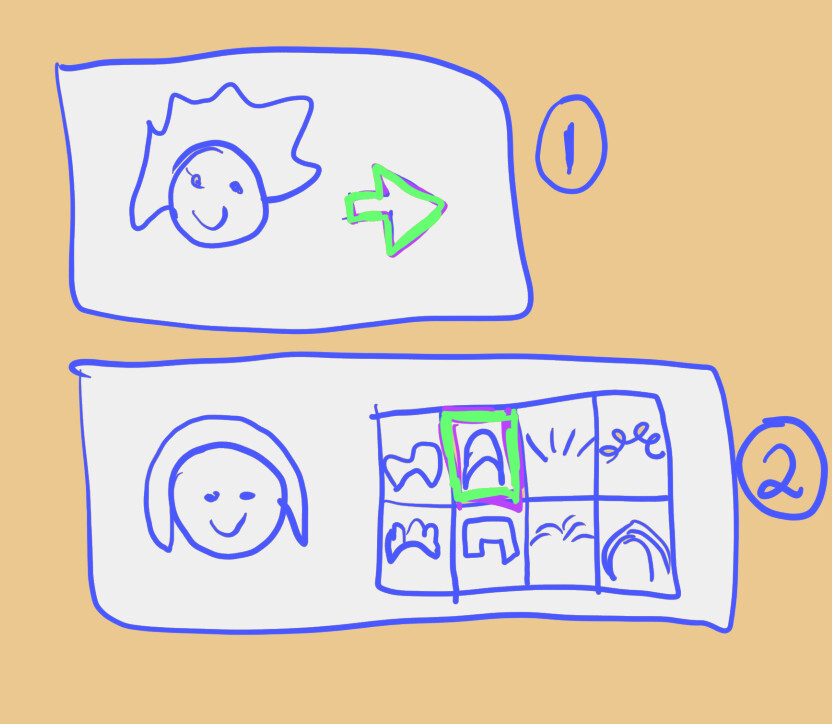
Then you will do exact same thing as if you would attach gun/sword to player
Each part would be additional object
But each part would have multiple animations
So when i change face
Not player or other parts but only FACE part changes animation
Then you can save it to variable and use it in your actual game to change animations
To make it easier for yourself make all your images of some parts as bis as biggest one of them
FOR EXAMPLE
Face parts biggest one will be 10x16
Cause you have there beard
But you have one with only glasses
And that is 8x12
Well you make this as well 10x16
BUT you do not take that into account for other part types
For example that was for FACE
Now you go make body parts and you make all images as big as biggest BODY part you have
Now you do not need to care about points or positions
Cause everything will perfectly align
MAYBE you will just change origin point to center point
And rest is just position them
I would advise NOT going with prefabs cause depending on what you want to do you can find out you can’t
From what i seen ppl struggle to do various things with prefabs and unless you know prefabs will do everything you want its better to avoid them
Like for example trying to use recolorizer extension
Imagine being able to recolor SOME color on some part instead of tinting whole part
Like you made red shirt but i want it blue but it also have white star on chest
If you tint it then star will get tinted blue where you cannot get blue from red you will get purple
With recolorize exension you can give it whatever color you want by replacing red with blue NOT affecting white
As far as i know that would be not possible with prefabs cause you cannot target directly child objects
And now think like instead of having shirts of all color just allowing ppl to color them as they please
Heck think about eyes and hairs
Do something small for 2 characters like ability to change face and pants for example
And after you get it to work you can expand it for other parts and go with recolorizer if you want
Or even effects
Thank you very very much GDevelop family@ZeroX4 @Bubble @Spite
now i am very much exited to work more and study.
Salamat! 
1 Like
Sure thing 
Regarding ZeroX4‘s critique about Custom Objects I can agree that it is tough to get started. I would also recommend trying to get everything done in normal scene events first. That’s easier to reach your desired goal.
But if you are interested in a cleverly structured code that encapsulates logic (in particular thinking about long term advantages), it is well worth diving in Extensions (in particular since you seem eager to learn).
Yes you will hit barriers there, but we are here to go through that together. Most people who are helping here are learning too. We are just exchanging knowledge and experience. 
1 Like
… let me start by saying that, as the first person who complained about how custom objects are set up, I still think they’re definitely more complex. I learned the hard way that what made them difficult for me to understand was the timeline of events executed by custom objects compared to the scene. But once I finally wrapped my head around that, everything started to click and I went full speed ahead.
However,and I’m not saying this as a joke,I genuinely believe they’re the future of GDevelop.
The way object handling works, even though completely different, actually expands the possibilities to a higher level, letting you do things (once you get used to them) that in a normal scene would require unavoidable and unnecessary complexity.
As for the specific case we’re discussing, I agree that using a custom object would be perfect: you get all the children available right at creation time, in a much more compact and less invasive way than writing and linking everything in the scene across multiple events.
1 Like
I can make an extension with an example of this object if you want!
1 Like
If the OP has moving characters then I think custom objects are the long term solution, but if the character is static in the scene then there will be more beginner friendly ways.
Hi RMDB, can you say a bit more about this? I’m using custom objects for characters so that I can edit the children (body parts) and it’s working well and replaces the nightmare of when I had multiple objects. In the scene I call on the custom object functions when needed. I have assumed/hoped that these functions only run when called. In my situation there is always many of the custom object in the scene. So yeah, could you please share your insights from custom objects? Thank you.
1 Like
Yes, the best solution is a custom object!
1 Like
I’ll try to explain this in a simple way… at least based on what happens to me when I use custom objects. I think I now understand a bit better why they’re isolated and why they’re not meant to be easily accessible from the scene.
for example:
When you want to pass a variable, the simplest method (at least the one I use) is to create a global variable (in the scene) with the value you want to transfer, whether it’s text or a number.
Then, inside the custom object,i create a global variable and use the Extended Variables extension to set it equal to the scene global variable. Up to this point, everything works fine.
The problem appears when the project isn’t basic anymore: you always have to keep in mind that if you pass the variable in the custom object’s On Create event for example… and then the global(scene) variable is read in the scene after! the custom object has been created, its value don’t affect what you put inside the c.object.
And you might spend hours trying to debug things. (and thaz why functions exists)
You might say: “Well, that’s normal", And that’s true.
Also the same thing happens in post-events.
This is just to say that as long as custom objects stay isolated, there’s no issue.
But if you decide to make them interact with the scene, then when you write events you always have to keep them in mind and remember which events you put inside the custom object, how you structured them, and where. …(without seeing them)
In practice, your brain ends up doing more work than what would normally be necessary when dealing with scene events alone.And this can lead to more than a few issues.
It’s easy when there’s not much going on… but trust me, it becomes difficult when the project grows.
So I think I finally understand why there’s such an effort to keep them isolated and avoid having them communicate too much with the scene.
In GDevelop, keeping the timeline consistent across all events is, in my opinion, the most important thing and once you throw custom objects into the mix, things get more complicated.
Anyway, once you get the hang of it, things improve a lot… and it’s definitely worth it.
2 Likes
Right, thank you. We have different approaches as my projects are usually pretty simple. And also we probably have different reasons for using custom objects. My reason is not for game optimisation but just to have object parts as one cohesive object in the scene.
For anything related to the actual custom object as a whole (creation, position, z order, dragging etc), I do it in scene events.
I only use action and expression functions inside the custom object for things relating to the children (things I can’t do in scene events).
2 Likes
I fail to came up with any reason how moving/not moving objects have anything to do with what will be easier?
1 Like
…the “easier”part is debatable.
However in c.objects:
-you don’t need to link anything,
-you don’t need to stick objects together,
-you have a dedicated “On Create” action available (without conditions),
-you don’t need to create a group,
-you have properties that belong only to that object,
-in some situations a For Each isn’t necessary.
I could list more, but these improvements really depend on the project.
1 Like
If the character doesn’t move then there’s no need to worry about how to position each body part relative to other body parts. Just place them in the scene where you want. Which means simple methods of changing appearance will do.
If the character does move, then the different body parts have to be integrated with the movement. There is also the risk that there will be weird z order overlaps with body parts and other objects. So, in my opinion, a moving character that needs editable body parts is best done as a custom object. But that might be too complicated for the OP right now, which is why I said it was a long term solution. That does not mean it’s the only solution. And to be specific, I didn’t use the word easier.
1 Like
What i read
- you don’t need to link anything but you still need to make it into custom object and will have worse experience when trying to pass info to it
- you still need to position it someway so its no different from change position action
- you use oncreate function where its like adding action right under create action
- you would need only group if you want to use one action
- i fail to see how properties for one object are better than having full control in events since that is 1 condition check
- only instance when you would need for each is if you would have multiple characters
1 Like
No need to worry about position of each part so i still don’t understand
1 Like
correct
correct
correct in part…i found some differencies…that i don’t remember rite now.
correct but i still prefer to no create one.
correct
this one is situational
As you clearly explained, you’re not required to use a custom object to make things work. However, in complex projects, having a modular system for the scene becomes a real added value.
edit: i forgot to add behaviours
1 Like