Please make sure to follow the forum’s rules before posting.
 Posts that do not follow the rules will be ignored, closed and archived.
Hi.
for the first time i creating a 2D car game.Unfortuatelly my new laptop is in a very low class.So when i draw the entire road system with approximately 50 piece of 30x135 pixel road blocks the game go under 20 FPS.So i need change to it a system what delete offscreen roads and create new ones on the other side.
In this situation comes the idea this feature what give an extra switch under collision to check if one object stands out from the other even by a pixel.
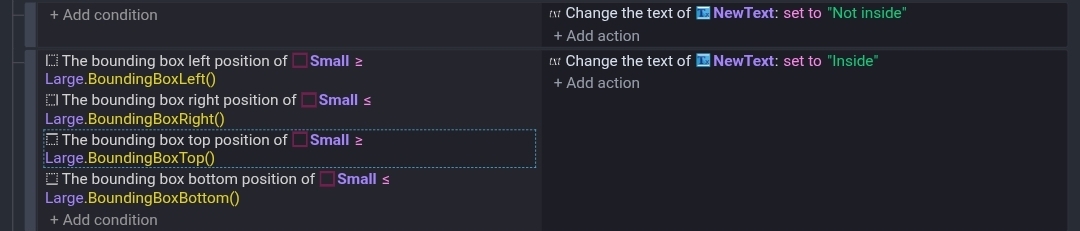
You should be able to do it by checking the bounding box. The bounding box is the overall size of the image. It ignores the collision mask. So, there can’t be excess transparent parts around the edge.
It’s a one way check. Is the smaller object inside the larger one?
The bounding box changes when an object is rotated unlike the width and height which remain constant when rotated.
hi.
As in mention my game is a car game so the car must be smaller than the road.Yeah i try this by myself but the outcome become very ugly when my car rotating and more times when colliding the road edge.Sometimes too early sometimes far outside of the road edge.So this is why comes to my mind probably the best precise way is checking every pixel of objects.