Hi, i’m trying to make the enemy ai for a 2d game. The enemies need to be able to navigate around the level, knowing when to jump, to reach a set point. I tried just using the pathfinding behaviour but then realised that works better for a top down game. Is there any other ways i could achieve this?
I’m really curious about the solutions people suggest. It’s not an easy concept. Most of the time enemies just patrol areas. They just go back and forth.
While you can’t use the pathfinder to move the character, you might be able to use it as GPS. It could tell the enemy which direction to go.
Hidden objects could tell the enemy when to jump or climb.
It’s a very interesting and complex concept.
yeah, i did think about a hidden “jump” or “move” object that i could place around the level
You can create two hidden jump objects, RightJump and LeftJump, and if the bot goes to the left (you can determine this by the object variable) and encounters LeftJump, it will jump. Similarly, RightJump will also jump. To change the state of going to the right or left, use the object variable.
To change the state of going to the left or right, use the Left and Right objects.
If the enemy object’s variable is left, simulate pressing the left key.
This is useful when an enemy needs to climb a platform, but when they go back down, they don’t need to jump.
Ah, the AI!
Not simple, it’s true but how happy you are when all works fine, as you planned.
Personaly, i write all on paper before to do anything.
There have been a few threads on ai platform logic B4 and it really boils down to …what are you trying to achieve?..have you got a clear idea? If so write it down as amigo says and do a flow chart with a state variable. It could get very complicated if you want it to learn from mistakes and the world is proceedurally generated and also the order that events are processed is important. I like to use a number variable for the state as I like to be able to add or subtract and not just set it to something.
Hidden objects are useful. Ray casting. Distance between objects. X,y checks, whether they’re facing each other (flipped and not flipped or not flipped and flipped), point inside object. You can base a lot of the logic on the platform state…on floor etc
Here’s a way of using pathfinding on a platform game.
The explanation is further down the thread, in this post.
I’ve done this before. Gdevelop lacked platformer pathfinding, so I tried to reinvent the wheel, I did have a tortoise SVN repo for it. I’ll do some digging and salvage some stable part of the AI to showcase. I can still explain it but it was in 2024-2025 so I can’t remember the exact details.
Firstly I used invisible objects such as blocks with variable that tell the AI what to do. Like a block with a variable like action that determines the actions to be met. This worked well but wasn’t that smart, hard to scale, and other reasons.
Secondly I moved to a path system; I arranged a row of slim paths object (later I moved to an automated way) with metadata. This allows the AI to know where it is at all times, to go to specific position on command, follow a character and interact. You could even possibly make obstacles add info to the metadata on collision with the path so we could have obstacle avoidance. This was the golden era of the project. One of the flaws was performance, when the number of paths increased and also AIs I was stuck between 20-40 FPS. Another flaw was the setting up the path, I did greatly reduce the stress with automation on some parts though.
Thirdly, I ditched the paths and moved to a registration system. I simply registered the start and ending of major place and them used a bunch of math to get the current position at a point. This put the FPS at 50-60 FPS immediately. No collision checks again just simple math. Around 30 AIs were moving around smoothly doing tasks. I recommend you do this but warning: its overkill for small projects.
Pro tips:
- Use extensions always
- Always optimize. Major bottlenecks are collisions so try to call them every few seconds using something like the repeat extension.
If you do manage to find the ai that would be great as it sounds like what you did could be what is needed.
this could work but i can’t work out how the path to the player would be created…
You can use the pathfinder to calculate a path or at least a direction. The walls and floors can be part of the obstacles. You can the get the location of the nodes through expressions. You can then calculate the angle between nodes and the current position. Disabling diagonal movent would probably help.
This would give you up, down, left or right depending on the angle or a range of the angle. You might need some hidden obstacles like where there are gaps between platforms. Otherwise, it would try to fly up instead of taking a path to a ladder.
If you made a tight obstacle path. You might be able to use the pathfinder to move the enemy. It would be restricted inside an invisible maze. Or give the enemy a hidden object that uses the pathfinder and have the enemy follow it. Pausing when needed.
The linked tools pathfinder might also work with hidden waypoint or nodes. It uses linked objects and moved from point to point. The nodes would need to be linked manually. The built-in link mechanism is for objects on a grid. You would need to link all of the objects on each level and then link the matching nodes at intersecting ladders or elevators.
The pathfinder would then take the shortest path to the closest node to the player and then eventually to the player. I guess the player could be a node but you would need to link and unlink the player as they moved around.
Jumping would require either additional curvered nodes or a different behavior.
Either way, the pathfinder would work well as a GPS.
YES! the a pathfinder object trapped within a maze could lead the enemy, then that could be combined with some hidden markers to tell the ai when to jump. the pathfinder would follow the player, finding the best route then the enemy can follow that but wouldn’t need to follow the rules of the pathfinder behaviour
been doing some experiments on @Keith_1357 's idea for a maze. i’ve got the AI chasing the player successfully, and the fps stays at 60 unless there’s over 20ish enemies moving at once. and because the pathfinding behaviour does most of the work, there’s not many events needed.
also, if anyone wants more details would be happy to make an example available somehow
I’ve found the SVN server. Okay, I can’t share my 1-year work, but I’ll explain fully the AI system but beware they might be some game specific code.
Firstly, my game is larger - huge exploration areas with procedural generated cites. So firstly, we register the points. Instead of heavy collision checks, we need these points later for calculating were the AI is.
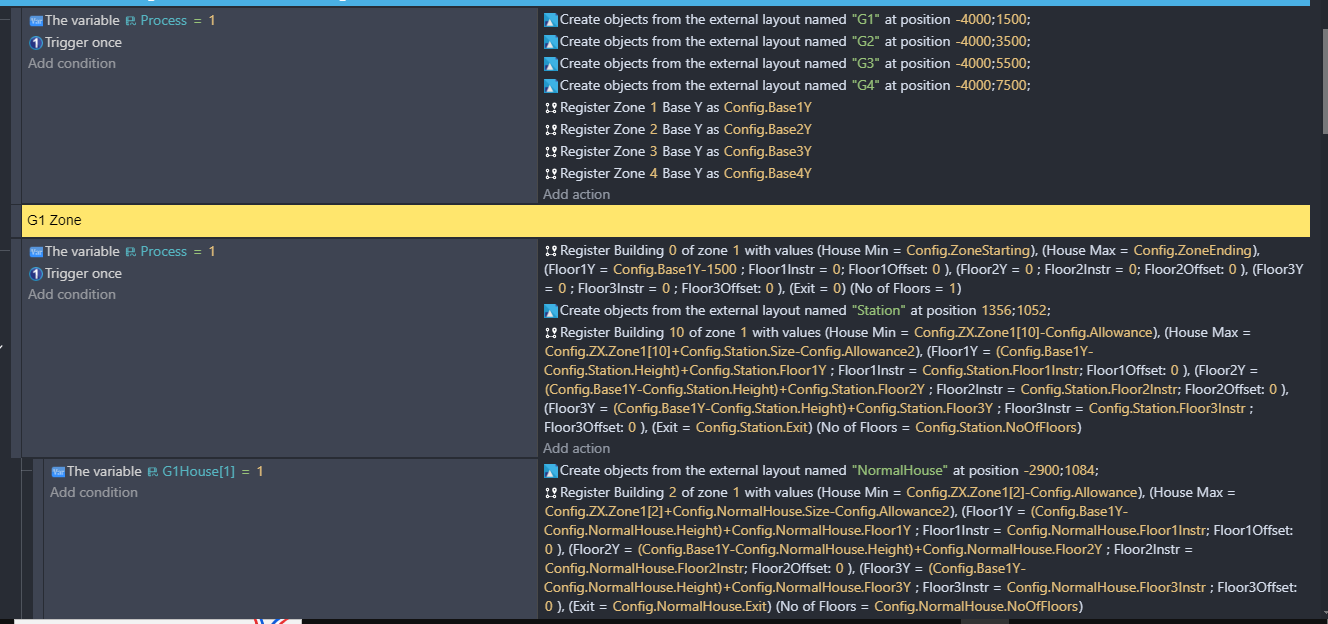
Some parts of the screenshots are custom extensions, and normal variables can still be used.
Secondly
So next once we have all we need. Then can calculate the AI location from wherever the AI is:
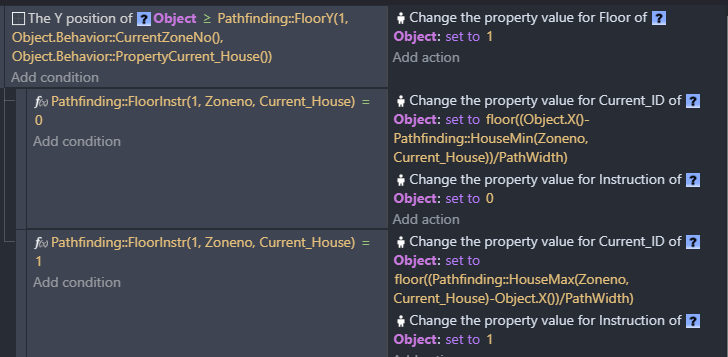
Let me explain this screenshot:
- ID is the where the player is
- Floor is the floor in a building. This is what I meant when I said the AI can enter and leave houses.
- Flooe Instr is either 1 or 0 and they tell if exit is at the right or left.
- Path width is how long one path block is. We use 64 since most of out characters is 64px.
So for the calculation: we get simply get the length of the entrance to the player and divide by the path width. We floor it because I don’t like decimals and that makes it easier to compare.
(I am a bit rusty  )
)
Nex the movement, I used physics instead of platformer because it allowed me to control collisions.
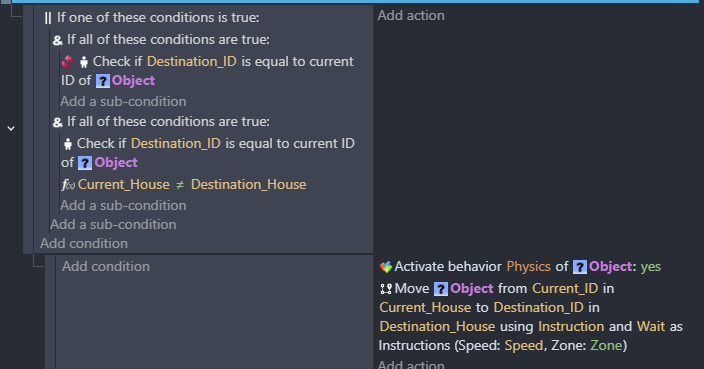
For this I first make sure that the AI actually really has to move by checking if he is in the house his meant to be and at the exact id. If not he should move there.
So then this is the movement:
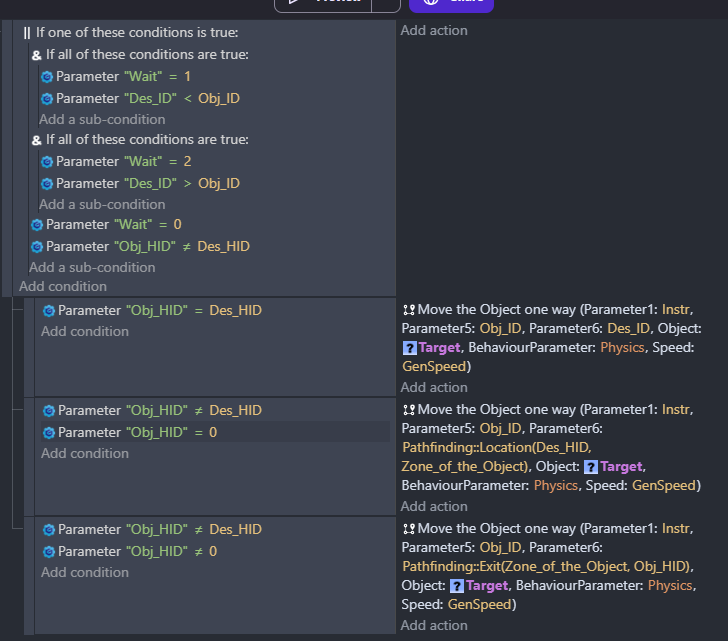
To understand this just take Move the move one way function to be a move straight either left or right based on Instr.
- If AI is in house move to Destination ID
- If AI is not in his house move to Exit of house
- If AI is outside - in street - and want to go to house then move to house entrance.
The wait is legacy and even me is trying to figure out why I left it there and it’s defaulted to 0,
And final movement (self-explanatory):
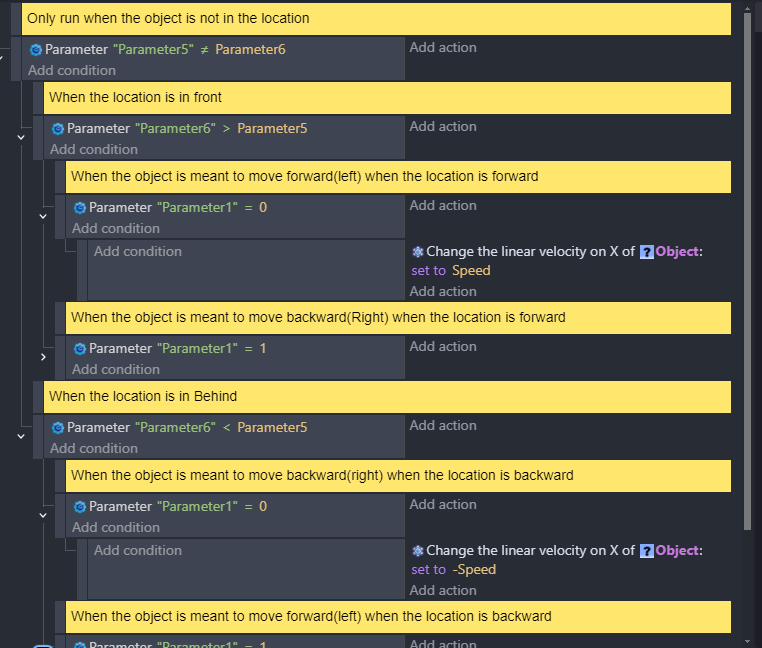
I apply a lot of performance tricks. Ensuring that physics doesn’t run unless needed and location updates are only needed when the AI is asked to move.


So that’s the core of the AI.
Good to hear. There are ways to decrease the workload. One way is to use object timers with a variable that changes the update frequency based on distance. Update infrequently when greater than a certain distance and then use a shorter delay when closer.
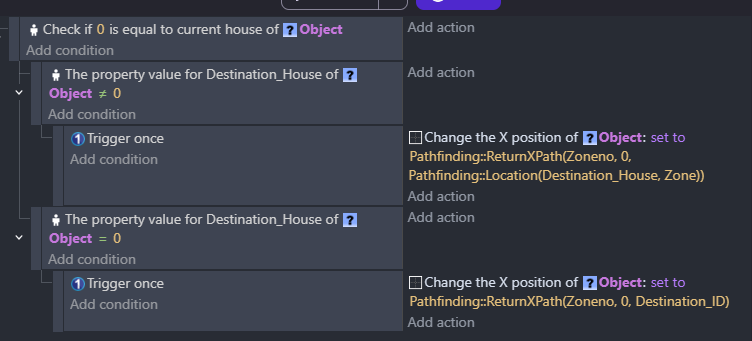
yeah, i think that system will definitely be overkill. (tbh my brain stopped working for a bit after trying to understand all of it) thanks for showing the code though.