I still don’t know how to solve my previous topic and I’m losing all the hope in myself  Sorry for repeating the topuc but I really need to solve this
I would even send someone all the files so that the person can see what’s wrong and fix it himself…
Selected character shows, but clothes don’t - How do I…? - GDevelop Forum
Hopefully by replying here I’ll draw some attention and someone will help you…but I think that you need to screenshot more things …like the game running and more shots of events and where you think the problem is.
…someone will help. I know you want to send them the project …they’ll probably prefer to look at the code as a screenshot and see if they can spot a problem.
hey! thanks for replying again 
other code is just for buttons, sounds and other not relatable stuff so i didn’t show it
when i’m previewing a game, code works as i want to - selected cloth is copying, I put it on a character by dragging a mouse, I can put it anywhere. The issue is just that I can’t make the clothes “stick” to the characters so I can move it to the next scene
Or for example if there would be only one scene - I still need to place character in selected clothes to the center when button is pressed, but clothes won’t move with a character
So do you mean that you just need to save the positions of the clothes from scene to scene. So you possibly need a global variable thats a structure inside an array for the characters and possibly inside that a structure inside an array for each item of clothing and it’s position relative to the character. You can use a for each object in the group event to set the position of each item of clothing
Or create points on the character to attach the clothes to.
thank you so so much for replying!!
i see what you mean but i’m new to gdevelop and don’t understand how global variables work and how can i do that for my game
and since i have a lot of clothes, i don’t want to write an event for each item, i’d rather do something like “for each object in [group with clothes]”
maybe you could help me and show where in events write what…
Hi…are you wanting all the similar items to snap to the same point on the character or all the clothes to go to the exact position that they are dragged to?
If you’re saving all the relative positions of each piece of clothing that is in collision with the character then
if ‘clothing’ is the group containing all the items and ‘character’ is the group containing all characters do something like
create global variable characterclothing.
this is a structure inside an array inside an array - the structure contains ‘x’ and ‘y’ and ‘id’
in this method don’t have a clothing with ‘id’ =0
saving before leaving scene…
repeat for each ‘character’
repeat for each ‘clothing’
‘clothing’ is in collision with ‘character’
set global variable character[character.id][clothing.id].x=character.X()-clothing.X()
set global variable character[character.id][clothing.id].y=character.Y()-clothing.Y()
set global variable character[character.id][clothing.id].id=clothing.id
To load at the beginning of the next scene…
add a scene var called say ‘sort’
repeat for each character
‘sort’=0
repeat number of possible clothing times
character[character.id][sort].id is not equal to 0 then create ‘clothing’ with ‘id’ equal to ‘sort’ at clothingX()+character[character.id][sort].x,clothingY()+character[character.id][sort].y
‘sort’ +1
@MrMen - does that look about right? I’m an artist not a programmer and I’m still getting my head around this stuff!
what i can’t seem to do above is indicate which is a sub event of which — that’s quite important as you need to have the two ‘repeat for each’ in the save event inside each other.
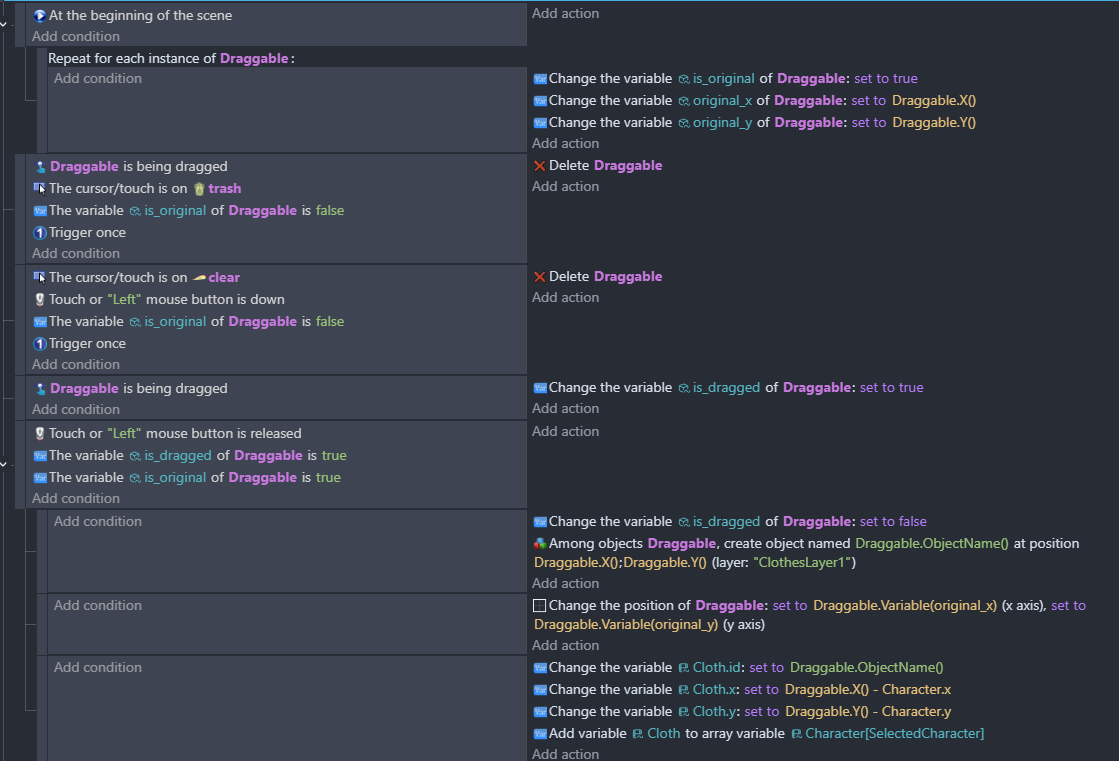

If you want transfer the information to the next scene you need to use global variables or the storage system…you can copy your scene variables to a global variable
How many characters are there? And how many different types of clothes?
It’s worth watching a video on the storage system as it’s a little tricky.
yes i think about it too
i’ll make it global variable
what do you think - is everything okay on the “dressup” events? how to correctly show clothes on “display”?
If you’re having more than one character then I think you should set it up as I said above
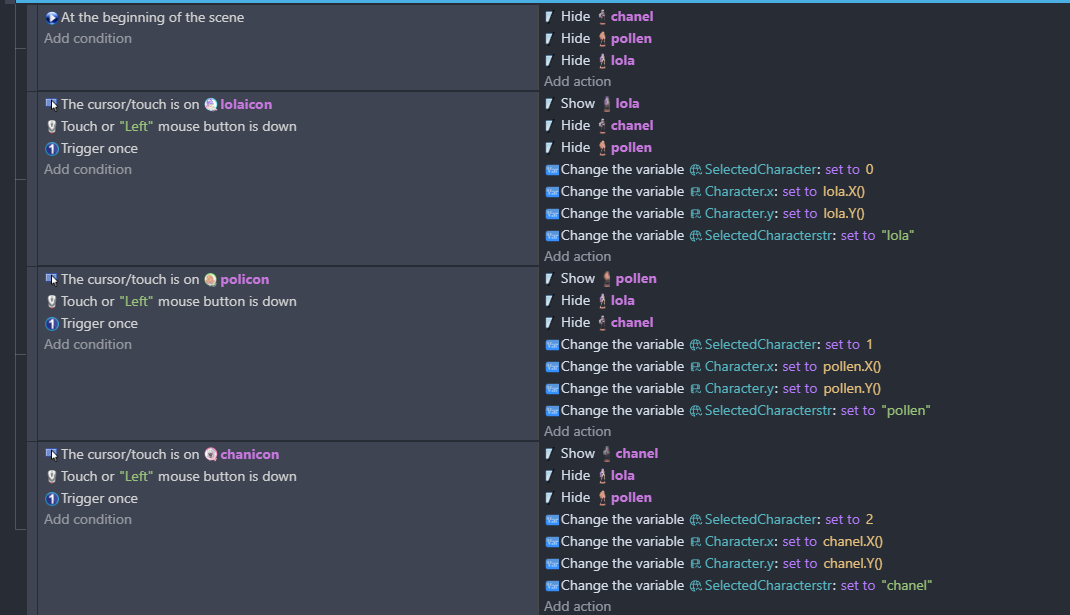

Ok I’ll have a look later when I’m not using my phone
thank you so so much! i’m a little shy to post here a video of how it works
but if a video will help you to understand better - i can send it to you on email/telegram
Hi - The way that you’re saving it now in the scene structure variable - does it work? does it do what you want it to?

now i have this - selected character in dressup scene properly shows in display scene where i want to (so they’re saving)
but clothes don’t save 
did you say you used ai for some of this? I can’t get my head around ToNumber(VariableString(cloth.x)) - looks like it turns a number to a string and back to a number? - why not use cloth.x and cloth.y?
I’m finding it hard to grasp - because it’s not the way I would do it. I hoped someone else would step in who is better at database stuff.
If I get time I’ll start a project and try and do it the way that makes sense to me and send you some screen shots