The last post I found on this is from 2022 so trying my luck with the same question…
does anyone know if there is a single Action that resets ALL Global Variables to completely restart the game?
if not, what’s the easiest way to do that?
Thanks!
M
The last post I found on this is from 2022 so trying my luck with the same question…
does anyone know if there is a single Action that resets ALL Global Variables to completely restart the game?
if not, what’s the easiest way to do that?
Thanks!
M
Never heard of any way
Most sense would be to 1st have your all global variables under structures/arrays
And save them when game starts
Now you could load that save to fake reset
that’s what I thought, but there are at least few dozens and wanted to avoid going through the whole project noting them all down…
but that’s weird, surely I’m not the only person needing it… and it seems like such a straightforward solution to add. Why wouldn’t they add it?
Before i started game dev i was wondering
Why so many games don’t have options to enable/disable graphic settings (most have but often poor)
Why there are not all resolutions to pick in game settings?
And when they are why there are not all resolutions my display can handle?
Why there is no volume control either by sliders or buttons or even just a mute button?
Why there are no settings to change controls?
Whatever is real answer
For me answer always was devs were lazy
Now that i am game dev myself
Turns out things i was considering as ultra simple to make/implement
Stuff that for sure takes 5 mins to add
Actually is not so simple and it does not take 5 mins
Maybe resetting global vars is easy idk
But maybe its not?
Same as you assume its easy to do
Same i assume everyone making a game going with tons of variables would start with putting them all under array/structure so they are easy to save/load
As you see i was wrong
Better start assuming you also can be wrong
Anyway
Why not just go make feature request?
At worst nothing will change
At best it will be implemented
I’ve never used the Extended variables extension but it seems to have functions that allow you to use variable names as strings among other things. I wonder if you could create an array of the variable names and cycle through it with a for each child. Maybe create a copy of the variables in a structure so apple would be backup.apple in a structure named backup.
https://wiki.gdevelop.io/gdevelop5/extensions/extended-variables/
The array tools extension might also help. I love the split function because you can create a text with the variable names seperated by say commas and then use the split function to create an array and then use that array to either backup or restore the default values.
I would recommend in general to use a structure for related variables. Imo, it makes things easier to understand and if you’re saving variables to storage then it’s much easier to save a structure instead of seperate variables.
Last year I moaned (just internally i think, but perhaps I aired it!) about there being no ‘reset global variables’. Since then I’ve seen Keith point out that it’s a good idea to have them all inside a structure - a great idea - but Doh! I’ve only gone and not done it again!!
uff going deep here! 
you’re right, maybe it’s not that easy… but then if they created something so complex as the whole Gdev platform, I think making a button that brings the values of all Global Vars to their default values shouldn’t be that difficult. But like you said, maybe it is!
I’m not a dev myself (or maybe I actually am as I just finished my first MVP of the game!) so I had no idea what even Variables were when I started this game, forget about putting them in structures or arrays. So now half of them sit in Structures, the other half sits in really badly organised structures, and the third half (lol) sits loosely here and there hehe.
But I will organised them while Im waiting for the feedback for my MVP.
Feature request is a great suggestion and I am going to do that.
Thanks @ZeroX4 !
Yes I completely agree and I am only starting to see the value of well organised Variables now that I need to reset them all. It’s been a very messy journey this MVP as I am learning as I go and I am at a point where I think what you said is staring me in a face. So I’m going to go and organise them better now, thanks!
1 - your reply to Keith
Its not only value in organizing variables
ALL your stuff events/objects/resources and so go on
Properly organized really pay off
2 - you agree with me yet you repeat same thing
And in fact i do agree same thing
They did make something SO complex so why we don’t have so many simple things we should
WELL it again go back to what i said
Just because we think something is simple does not mean there is
BUT that is only our side of things
What about actual side of ppl who write code for gdevelop engine itself?
Is it for them just add something or not
Or maybe there is additional factor that does not concern us
We just see is something simple or not
They need to think is it doable AND will it work with the engine itself
For example
Ever wonder why we don’t have IF ELSE statement/event type?
Gdevelop work on some kind of logic and everything needs to circle around this logic
Something as stupid as fit image to screen we don’t have
Ever wonder why?
A lot of stuff that would be easy to implement is simply not there for a reason
Some stuff is not there cause they just did not make it yet
IDK what is the deal with resetting all global variables
And believe or not i was just like you didn’t knowing about all the stuff that needs to be on par with engine for it to be implemented
I ASK WHERE THE F IS AUTOTILE!!!
Such a simple feature that is kinda built in to all engines i know
Except gdevelop
Why?
Answer is convoluted and i already made wall of text but like always turns out its not so simple as we would expect
Keep that in mind when thinking something is simple to add just cause it looks simple
Found the solution—and it’s surprisingly simple!
You can transfer all Global Variables into a JSON at the start of the scene (see image). Later, you can restore them from that JSON, bringing them back to exactly the values they had at the moment you saved them (i.e., at the very beginning of the first scene/game).
The key steps:
_Defaults structure (the one used by the JSON), each child variable represents one of your Global Variable structures._Defaults is the JSON structure.
Example from my setup:
you’re right that keeping literally everything well organised with consistent naming convention makes everything so much easier.
it’s true that many things that seem simple, are way more complex than we think. But as mentioned above I managed to find a solution that takes 5 lines of code so I guess this one is not that tricky.
But I appreciate all your input, thanks!
Hello @sunbathingecko!
And well, congratulation!
The opposite is also true: things seeming apparently complicated can be quite simple to solve.
A+
Xierra
Hello!
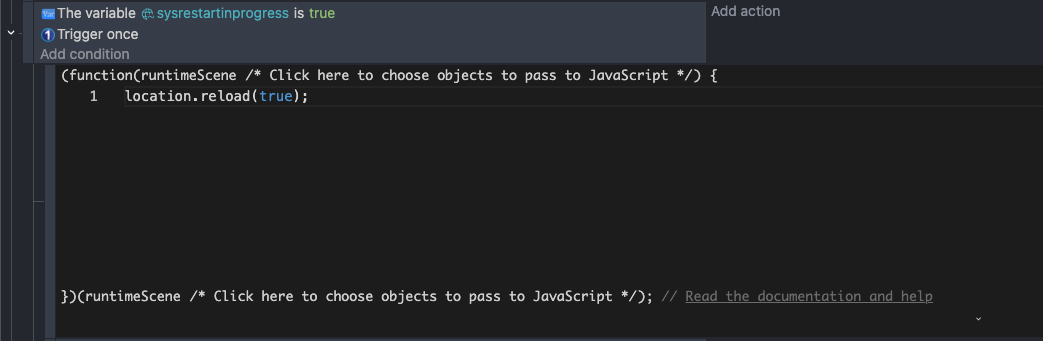
Go to the scene you intended to be the starting scene, like a title screen for example, and check once if RestartInProgress is true, if it is, next create a JavaScript code block with location.reload(true);, and drag the code block underneath the other event to make it a sub event.
Next, go to the “Restarting” scene and simply add one event to go to the title screen (or whatever it may be).
Note: You cannot preview just any scene within the GDevelop editor if you intend to test the restart functionality, only the restarting scene.
Now, to restart, simply change the RestartInProgress variable to true, and then go to the Restarting scene.
All global variables and by extension the entire game should now be reset to their default value!
Here’s some screenshots to clear up any confusion:
Title Screen
Restarting (Condition normally shouldn’t be required)
Example code for how to initialize a restart
Please let me know if you need more help!
shoot I just realized there was many other totally different ways of doing it above, but I hope this is a good example of using javascript in gdevelop either way lol! this also could be helpful for other people maybe
Hello!
I did not test but if it were to work; It would be logical because the global variable is defined in this restart scene.
In other words, define all your global variables in the 1st scene of your game or application.
However, this may not respond to the initial request which undoubtedly wanted to reset the global variables on demand and whatever the scene.
What do you think?
Xierra
They wanted to restart the game and by extension all global variables, this would do just that.
It’s important to define that global variables are… global. You don’t define them in code, if you were to try and define them in code it would be a scene variable.
However if they meant something else, the above methods would probably work
Thanks for your response! And sorry to say that, as my message above, I have found another way of doing it, but much appreciate your input!
How do you easily reset global variables?
Sorry for reviving this post, I was looking for the same thing as well.
The above solutions seem to work, but I think that Gdevelop should add this as an action in the editor. It would save people time and trouble. Maybe we should turn this into a request threat? Or create a new post.
It would be really useful for Roguelike games, where you die a lot and reset. You want to keep some variables, but many games stats must be reset back to normal. Sure you can save the normal variables at the very beginning and load them, but I think most of you get my point.
Would love to know what the devs think about it.