There is read pixels extension
You could totally loop trough your image even do it on grid and that would not be a problem
BUT how you would determine which pixel should be what?
I mean if you would have few colors then yeah you do like
Read pixels = SOME NUMBERS HERE
Then do this or that
And you would need to have same events for as many colors as you have on your picture or scene or whatever
Watch this
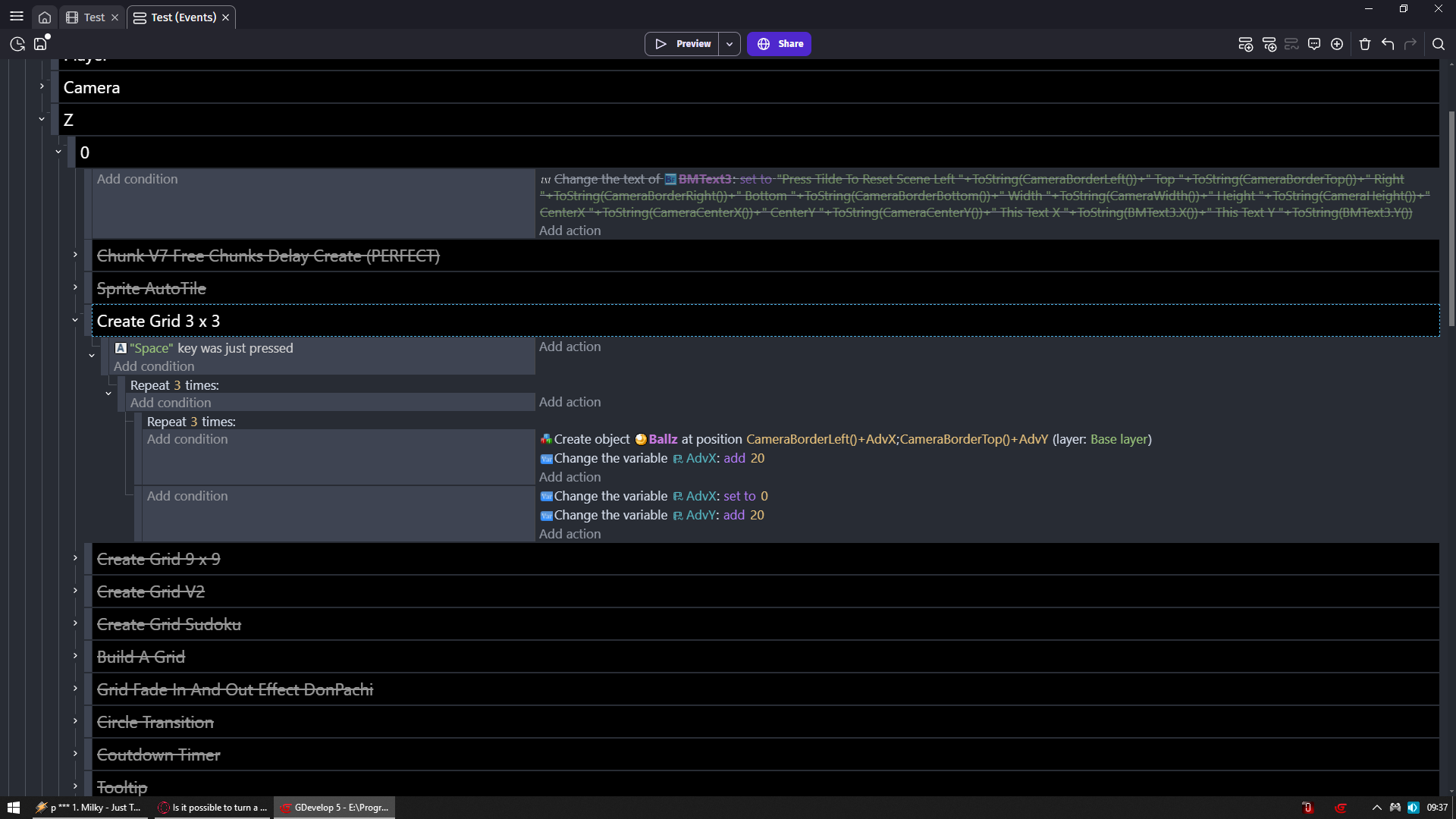
Hit space to create grid of ballz
I am not like literally creating grid of ballz there
I am telling my game to create ballz at this position then move away to the right 20 pixels and create another one and then repeat it so i have 3 ballz
Then add 1 to 20 to Y pos on which it happened and i reset X pos to 0 and it is again done 3 times
And then once more i do exact same thing and bam grid of 3 x 3
You would do exact same thing with your image
But you would need to start on Image.X() + some offset + your multiplier (AdvX in my case)
Same for Y
And then you would need to have action to set tile on tilemap to some ID in relative position
Issue is like i told you
You would need to pre determine color what which color be as tile ID
This guy is doing pretty much what you want
He is just reading color of button whichever you pressed
And apply color of that button to outline
You would need to read same way pixels using grid logic i provided and then apply it to tilemap tiles