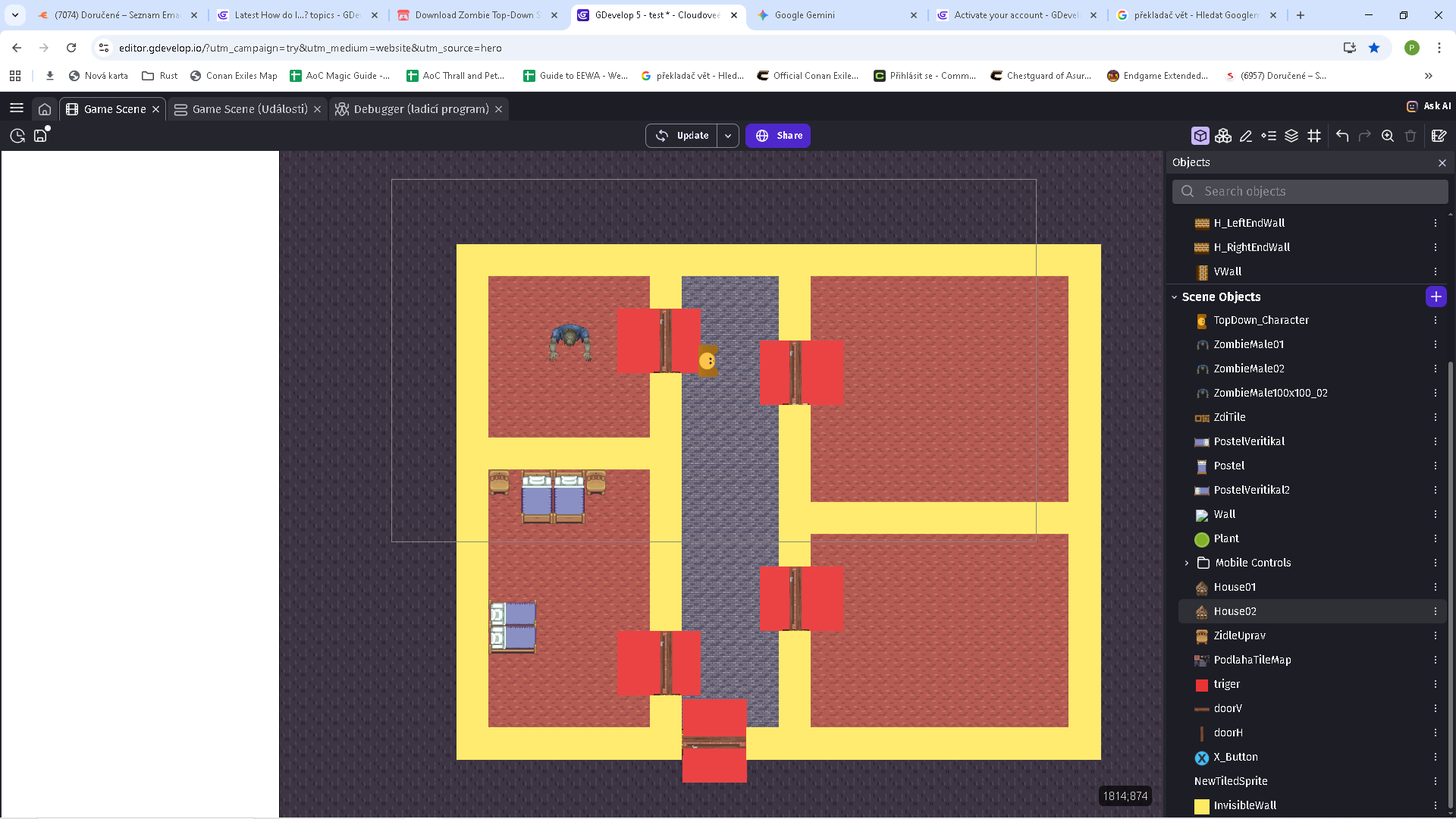
Can you please help me with the following problem just from PrintScreen, or should I provide more evidence? I have a problem with finding the path of the enemy object “ZombieMale02” should follow “Top_down character” In the scene when the player steps on any trigger and presses “e” the nearest door will either open or close. But the enemy’s behavior is that sometimes he ignored the closed door and went through it. Where am I making a mistake?


I’ll look at your code after I post this. So, I might add to it later. I could be completely wrong. But I might not have an answer to the events or the time to come up with one.
My initial thought is if the walls and doors are obstacles then 2 things need to be followed if you’re using the default pathfinder.
First, the entire object is used for the obstacle not the hitbox.
Secondly, the default pathfinder behavior is flawed. The path check function uses the objects width and height. The problem is that when you rotate an object. The width and height don’t change. So, the behavior still treats the location as if the object wasn’t rotated.
The fix for the 2nd issue is that you can’t rotate objects. For the doors and walls, you need to completely resize the instance for the other aspect. Once you have a wall or door for each aspect, if you want to add a new wall or door then you can copy the instance facing the the desired aspect.
Another option is to use the nav mesh behavior. It uses the hitbox instead of the size. So, it’s more accurate and it follows the shape not just the size if the object.
I prefer the builtin pathfinder. I’ve had issues with nav mesh not always choosing the shortest path and it’s a little more basic. But it does do a better job with objects that aren’t simple shapes.
OK. I’m gonna read through your events. I might be completely wrong.
This post has a good explanation of the pathfinder behavior’s logic.
https://forum.gdevelop.io/t/make-pathfinding-collision-less-choppy/60067/7?u=keith_1357
It could also be the size of the virtual grid. See the link above.
I’m going to update this as I read it.
I’m not sure why you’re picking the nearest door. The nearest door could be in the wrong direction. If the doors are obstacles then it will pick the path using the doors. You can move open doors or disable the pathfinder obstacle behavior for uocked doors. If that applies.
Can the enemy open doors? Can it open all of the doors.
If the enemy can open the door then the door then the door’s obstacle behavior isn’t needed or could be disabled.
If the enemy opens the door then you could check if the enemy is in collision with a closed door and then move the door out of the way.
OK. I see that the red rectangle is a trigger and not part of the door. So, are the doors rotated? You might need to resize the door or use seperate objects for horizontal and vertical doors.
Alright, that’s all that I got for now.
Keith …I think it would be great if you created a comprehensive how to thread on pathfinding when you find time listing the alternatives and their pitfalls and workarounds etc
Personally, I would replace the pathfinding system with a raycast system… I think it would be easier to use and adapt to your game.
Thanks. I’ve written some detailed posts. I love the pathfinder. The linked objects pathfinder is even more interesting although it links objects like tiles so I don’t think it applies here. But it’s still an excellent behavior.
The linked post with the maze is one of my favorites. Using dots to show the nodes really demonstrated the process.
I’m just adding an explanation to the scene: yellow walls (they are just placeholder objects, because otherwise I have walls built from a tileset, the enemy takes these yellow walls as an obstacle) and triggers are hidden in the events at the beginning of the scene. Triggers should only react to the player, so the enemy won’t open them. Yes, I have pathfinding obstacles set on all doors and when they are open, I deactivate them, so it probably shouldn’t matter if they are closed or open. Yes, I’m not sure about my door opening system, I would be grateful for a review and possible adjustment.
Are the doors rotated when closed? Meaning not at angle 0.
still for the doors, I have variables on them: isOpen(0-close, 1-open) and isAction(0-inactive rotation,1-rotation in progress). The door opening animation is replaced by rotating the object and moving the pivot to the hinge position. Apparently I don’t understand the rotation of the object and its behavior on events correctly, I thought that if I specify in the condition that when I press the button, the rotation will take place by 90 degrees, but that only turned the object by one step, I assume one frame, a cycle of events. That’s why I have those variables on them so that I can handle it.
Doors close… angle 0
OK. The issue that I was concerned with the doors is that rotated objects are seen by the pathfinder as not being rotated.
The object on the left is rotated to 90 degrees while the object on the right isn’t rotated. I used the pathfinder path painter or drawer to draw the path as I moved the object all over the place.

You can see how the behavior perfectly followed the object on the right but passed through the rotated obstacle on the left. The lines are drawn from the center of the circle. That’s why they’re not closer to the object…
I need to look at the Javascript events for the behavior. It seems to be acting differently although it’s still not working.
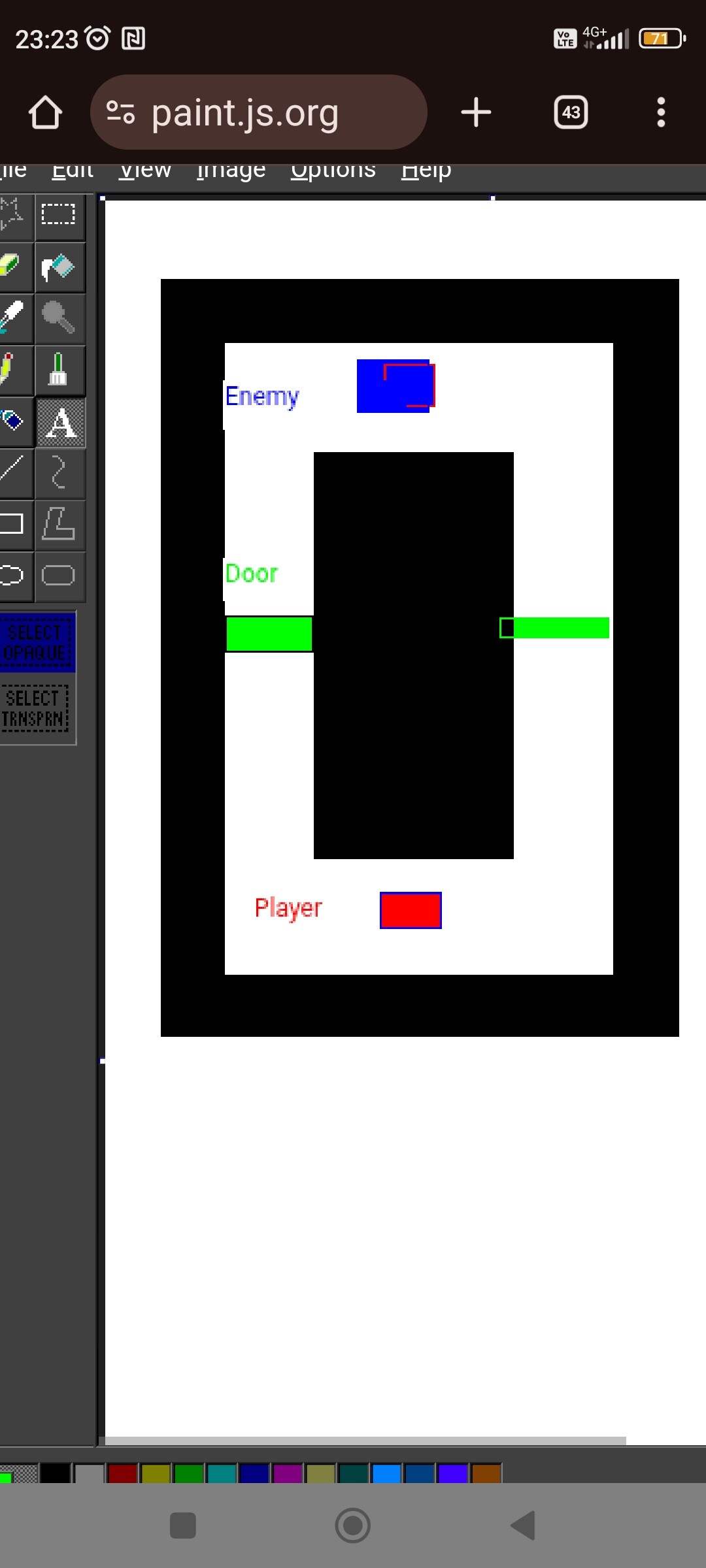
Sorry for the English. I would understand it best from an example. It would be possible to make a tutorial about pathfinding from this image, where the enemy would follow the player, the enemy would be slower than the player and could not open the door (green) The player would open the door by pressing “e” (no animation is needed, it is enough that it disappears after pressing and reappears after another) I would like 2x doors, so that the presence of multiple instances of the same object would be obvious and each instance would have its own behavior. If it were possible to solve the doors and their reactions with the shortest possible code, even if there were multiple doors in the scene
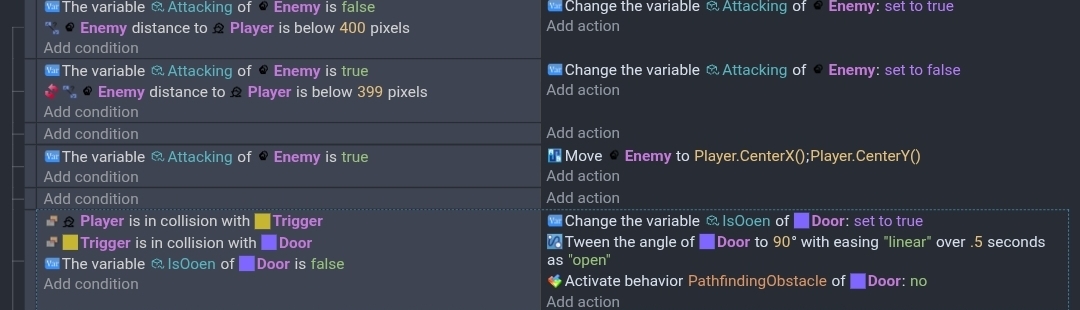
This is how I might do it.
The enemy has a boolean variable named IsAttacking and the pathfinder behavior. The door has a boolean name IsOpen and the tween behavior.
The center and origin of the player and enemy are in the center.
The center and origin of the door are where the hinge or pivot point would be.
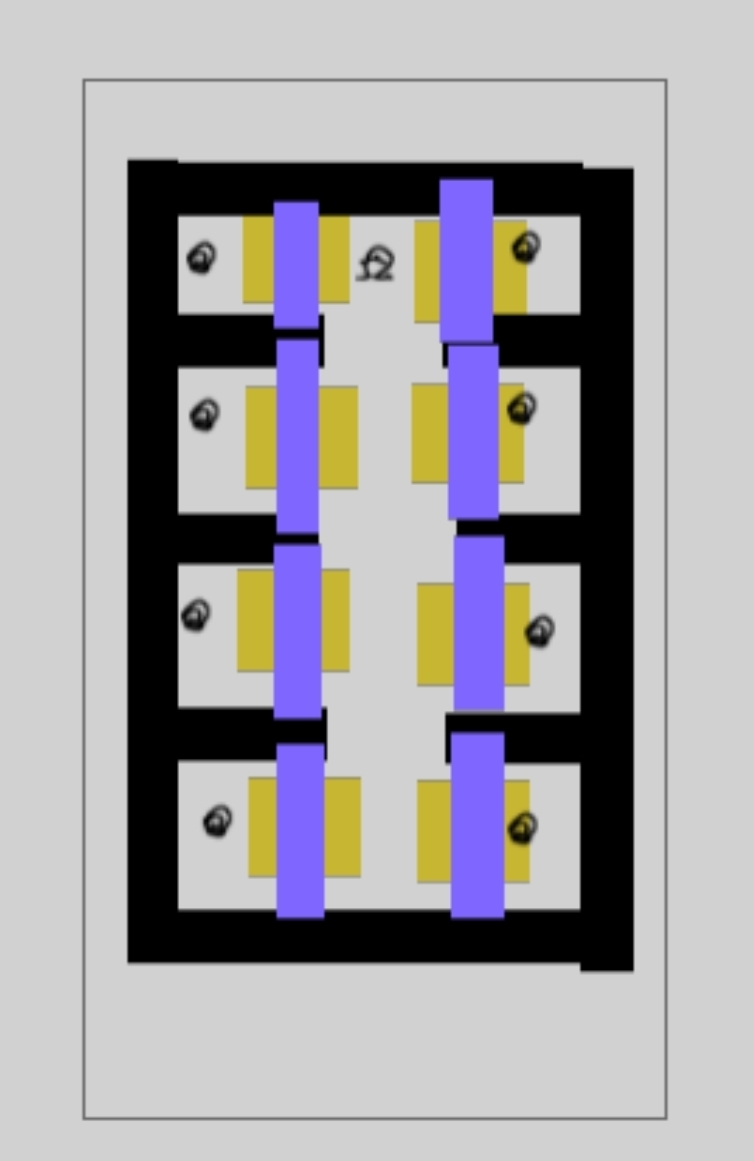
My rough scene.
My objects.
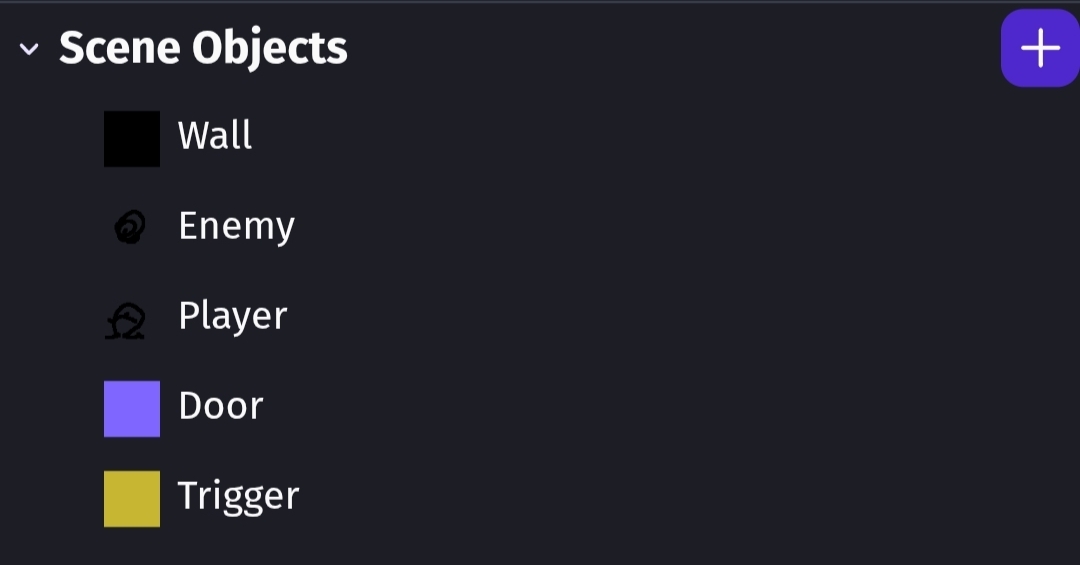
Possible additions.
When the player is no longer in range, it could return to its room.
When not attacking, the enemy could use a timer to occasionally change rooms. (Patrol) Opening and closing doors. The room order could be sequential or random using target objects in each room and possibly an ID if sequential.
Tbe door could automatically close with a timer after a set time and/or player distance from the door or collision status with the trigger object.
You could also use linking for the trigger. Li king each trigger to the matching door.
The tween rotation angle could be decided by comparing the player X position to the door or through a door variable.
IDK. It’s late. That’s all I have.
Keith…is the pathfinding issue with all objects that are rotated or just tiled objects?. Tiled objects rotate in a really weird way!
Looking at this, I wouldn’t have rotating doors …I’d use sliding doors and change the objects height with the origin at the top.
Thank you very much for your suggestion. I’m going to work now, I’ll look into it this afternoon.
You could also add to your scene that the door closes when the player is not on the trigger after 3 seconds and adjust the pathfinding behavior so that the enemy does not pass through. This is causing me a problem. Leave only one enemy in one of the rooms, so that I could hide from him in the others. I had a problem that even though the door closed, the enemy still passed through and vice versa, when I opened it later, he did not continue searching. deliberately keep the enemy slow so that the escape could be timed.
I’ve never tested it with every object. The source for the behavior doesn’t care what the object is. It just checks the width and height. It might treat objects differently.
https://docs.gdevelop.io/GDJS%20Runtime%20Documentation/classes/gdjs.PathfindingRuntimeBehavior.html
I did another test. It doesn’t seem as simple as the behavior checking the width and height because it doesn’t avoid the area as if the object wasn’t turned. It seems to create a square area instead of the full rectangular shape. It could be related to the virtual grid. IDK. It needs more testing.
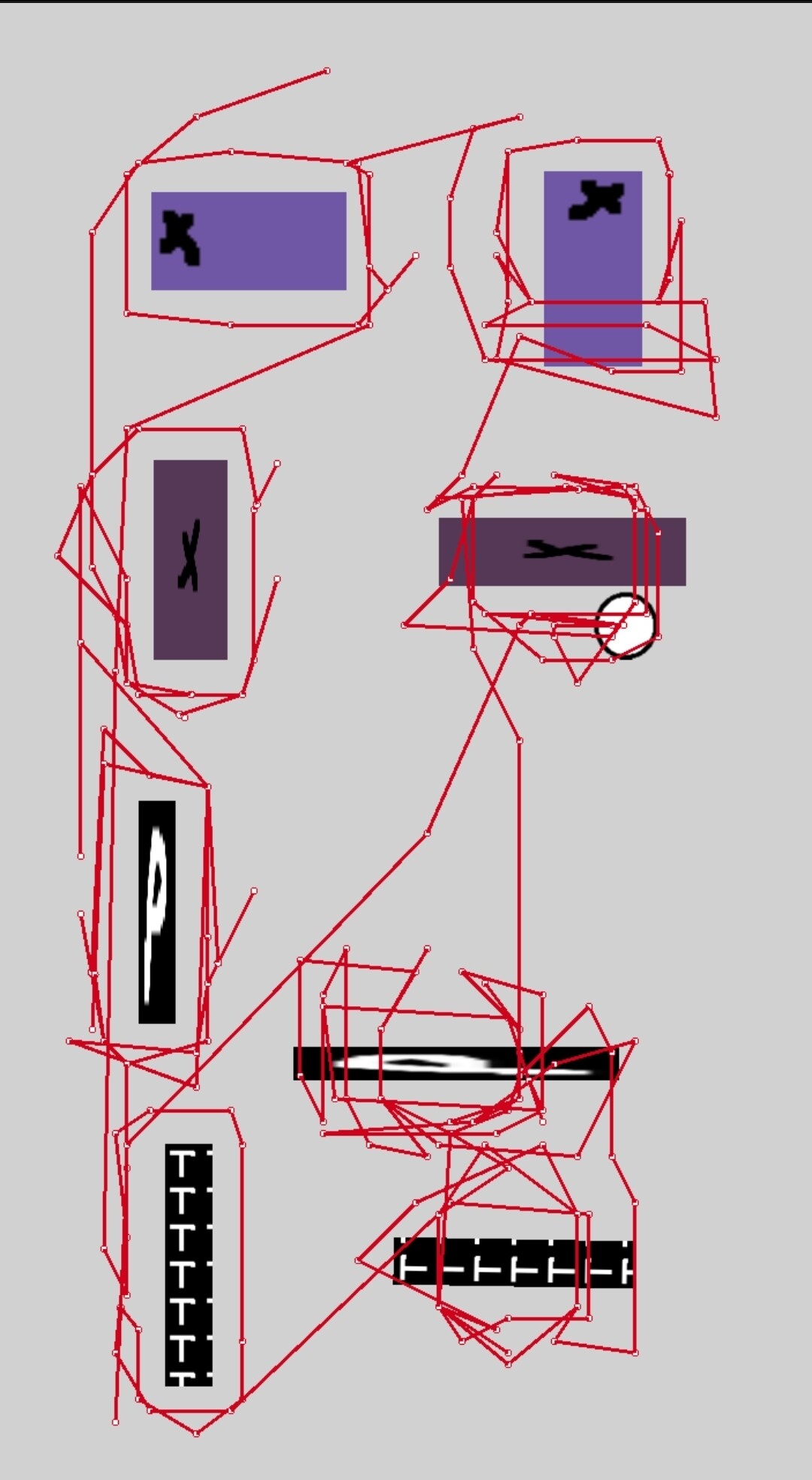
I added the objects in pairs. The instances on the left aren’t rotated. The ones on the right are rotated.
I wanted to test if the origin and center point position matters. The top 4 objects are sprites with an x where the points are. For rotated objects, the point position affects the obstacles.
The objects with “p” are panel sprites.
The objects with “T” are tiled sprites.
The objects are stretched square objects. I wonder if it’s using the original dimensions. It needs more testing.
I redid my test with rectangular images that weren’t resized. It’s the same. Remember that the lines are drawn from the center of the circle. So, if the line is next to the obstacle, it means the circle moved through the obstacle not around it.
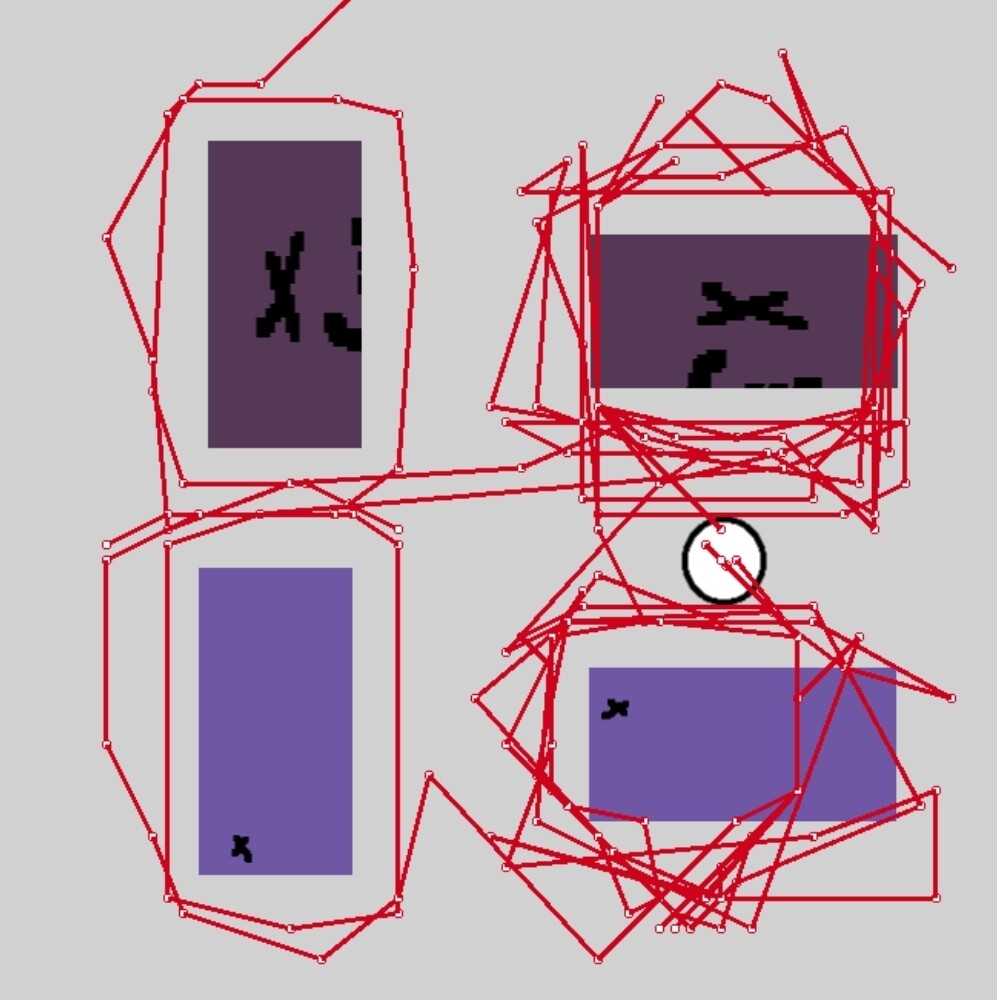
It follows the horizontal as long as the points are centered but not the vertical or sides.
I wanted to try wider objects. It’s definitely worse. The large the difference in sides, the more it’s noticeable.
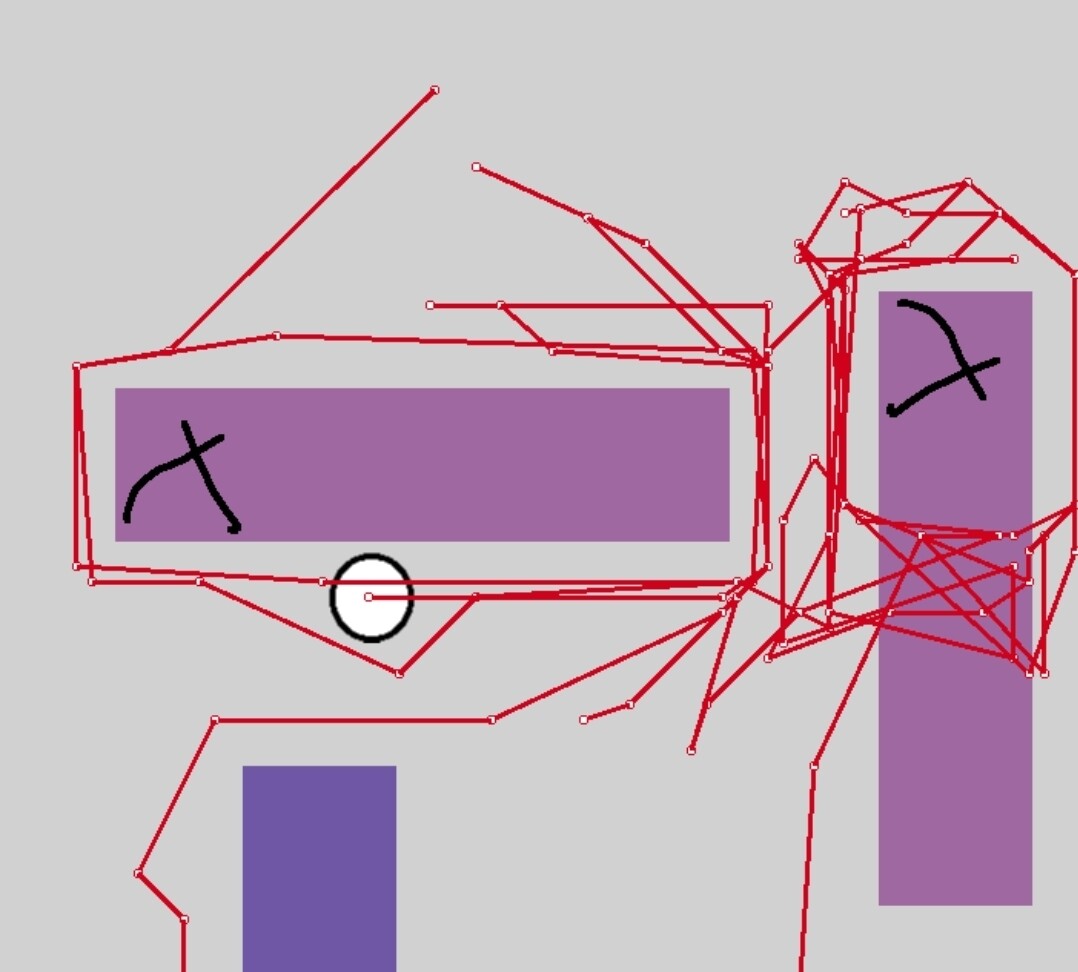
1 Like
That’s interesting Keith - Its difficult to see how to work around it if you neeed to rotate long objects - These are all nuggets that can go into the ‘Keith’s PathFinding Bible’
You can use the Nav mesh pathfinder or just don’t rotate objects.
For some objects, you can just resize the object if it’s a solid color or repeating pattern but other times, you might need different objects with rotate images. Or make the objects square.
You could also use hidden objects as the obstacles. The image wouldn’t matter. The visual part could be a solid image.
I didn’t test a rotated square but I’m assuming it would be fine.
I wish they would fix this bug.
The nice thing about the nav mesh behavior is that it uses the collision mask. So, it follows curves. It also works with the new tilemap object.
The builtin pathfinder see the entire tilemap as an obstacle but the nav mesh looks at the collision mask.
1 Like