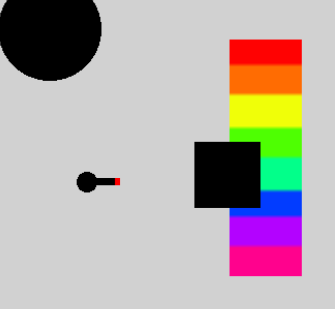
im making a feature where the color the playable character is looking at will be desplayed, but the problem is the way im picking colors is with the screens position, which includes everything above the players view.
so in this situation i want the color picker to ignore the black bar and pick the color from the rainbow, which is what the ray the player casts intersects with, instead of picking the color at the position of the intersection.
so basically i want to pick a color from an object, regardless of what the camera itself sees, how can i do that?
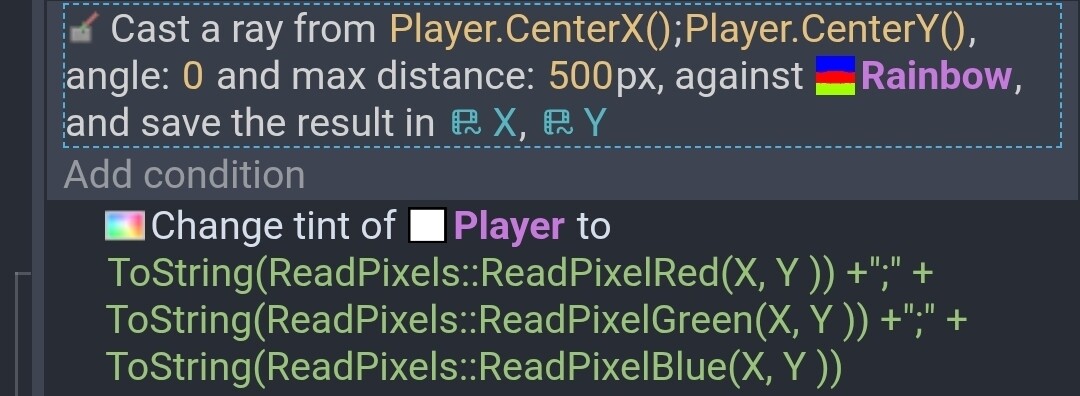
Hi - theres the read pixel extension - if you raycast from player and save the x and y intersection point you’ll be able to read the colour at that point
i know, i did it
but it doesnt read from the intersecting objects color, but from the camera position, meaning that if something hides it from the camera it wont give me the objects color
The rainbow object needs to be visible for the extension to read the color. Is that the issue?
Can you post a screenshot of your events?
This works for me.
The X and Y variables need to be scene variables setup as numbers. If the rainbow image has a border then you could add a few to the X value like X+3. Make sure the formating of the color is correct. It’s a string in the format of R;G;B like 255;0;0
Is that black object above the rainbow? Then maybe the color can be read on a different part of the rainbow by adding an offset or an object point that is outside of the black object. Does the black object always appear at the same X position relative to the rainbow?
Another option is to hide the black box for 1 frame, read the value and then show the object. Although, that could cause a flicker effect.
Maybe you could create the color value based on the Y position of the black box in relation to the rainbow. The colors could be in an array with the index calculated based on the position.
1 Like
the black box is just there for demonstration, in the real game it would cover the entire screen so that you can only know the color of an object infront of you, and try to oriantate yourself based on that, which means hiding the box for a frame would reveal everything.
and the fact that i need to have in the game multiple objects hiden, some having multiple colors, means that i have to read their pixel values, and cant store their color in another place
i tried now to hide the box, calculate the color and then show it but that didnt do anything, it probably calculate the color at the end of the frame which means switching the box visibily on and of in one frame doesnt change anything
and to be clear the color picking works completely fine for me without the black bar (i did it the exact way you did)
the problem is just when hiding an object
Yes. The color needs to be drawn on the screen for at least a frame. In a previous post, I used a boolean variable.
If readColor is true then do something
Some conditions then set readColor
The variable is changed after it’s read. So, it can’t change it won’t be changed in the same frame.
See this thread
https://forum.gdevelop.io/t/collision-mask-index/74196
In the end, I came up with the idea to use a tiled sprite that was only a pixel or 2 in size. You can then change the tiled sprite offset to position the visible pixel. It’s a bit like moving an image behind a window or a pin hole.
Depending on the concept a mathematical approach might also work. I’m still insure of what chooses the color. Think of the object divided into sections equal to the number of colors.
1 Like
the pin hole apprach seems great for my case, so i will definitly try it when i have the time, so thank you very much
1 Like
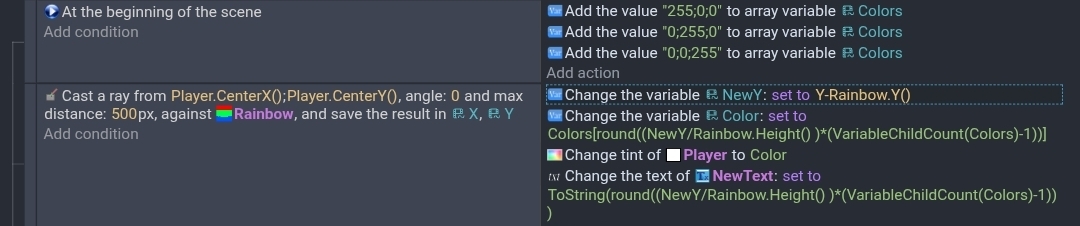
This is a method using the raycast although it could be anything that returns a Y position. It splits the object into segments related to the number of colors in the array. The image of the sprite itself isn’t used.
Colors is an array of colors. NewY is a number variable. NewText is a text object for debugging.
just to make sure i understand, this stores multiple colors, and then depending on where the ray hits on the objects y position it returns one of the colors?
this does seem very useful, though the pinhole approach will probably fit my game better
thank you very much for the help here, i was really stuck n this problem and now im happy to get back to developing
1 Like
Whatever works.
Yes. Using math, it basically divides the object into segments. Say you had 3 colors and the object was 300 pixels tall. Then each segment would be 100 pixels. So, index 0 of the color array is 0 to 99,index 1 is 100 to 199 and index 3 would be 200 to 299
okay, i tried the pinhole approach by draw rectangles around the point, but when moving fast the color picker just stops working, which makes it unusable for me…
i really dont want to need to use the other approach since that will require me to manually code colors for every onbect i want to detect, and will also prevent me from doing gradiants
im completely stumped
I’m not sure I understand your concept. What does the rainbow represent and what happens?
My pin hole approach used a tiled sprite. You make the tiled sprite really small so only a pixel or so shows. Then you adjust the X and Y offset of the tiled sprite. You would only need to adjust the Y. That allows the pixel that you want to read to be displayed on the screen. That tiled sprite could be anywhere. It could be modified to work with other colors.
I guess you could also use object masking to show only the desired pixel and read that color. I don’t know how efficient any method would be over the other.
A better way would the ability to read the colors of hidden objects. I know people worked on that but I don’t know if they succeeded.
Do the objects have different colors? The array method could still be used if you automated the building of the array. You could scan the objects and grab a color from each segment.
All of this is speculation without knowing a little more about the way your project works.
i am trying to make a 0 dimentional game, where the color of the screen is the color of the thing the player sees, and you have to try to orientate yourself by the colors of the objects around you.
so in the game you shouldnt be able to see anything but the current color on your screen
The read pixels needs something visual to read the pixel color. I wish there was a way to read the pixels of an object even when hidden but I’m not aware of a process. There was some discussion but I’m guessing they all involve Javascript.
A variable or formula method seems like your best shot. Are all the objects rainbows or was that just a test object? Could the objects be anything? Any shape, any color pattern? Or just solid colors?
objects can be any shape or pattern, so this makes it much more complicated.
im not smart enough to actually start writing in javascript, so i might need to shelve this prject for a later time when this functionality is added or im more capable of programming this
I don’t know of anyway to get colors from a hidden object other than object variables or the previously mentioned ideas.