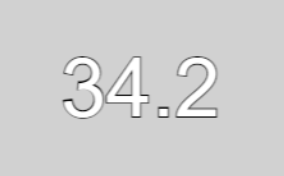
I believe the engine has small bug, but a bug with a MAJOR impact on how the game runs. Basically what is going on is that the engine does not seem to execute code ON THE FRAME all conditions have been met, and executes it 1 frame later. Hence the name of this post. And I have both visual AND mathematical proof that this is indeed happening with the use of a simple continuous resource bar which is set to 60, and drain at a fixed rate of .3 every .1 second intervals for 10 seconds (the reason is so I can control the number of executions per second). Then stop after the 10 seconds have elapsed. In theory, the math says that it SHOULD stop at exactly 30 [60 - (.3 * 100) = 30]. HOWEVER when I run the simulation in game. THIS is the result I get instead

So how did we get this result you might ask? Well it’s simple, due to the aforementioned bug, the game is delaying the execution of the code by 1 frame (in this case, the standard 60 FPS), which means the REAL speed is .3 every 7/60 seconds. So when we run the math, we get [60 - (.3 * (100 / (7 / 6))) = ~34.3]. WAIT A SECOND! the meter shows 32 and not 34, what gives? Well here’s another fun fact, for whatever odd reason, the Minimum Frame count also has an effect in this bug, but what effect it has exactly is unknown at this time since I can’t pin down the exact math on how that is happening. That being said, when I tried a fix of setting the min framerate to the max frame rate. This is the result I got

While this did not fix the bug, it did however get rid of the discrepancy that came from having the min and max framerate at different values. Which is more in line with our calculation from earlier. Now that being said, I also tried to see what would happen at higher and lower framerates. The higher frame rate (set to 120 FPS) was the exact same result as the 60 FPS one, likely due to my machine’s native refresh rate being at 60. However if my machine allowed it, likely the result would have been [60 - (.3 * (100 / (13 / 12))) = ~32.3]. And the lower frame rate test (30 FPS) resulted in this

And if we run the math, it comes out to [60 - (.3 * (100 / (4 / 3))) = 37.5]. EXACTLY as the test shows (assuming the meters round down). Now that we have established the fact that the bug DOES indeed exist through mathematical proof. The next question you might ask is “Ok, but why is this such a big deal?”, well the BIG issue here is as I have mentioned from the beginning, ANY code you make may not activate on the VERY frame all conditions have been met for that action. Which means if you have more than one event that controls the same object/variable ect. THIS can lead to events getting skipped over for 1 frame, allowing variables and ESPECIALLY animation sequences to play when they shouldn’t be, causing unexpected behavior that the user has no control over in some cases. A problem that has PLAGUED me for a long time, and I’m certain others who have had the same frustrations. SO while this bug may seem minor, I assure you that it’s effects are much more impactful that you think. Thank you in advance for your time on listening to me.
Can you post a screenshot of your test project? So, we can see your events and test them.
They’ll probably ask you to post a link to a simple test project as well.
Here, made this in 5 minutes. Very simple to demonstrate the issue. All you need to do is mess with the framerate and you will see the issue. (Also the bar is set to 60 just in case that information is needed)
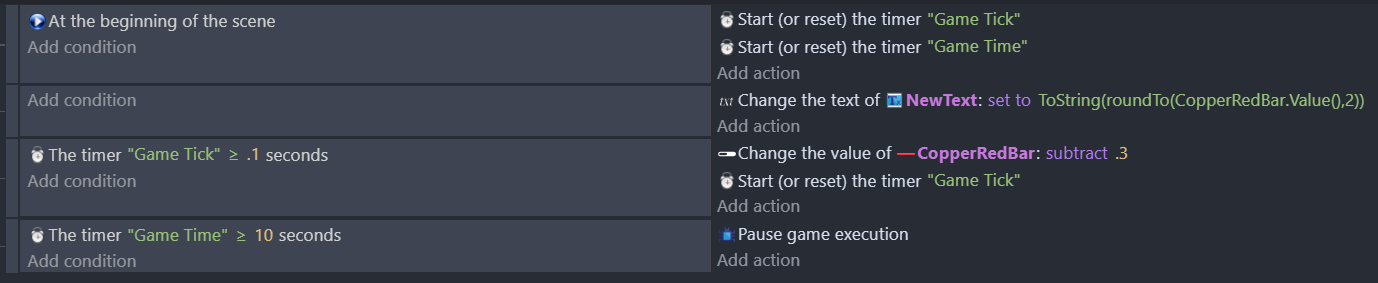
So while I think your math is sound for what you’re trying to test here, you have to keep in mind you’re testing with a custom object.
Most of them are using pre-event and post-event lifecycle actions. Meaning that some of them, by design, update after the frame has processed. The resource bars themselves specifically do all of their visual updates in a post-event sheet step.

Have you tried doing this with a basic text object of some kind to see if the math tests out still?
Yes, EXACT same result. this is literally just a text object attached to a variable with the same logic. it made 0 difference
Thanks for testing, and to confirm, does windows itself show your monitor as set to 60 hz or something like 59.94 or 59.97 when you check the advanced display settings?
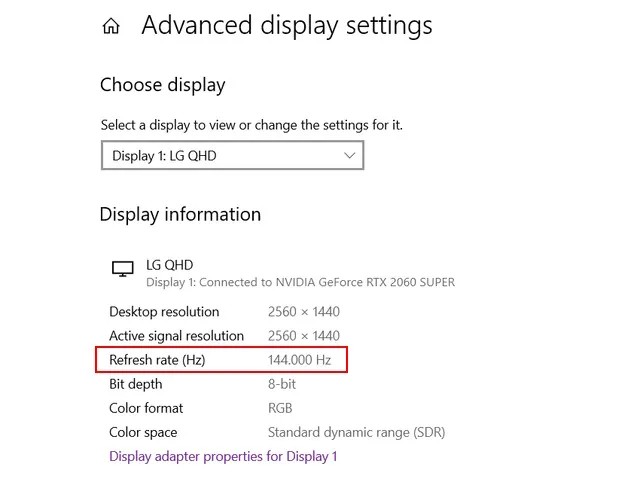
(rare but some displays still do this instead of true 60hz, so I want to at least eliminate that)
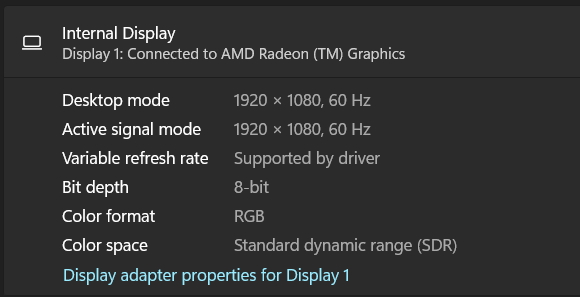
Thanks for checking that too.
What’s bizarre is that I don’t personally run into the same math problems you are from a quick test, but I’m also on a 240hz display and I’m just setting the max framerate to 60. I’d expect it to have the same behavior but it could be anything different between them, including differences in projects.
Incase a dev does take a look at this:
- Are you running your tests on a local install of the engine or the web app?
- What OS and version are you running it on?
- Have you tried using a variable that just adds timedelta instead of a timer? (I.e. have an event that checks if timevariable > 0.1 to set it back to 0, and have another event that just runs every frame without condition and does an action thet does timevariable + TimeDelta())?
- Again, this shouldn’t matter as I didn’t get the exact same behavior with the same style of events, but it’d be helpful to know if it is timer based issues or something else.
Ok, woke up to this, and tried it, and after learning how Time Delta works, this seems to work. So Timers do have a problem. THAT being said, when I ran the test, I am getting off results. The results are pretty close, but are always off by a few frames, and even then, it’s not always consistent where it stops. Sometimes it 3 frames, sometimes it’s 2, or 1. Or even 1 frame Ahead of where it’s suppose to stop. This is even stranger behavior for a state machine.
Had a chance to talk with some folks on this (Thanks Davy).
I think the reason I wasn’t experiencing the issue is I was testing for frame accuracy, rather than what you’re attempting to do with a resetting count.
Low detail answer:
Frames are not always even, therefore you’re not at exactly 0.1 seconds on the timer, and you’re losing the “overage” every reset, which will eventually have you past 1 or more frames “skipped”. This is expected behavior and not a bug.
Probably too much detail answer:
Frame pacing isn’t exactly 0.01667 per frame. One frame is 0.0166667, one frame is 0.0169004, one frame is lower, etc.
Some examples, at 60fps:
Here is the exact timestamps between frame for 5 frame on two different runs.
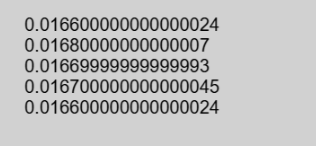
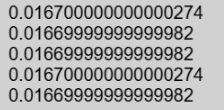
Because of this, when you actually go > 0.1 seconds, you’re not at exactly 0.1 second, you’re at, say, 0.10019.
When you reset to 0, you lose 0.00019 seconds, or the remainder.
This happens every loop. Eventually that remainder adds up until you’re way past 1 or 2 frames difference on what the total frame.
This would also be true with TimeDelta/DeltaTime as it is inherently variable (This is what you’re seeing above in the screenshots, basically)
From what I’m seeing, this is true on all engines (there’s even tutorials for Construct 3 and Defold on how to deal with framerate independent logic that talks about DeltaTime/TimeDelta being variable per frame).
I see, however this does make any scripts that are time sensitive a bit finicky as if the RNG decides to undershoot the true count. This could cause script to misfire for a frame, and in a situation where you have 2 pieces of logic that have the same timer, but are only separated by a “If/Else” structure with a single variable. A misfire can cause the game to accidentally fire one animation and the next frame the other, causing to pieces of logic to happen at the same time causing all sorts of bugs even if the code was correctly made (especially if it is an animation). This is also why I kinda wished there was a way to terminate code execution early (specifically with logic that requires the use of “Wait X seconds” to function), so I can at least patch that behavior. That being said, I still think there’s something buggy about timers because that “Overage” amount even multiplied by 600 total frames comes nowhere near close to explaining the over 10% error rate from my test with timers
Actually, it explains it because the remainder can be any value between 0 and almost a full frame:
- when the timer is 0.0999, the condition is still false
- the next frame the timer will be 0.1166 and you won’t take into account the remaining of 0.0166 seconds
Regardless, the randomness of it sometimes undershooting is an issue that needs to be addressed somehow, which is why if it can’t be fixed, at least give us some sort of backstop to make sure certain events never happen before they are suppose to even if the time undershoots a frame. Stability is my primary concern
The events are doing what you ask them to do.
If you want to count 6 seconds, you should not reset the timer 60 times in-between.
The fact you might want to do advanced time calculus and you would like a simpler way to do it rather than adding TimeDelta() to a variable is another discussion.
What do you want to do actually?
Look in my post “Pointers for GDevelop” if you want an idea of what I was trying to do (they say it’s solved, but it’s not really). Was just trying to debug what was even going on when I came to the conclusion that it might be something wrong with the engine. Which was why I made this post in the first place.
Do you mean this topic?
I don’t understand how it’s related to this topic.
Basically it’s a workaround on this issue with this 1 frame discrepancy so even if the overage happens to undershoot, this failsafe would ensure the game operates as intended.
I still don’t understand what the issue is.
If you still have an issue, you should open a new topic giving a precise example with screenshots of your events:
Can you access the timer duration from an expression? If you can you could avoid resetting the timer repeatedly and losing the remainders.
At beginning of scene
— start timer “time”
Every tick
— set redbar value to 60-min(timerDuration(“time”)/0.1*0.3, 30)
— set text to toString(roundTo(redbar.value, 2))
I’m not too familiar with the expressions
available in gdevelop but that’s roughly the idea.
That would give correct values and be done between 10seconds to 10+1/60 seconds at 60fps.
You could alternately do it without the min with the following. But you’d most likely end with a value of 0.3/60 short at 60fps, and it would end at about 1/60 shy of 10seconds.
At beginning of scene
— start timer “time”
Timer “time” duration <=10
— set redbar value to 60-timerDuration(“time”)/0.1*0.3
— set text to toString(roundTo(redbar.value, 2))
There are likely other ways to do it.