Description: WHY do I have to leave the event sheet to look at my scene or global variables ??? It makes no sense why I have to click out my event sheet go to the 3 lines click then find global variables then scroll to find the right one then change value. WHY ARE THEY NOT IN THE EVENT SHEET AT THE TOP OR MAYBE A DROP DOWN BUTTON LIKE EVERY OTHER ENGINE/IDE IN THE WORLD. Way to many clicks just to look at my variables just let me put them at the top or describe them in the events.
Having to leave the event sheet to look at variables has to be the dumbest thing I have ever seen. Just copy construct ui for the love of god. Copy everything else but the best part of construct (the ui)
Task - put variables in the event sheet at top and let you create them in the events
You might need to add more context on what your process is or what you are missing (outside of it wanting it at the top of the event sheet, which would be a nightmare), since you can access global variables from the event sheet?
For context: You just click the sandwich button on the upper left then click global variables.
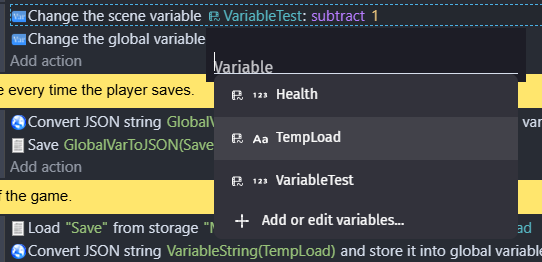
You can also access scene variables from the event sheet on any variable condition or action. It literally pops up every valid variable when in the event sheet:
Or you can access the full variable editor simply by clicking the add or edit variables button. Similarly, when using an expression, you can access all valid variables for that expression (text/number/etc) in the drop down typeahead.
In all cases you should probably just be using that last one (the type ahead), which is how most code based IDEs would have you use it (intellisense)
No need to be hyperbolic. Most IDEs use intellisense to let you type-ahead for your variables, just like the examples above do from GDevelop. For full game engines, I’ve used dozens of other engines at this point, your statement appears to be incorrect. For some examples:
Godot generally keeps them in an autoload or singleton. (A separate script from your game logic/object node)
Unity keeps them completely separate from the main script interface (including their visual scripting interface).
Defold would generally have them in seperate scripts from your logic scripts (although the code can be anywhere)
In fact, the only place I’ve seen globals fully listed out in the main logic location (the event sheet) is Construct 3, and it’s generally terrible to use on larger games.
As an example, when I was working on an adventure game before, every inventory item (of which there were 115 of) has a structure variable for each item which contains their text descriptions for being picked up, looked at, combined with other objects, a boolean for whether its picked up or not, a maximum quantity, etc. There is no reality where I want all of those at the top of the event sheet. Even something like a metroidvania with stats would make the event sheet impossible to scroll through.
I’m not sure what else to tell you?
I gave you examples of how it is done in other major engines (none of which keep globals in the same codespace, node, or visual editor), and why the Construct method is horrible for visual scripting based event sheets.
As with any feature request, you’ll need to explain what you mean by “leave the event sheet” since you don’t have to as mentioned in the methods above from me and others, and why you feel that scrolling through the variables in each event sheet is beneficial to you and others.
Also you’ll need to dial back with the weird inflammatory language, as requests like that are generally ignored by the contributors and dev team.
Bottom line i think whole issue here is about how many times you need to actually click
And not exactly where you need to click
They just have poor wording and there comes the confusion
Anyway i when adding toolbar buttons in any program that allows to modify them
I always ask simple question
How often will i use this button
And that is how i choose what should be on top and what not
I would safely assume all of us use very often variable window no matter what kind of game we are making
So button to open BOTH scene and global variables on toolbar
Would make perfect sense
Even if it saves only 2 clicks
After you have declared the variables in the variable editor, you can use events and “At the beginning of the scene” condition to set the initial values of every variable at the top of the event sheet if this is how you prefer to do it. But the variables always need to be declared in the variable editor before you can set their values using events.
It seems to me the op is complaining about having to open windows at all to set initial values and would prefer if all the variables were displayed directly in the event sheet. What I recommended is one way to go about it.
To me it looks more like
WHERE it happens and not how
If you read 1st message here
You will see he is asking why there is no drop down menu
Where you click and you see list of your vars
Where button on toolbar that would open vars window would do exactly that
Even so it would not be exactly that
Form what i understand you were describing is
To first declare vars
And then be able to set their values at beginning of the scene
That solves nothing cause you still will need to go to 3 lines burger icon then global vars (with scene vars is even worse)
And THEN declare some if need new
But in my eyes button in toolbar to open variable window would do what OP is expecting
What you are suggesting is managing existing variables in a different way
While not solving the problem
The OP didn’t seem to be happy about the explanation how the variable editor can be opened and how variables can be referenced and insisted he is not happy about having to “click outside the event sheet to view variables”.
This is what I responded to. If I have misunderstood anything it is perfectly fine, I let the OP make the decision if my answer was any helpful or not.
That is what im talking about
I think it have nothing to do with clicking outside
Since drop down menu would also be outside
Its about easy access
And core concept here would be time taken to access them
With your approach when you would have long events sheet
Then you would need to scroll up wasting time same as clicking into 3 lines icon and going for scene or global vars
I can understand OP question wrong and you can be correct
But my point will still stand that it will not solve the core issue
In programming it is common to have all your variables declared at the top of the code and some IDE’s list all your variables in a tab somewhere in a tree, so you can simply jump to a variable declaration to change initial values from anywhere in your code.
If the OP is coming from such programming background and used such IDE’s I can imagine this is what the OP would prefer over navigation using menus and windows.
If this approach is better than using the variables editor every single time you want to change an initial value, it is something that mostly comes down to personal preferences really. I see no downside to initialising all the variables at the top of the event sheet. Variables can be initialised inside sub-events and fold the entire “variables section” so it is not in your way if you don’t need it, and in case you need to scroll up from the bottom, it can be done quickly not that much of a big deal in my opinion.
I also do not claim that it would be better than using variables editor. I simply wanted to share this approach just in case this is what the OP was asking for and haven’t considered doing this.
Ow by all means ignore my argument
And ask VCD (dev who is behind one of most popular gdevelop game)
How your approach would fix anything
Actually ask him to show you screenshot from any events sheet from his game from any scene and then explain to him your solution
I seen them and i can already tell you what he will say but i gonna let you do your own research
And i do know what OP wrote but i am talking about what he is addressing and not what he literally wrote
Solution to core issue is to have quick access button to variable window on UI and not events sheet where you can hide it
Your idea is good but it don’t account every possible scenario
Same as best workaround i got when i made that feature request was to use V key to open variable window
And that totally work
But what about mobile users?
THAT is how workaround solves something but not everything
VS actual solution solving problem for everyone in every possible scenario
Same as what you suggested
Its just workaround and in the end problem will be still there
Matter will be only of how long events sheet you have
And then also by how many variables you have
Cause in variable window you can collapse them (structure/arrays)
In events you would need to pre made multiple events to not roll wall of text of variables
And then imagine adding/removing variable
Imagine hell of managing them in 2 places
Even if it would come down to alphanumeric order
For smaller games your approach is totally fine
It will not give any advantage and quite opposite if project gonna get bigger with more complex logic and higher variable count
I don’t see the point of turning this into an argument. I am here to offer the OP one possible approach within the limitations of the current system and not to argue with you or anyone else about it.
If you don’t understand i am trying to explain to you that your suggestion is not a fix and OP will end up in same situation as his project will grow
Then i agree we should end this cause idk how to explain it to you in any other words
I guess having a shortcut button for the variables next to the two main ones we already have is out of the question… right?
Just to ask… I mean… wouldn’t that be a compromise between the two?
Just to clarify…i dont find the actual method so frustrating as OP described…but that is my point of view
Just cuz someone disagrees with you, doesn’t it mean it will be the start of argument. If you’re going to feel offended and say “Oh you’re starting an argument” then please refrain from getting into the forum post.
If you or anyone else disagree with me it is none of my concern honestly I don’t feel offended at all, but looks like some users really would like to start and win an argument about this which I am simply not interested in. You are not going to get any argument from me regarding my suggestion.
However the fact you posted a reply to me just to tell me to stop posting on the forum if I feel offended is extremely disrespectful with the OP and border around spam. If you have nothing to say to the OP then it is actually you who should stop posting honestly. Please don’t make this topic about me. Reply to the OP if you have anything constructive to say or reply to my suggestion if you feel like you have anything to say against it, but don’t come here just to pick a fight with me. it is called posting spam, harassment, you can be banned for things like that.